Is n8n Worth It in 2026? Real Cost + ROI Breakdown
[ SUMMARIZE WITH AI ]
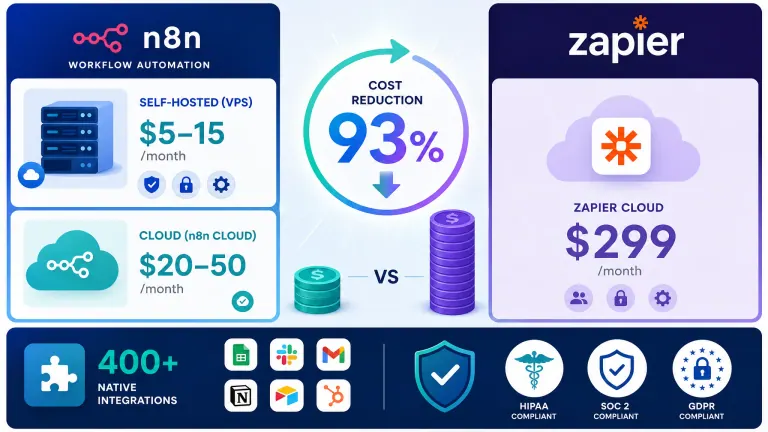
n8n workflow automation is worth it for small businesses that have at least one technical person on the team and need to automate high-volume or data-sensitive processes. For non-technical teams running fewer than 5,000 tasks per month, simpler tools like Make or Zapier will cost less in total time and money. The n8n Cloud plan ($24/month) is a practical middle ground for businesses that want n8n's flexibility without managing a server. Evaluating this for a brand-new business rather than an existing one? How to use AI to start a business covers what's worth automating before you've even hired anyone.
Cost at scale: at 10,000 tasks/month Zapier Professional is $129 (annual billing) to $193.50 (monthly); n8n Cloud Pro is $60 and self-hosted n8n runs on a $5–15/month server. The licence saving is real, but the server price leaves out your time Technical requirement: First productive n8n workflow takes 15–20 hours to build; self-hosting adds 4–8 hours of setup upfront Integration count: 500+ integrations on n8n's own site — covers most SMB stacks, but Zapier offers 7,000+ Data control: Self-hosted n8n stores all workflow data on your own servers — essential for HIPAA, SOC 2, or GDPR-regulated businesses (see our overview of the ethical considerations of using AI in your business for the broader data-privacy picture) Managed middle ground: n8n Cloud removes all infrastructure work starting at $24/month with a 14-day free trial
Updated October 2026 · by Iliyan Ivanov · Zapier, Make and n8n prices checked against each vendor's pricing page on 2026-10-12. The ROI example further down uses stated assumptions ($75/hour, 17 hours saved) and is an estimate, not a client result.
You've read the articles. Watched the demos. Maybe spun up a free trial and stared at the n8n canvas wondering where to start. If you're newer to AI generally, what is AI and how can it benefit my small business is a good plain-English starting point before evaluating a platform this technical. For a lot of business owners, that's where the story ends — not because n8n is bad, but because nobody explained clearly who it's actually built for.
That complexity fear is legitimate. The n8n documentation is written for developers. Most reviews are written by developers. And the self-hosting setup is genuinely technical. If you're running a business and not a software team, those first few hours can feel like being dropped in the wrong country with a map in the wrong language.
This post skips the hype. You'll know by the end whether n8n fits your situation — and if it doesn't, what to use instead.
According to Zapier's State of Business Automation report, 88% of small businesses say automation allows them to compete with larger companies. The question isn't whether to automate — it's which tool fits your situation without eating your team's time.
Not sure which automation approach is right for your business? Answer 5 questions and get a personalized recommendation — which tools, which workflows, where to start. Take the Free AI Readiness Check →
Table of Contents
- What n8n Actually Is (and What It's Not)
- The Real Cost of n8n for Small Business
- n8n vs Zapier vs Make: Which Fits Your Situation?
- How to Know If n8n Is Right for You
- Who This Is For
- Frequently Asked Questions
What n8n Actually Is (and What It's Not) {#what-n8n-actually-is}
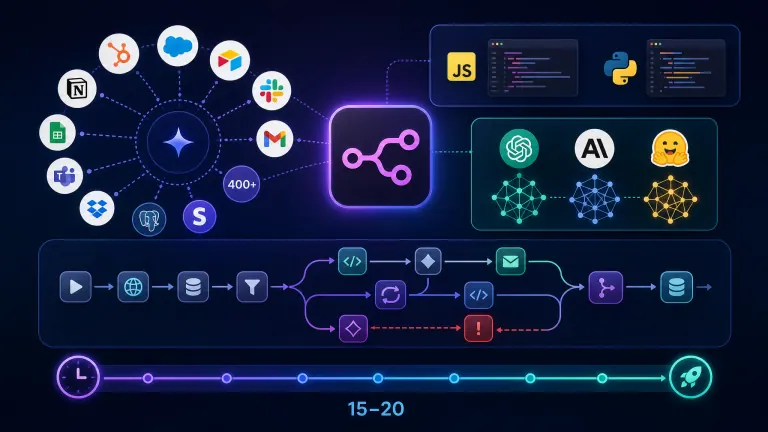
n8n is an open-source workflow automation platform. You connect apps through a visual canvas — similar to Zapier and Make — but with two key differences: you can run it on your own server, and you can write custom JavaScript inside any workflow step. If terms like "node," "webhook," or "AI agent" aren't familiar yet, our AI automation glossary defines them in plain English.
That combination makes n8n uniquely powerful for certain use cases. It also introduces a learning curve that Zapier and Make deliberately remove. If you're still deciding between platforms and AI tools at large, which is the best AI system to use is a useful first read. For the marketing-automation angle specifically, see n8n vs Zapier vs Make for B2B marketing automation.
What n8n does well:
- Multi-step automations with branching logic — if/then conditions, loops, merge paths, error handling
- Custom code — any workflow step can run JavaScript or Python, not just pre-built actions
- 500+ integrations: HubSpot, Salesforce, Airtable, Slack, Gmail, PostgreSQL, and most major APIs
- AI-native workflows with 70+ AI nodes including OpenAI, Anthropic, and Hugging Face integrations — this is the layer businesses use to build conversational AI for customer service rather than buying a fixed chatbot product, though if you'd rather just compare packaged options, see AI chatbots vs. human support
- Full data privacy — self-hosted means your customer data never touches a third-party server
What n8n isn't:
n8n is not a tool you hand to a non-technical team member and expect them to manage independently. It's not a drop-in Zapier replacement for someone who needs a workflow done in 20 minutes. And it's not free once you factor in your time — the software is open-source, but setup, maintenance, and debugging carry a real labor cost.
The n8n workflow canvas rewards people who think in systems and are comfortable with occasional error messages. If that's not your team right now, that's useful to know before investing 20 hours in a self-hosted setup.
That said, businesses that do invest in n8n tend to get serious leverage from it. McKinsey's automation research estimates that 60–70% of work activities can be automated with current technology. For companies building that automation layer, n8n's flexibility makes a meaningful difference at scale.
For clients we work with at AIessentials, n8n typically becomes one component of a broader AI operating system for their business — connecting CRM, outbound, client communication, and reporting into a unified automated layer rather than a collection of disconnected workflows. If your team's real problem is 5+ disconnected project and workflow tools rather than a missing connector, see our comparison of workflow management software for overwhelmed B2B teams before evaluating n8n on its own. The concept behind that is explained in what an AI operating system for a small business is.
Your 3 biggest time & money drains, free. We find the 3 tasks costing your team the most, what each one costs every month, and how to automate it. Get My Biggest Drains
The Real Cost of n8n for Small Business {#real-cost}
Most n8n reviews make the same mistake: they compare n8n's $0 licensing cost against Zapier's monthly subscription and call it a clear win. The real comparison is total cost of ownership — licensing plus infrastructure plus your time.
n8n Cost Breakdown
| Option | Monthly Cost | Setup Time | Ongoing Maintenance | Best For |
|---|---|---|---|---|
| n8n Self-Hosted | $5–15 (VPS only) | 4–8 hrs | 1–2 hrs/month | High-volume, technical teams |
| n8n Cloud Starter | $24/month (2,500 executions) | 0 | 0 | Mid-volume, some tech comfort |
| n8n Cloud Pro | $60/month (10,000 executions) | 0 | 0 | Growing teams, complex workflows |
| Managed n8n (e.g. Elestio) | $15–25/month | 0 | 0 | Wants self-hosted benefits without ops work |
The self-hosted option is genuinely cheap on the surface — a $5/month DigitalOcean droplet handles most small business workloads. But add 4–8 hours of initial setup (at $75/hour if that's your billing rate = $300–600 upfront) and 1–2 hours monthly for updates and debugging ($75–150/month equivalent) — and the real cost of self-hosting is often $100–200/month, not $5.
That math flips completely if you have a developer on staff whose time is already budgeted. For them, self-hosted n8n is the obvious choice at any scale. If you don't have that developer yet and are weighing whether to hire one versus bring in a consultant, see our full cost comparison of an AI consultant versus an in-house hire.
When n8n Pays for Itself: Platform Cost Comparison
| Monthly volume | Zapier Professional (annual / monthly billing) | Make | n8n Cloud | n8n Self-Hosted |
|---|---|---|---|---|
| 750 | $19.99 / $29.99 | $9 (Core, 10,000 credits) | $24 (Starter, 2,500) | ~$5 + time |
| 2,000 | $49 / $73.50 | $9 (Core) | $24 (Starter) | ~$5 + time |
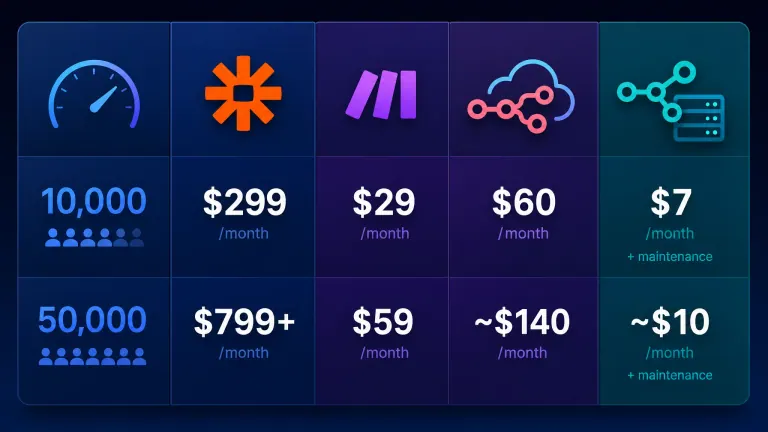
| 10,000 | $129 / $193.50 | $9 Core (10,000 credits) or $16 Pro | $60 (Pro) | ~$7 + time |
| 50,000 | $289 / $433.50 | Higher credit tier, quoted on make.com | Above Pro: Enterprise, custom quote | ~$10 + time |
Prices checked 2026-10-12 on zapier.com/pricing, make.com/pricing and n8n.io/pricing. n8n Cloud shows euros on its own page; dollar figures are the commonly quoted equivalents.
Read the units before comparing rows. Zapier counts each completed action as a task, Make counts credits per module action, and n8n counts one execution per full workflow run. A 10-step workflow that fires once can use around 10 Zapier tasks or 10 Make credits but only 1 n8n execution, which is why n8n pulls ahead on long, multi-step workflows.
At low volume, Make is often the cheapest all-in option. At high volume (50,000+), self-hosted n8n wins by a wide margin. Most small businesses running standard workflows — CRM updates, email notifications, invoice syncing, lead routing — stay under 10,000 executions per month.
At that mid-range volume, n8n Cloud ($60/month) and Make ($9–16/month) are within about $50 of each other. The decision isn't really about price — it's about whether you need custom code and data control.
Two independent reviews land in the same place. Hack'celeration, a French automation agency, tested n8n on client projects and puts it at 4.2/5, citing 70–90% savings versus Zapier at high volume with Starter at €24 and Pro at €60 per month (their n8n review). AI Productivity Daily's solopreneur guide to n8n puts self-hosting at $5–20 a month for the server. Both are consistent with the figures above.
For a full breakdown of n8n's pricing tiers and what each actually includes, see our n8n pricing guide for 2026.
Your 3 biggest time & money drains, free. We find the 3 tasks costing your team the most, what each one costs every month, and how to automate it. Get My Biggest Drains
n8n vs Zapier vs Make: Which Fits Your Situation? {#n8n-vs-zapier-vs-make}
You already know you need to automate. The question is which platform actually fits your situation.
Here's the honest breakdown — including where each tool falls short:
| n8n | Zapier | Make | |
|---|---|---|---|
| Best for | Technical teams, high volume, data compliance | Non-technical users, niche integrations, quick setup | Non-technical users, visual workflows, cost efficiency |
| Integration count | 500+ | 7,000+ | 1,400+ |
| No-code friendly | Partial | Yes | Yes |
| Custom code | Yes (JS + Python) | Paid add-on only | No |
| Self-hosting option | Yes | No | No |
| Data stays on your servers | Yes (self-hosted) | No | No |
| Learning curve | 15–20 hrs to first workflow | 1–2 hrs | 2–4 hrs |
| Entry price | Free (self-hosted) / $24 cloud | $19.99/month (750 tasks, annual billing) | $9/month (10,000 credits) |
| Price at 10K tasks/mo | $60 (cloud Pro) or ~$7 (self-hosted) | $129–$193.50/month | $9–$16/month |
n8n wins when:
- You handle regulated data (healthcare, finance, legal) that can't leave your own servers — for law firms specifically, that same data-control question usually comes up alongside how many cases are actually being lost to missed calls
- You need complex workflow logic — conditional branching, loops, merges, or custom JavaScript
- You're running 10,000+ executions per month and Zapier's cost is becoming a real problem
- You have a developer or technically fluent operator available to own the setup
Zapier wins when:
- You need integrations with tools n8n doesn't support — 7,000+ vs 500+ is a real gap for niche stacks
- Your team is fully non-technical and needs workflows built in an afternoon
- Reliability and battle-tested uptime matter more than cost savings
If Zapier's own pricing or complexity ceiling is what sent you looking at n8n in the first place, our roundup of Zapier alternatives covers the other options worth checking before you commit to n8n's learning curve.
Make wins when:
- You're cost-conscious and want a visual, no-code tool under $30/month
- Your volume stays under 10,000 operations per month
- You're new to automation and want a gentler learning curve than n8n
For specific B2B workflow comparisons across all three platforms, see our n8n vs Zapier vs Make comparison for small business.
The businesses that struggle most are the ones that choose n8n because it's "free" and then spend 30 hours getting a basic workflow running before giving up. If that time risk bothers you, start with Make and move to n8n later if you hit volume limits or compliance requirements. Whichever you pick, a tool won't rescue a messy process — see why workflow automation fails when your process is already broken.
Your 3 biggest time & money drains, free. We find the 3 tasks costing your team the most, what each one costs every month, and how to automate it. Get My Biggest Drains
How to Know If n8n Is Right for You {#is-n8n-right-for-you}
Use this framework to make the call in under 5 minutes.
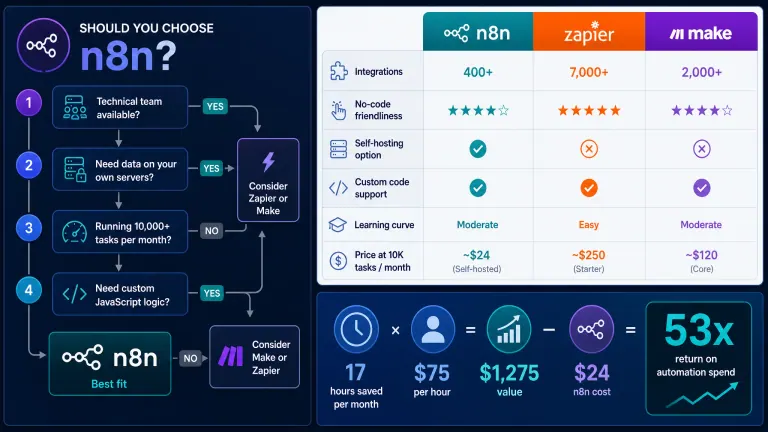
Ask yourself these 5 questions:
- Does your team have someone comfortable reading (not necessarily writing) JavaScript? → If yes, n8n self-hosted is viable
- Do you handle sensitive customer data that can't sit on a third-party server? → If yes, n8n self-hosted is the right call
- Are you running (or planning to run) more than 10,000 automated tasks per month? → If yes, n8n's cost advantage kicks in
- Do you need custom workflow logic — branching paths, dynamic data manipulation, API calls — that no-code tools can't handle? → n8n wins here
- Do you need a specific niche integration that n8n doesn't yet support? → Check Zapier's 7,000+ first
If you answered yes to 3+ questions: n8n is likely the right fit. Start with n8n Cloud Starter ($24/month) — it removes infrastructure work entirely and lets you build confidently before deciding whether to move to self-hosted.
If you answered yes to 0–2 questions: Make ($9/month) or Zapier ($19.99/month) will get you running faster and with less total time investment. You can revisit n8n later if your automation volume grows. Either way, our complete guide to AI automation for small business covers how to pick the first workflow before you commit to a tool. And if you can't yet say which processes are worth automating at all, how AI strategy consulting pinpoints high-impact use cases shows how that shortlist gets made before any platform choice.
Business ROI Calculation: What Automation Actually Delivers
Automation tools look expensive until you compare them against what they replace. Here's a worked example for a service business running three core workflows:
| Workflow | Monthly Runs | Time Saved/Month | Value (@ $75/hr) |
|---|---|---|---|
| CRM update + lead notification | 80 runs | 8 hours | $600 |
| Invoice creation + accounting sync | 30 runs | 5 hours | $375 |
| Client onboarding email sequence | 15 runs | 4 hours | $300 |
| Total | 125 runs/month | 17 hours/month | $1,275/month |
At $24/month for n8n Cloud Starter, that's a 53x return on the automation spend. Even if initial setup took 10 hours of your time ($750 one-time), payback happens in the first month.
This ROI math applies regardless of which platform you choose — the bigger risk isn't picking the wrong tool, it's not automating at all. McKinsey research finds that companies implementing process automation reduce operational costs by 20–30% within 18 months of deployment.
The businesses that get that result aren't running exotic AI implementations. They're automating the same 3–5 repetitive workflows that most service businesses run manually: lead follow-up, client onboarding, reporting, and internal notifications. Here are the tasks that add up to 20+ hours a week. For the B2B-specific version of this math — including when the ROI doesn't clear the bar — see is the best workflow automation software actually worth it for B2B. For non-n8n examples with real payback timelines, see 7 real AI automation cases with numbers.
Who This Is For {#who-this-is-for}
This is ideal for:
- Businesses with a developer, IT person, or technically comfortable operator who can manage setup and occasional debugging
- Companies handling regulated or sensitive data that needs to stay on their own infrastructure
- Service businesses where high-volume automations are making per-task pricing on Zapier painful
- Teams that need complex, branching workflow logic that visual no-code tools can't support
Consider alternatives if:
- Nobody on your team is comfortable with server setup, command line, or basic troubleshooting
- You're starting with automation for the first time and need results in hours, not days
- You rely on niche tools (industry-specific CRMs, specialist software) that n8n may not yet have connectors for
Not sure you're even at the automation stage yet? The 5 signs it's time to invest in AI tools covers the readiness signals before you pick a platform at all.
Why AIessentials specifically? We implement n8n as part of a complete automation layer, not as a standalone tool. Typical engagements connect CRM, outbound, client delivery, and reporting workflows into a system that runs without daily oversight. The outbound piece is a build of its own — our guide to AI lead generation automation walks through the four stages we implement. Engagements start at $2,500–5,000 for a foundational setup, with ongoing support available for teams that want a managed solution. Wondering what those first weeks look like? Here's the step-by-step implementation process we follow, and what ongoing support looks like after setup once the workflows are live. If you're evaluating us against other implementation partners, see our guide on choosing an AI consulting partner — or, if you're not sure whether this needs a boutique implementer or a bigger firm, our guide to AI consulting companies by type.
Frequently Asked Questions {#frequently-asked-questions}
Is n8n suitable for small and medium businesses?
n8n works well for SMBs with at least one technically comfortable team member and automation volumes above 5,000 tasks per month. For fully non-technical teams, the setup and debugging burden often outweighs the cost savings. The n8n Cloud Starter ($24/month) removes the infrastructure complexity and makes it accessible to semi-technical users who can follow documentation.
How do real SMBs rate n8n workflow automation?
n8n shows a 4.7/5 rating on G2 and over 200,000 GitHub stars on its own site (checked October 2026). Hack'celeration's hands-on review scores it 4.2/5 and calls it best-in-class for complex automations but not for non-technical teams expecting Zapier-level simplicity. Positive reviews consistently highlight flexibility and cost savings at scale. Critical reviews most often cite the learning curve and documentation gaps for non-developers. Technical users rate it significantly higher than non-technical business owners.
Is n8n still relevant in 2026, and is it worth learning?
Yes. n8n's own site shows over 200,000 GitHub stars and 500+ integrations, and it now ships AI agent nodes alongside the classic workflow canvas. It is worth learning if you are comfortable with logic like if/then branching and basic API concepts, or if someone on your team will own it. If you are non-technical and want results this week, learning Make or Zapier first costs less time, and you can move to n8n later when volume or data-control needs justify it.
Is n8n suitable for B2B workflow automation?
Yes — n8n is widely used for B2B workflows including CRM sync, lead routing, proposal automation, invoice processing, and client onboarding sequences. Its ability to connect HubSpot, Salesforce, Slack, Gmail, and custom APIs in a single workflow makes it practical for B2B service businesses with multi-step processes that require conditional logic.
How do I implement n8n workflow for my small business?
Start with n8n Cloud, not self-hosted, to avoid infrastructure work on day one. New to all of this? How to get into AI automation covers the basics first. Identify one repetitive process — a lead notification, an invoice sync, a client welcome email — and build that workflow first using n8n's template library. Budget 15–20 hours to get your first workflow running and refined. Add complexity and additional workflows from there.
What are the practical steps for deploying n8n in a small business?
- Start with n8n Cloud Starter ($24/month) — no server setup required
- Connect your first two apps (e.g., HubSpot + Slack, or Gmail + Airtable)
- Build one workflow from an existing template rather than from scratch
- Test with live data before activating in production
- Add workflows gradually — automating everything at once leads to unmaintainable setups, which is the same logic behind the 30% rule in AI
- Consider self-hosted only once you know your monthly execution volume and have confirmed you need it
How do I get started with n8n for B2B automation?
Sign up for n8n Cloud, connect your CRM and email tools first, and start with whichever workflow currently wastes the most manual time. Common starting points for B2B businesses: automated lead notifications, CRM data cleanup after forms, client onboarding email sequences, and invoice or payment status syncing. n8n's template library has 500+ pre-built workflows to adapt rather than building from zero.
How much does n8n cost for a small business?
n8n Cloud starts at $24/month for 2,500 executions. Self-hosted is free software with $5–15/month in VPS costs. Most small businesses running standard B2B workflows — lead routing, CRM sync, notifications — stay within the Starter plan limits. If you need 10,000+ executions per month, the Pro plan is $60/month, which is still significantly cheaper than Zapier at equivalent task volumes.
How do I calculate the ROI of n8n for my business?
Identify the workflows you'll automate and estimate the time currently spent on each manually. Multiply hours saved per month by your effective hourly rate (your billing rate or salary equivalent). Subtract the n8n monthly cost. Most businesses see 20–50x ROI on automation costs once workflows are running. A simple example: 15 hours saved × $75/hour = $1,125/month value, minus $24/month n8n cost = $1,101/month net return.
How does n8n compare to Zapier in cost?
At 2,000 tasks/month: Zapier Professional costs $49/month on annual billing ($73.50 monthly), n8n Cloud Starter costs $24/month. At 10,000 tasks/month: Zapier is $129 annual ($193.50 monthly) vs n8n Cloud Pro at $60/month. At 50,000 tasks/month, Zapier is $289 annual ($433.50 monthly), while self-hosted n8n runs on roughly $7–15/month in server costs plus your maintenance time. The gap widens with multi-step workflows because Zapier counts every action and n8n counts one execution per run. The trade-off is Zapier's broader integration library and zero maintenance overhead. Prices checked October 2026.
What are the pricing differences between n8n open source and self-hosted?
"Open source" and "self-hosted" refer to the same thing — n8n's Community Edition. It's free to download and run on your own server. The cost comes from the server itself ($5–15/month on a basic VPS) plus your time for setup and maintenance. n8n Cloud is the paid managed version, starting at $24/month with a 14-day free trial — it removes all infrastructure work but limits executions per plan.
Conclusion
n8n is a genuinely powerful automation tool — one of the best options for businesses with technical capacity that run automations at volume. The cost advantage over Zapier is real. The data control advantage for regulated businesses is meaningful. The ability to write custom logic is something no-code tools can't match.
But it's not the right starting point for every business. If you're non-technical and starting from scratch, Make or Zapier will get you results faster with less friction. You can always graduate to n8n later when you know your volume and have someone to own the maintenance.
The bigger question is whether you're automating at all. McKinsey's research consistently shows companies that automate core processes reduce operational costs by 20–30% within 18 months. The platform you use matters far less than whether you start.
Your 3 biggest time & money drains, free. We find the 3 tasks costing your team the most, what each one costs every month, and how to automate it.
Your 3 Biggest Time & Money Drains
Every manual task you're not automating is leaking team hours and money. Get a free report on the 3 tasks costing you the most: what each one costs your team every month, and exactly how to automate it.
Limited to 10 reports per week
Sent to your inbox within 24–48 hours. Yours to keep.

Iliyan Ivanov
Founder of AIessentials · AI automation consultant helping B2B businesses save 20+ hours/week and grow without hiring