Beyond Setup: What Ongoing Support Do AI Consulting Firms Offer?
[ SUMMARIZE WITH AI ]
Workflow Audit
]99% sure you are not seeing all the spots AI can help you in your business.
Are your workflows optimized with the most up to date solution, or are they costing you and your team time and money?
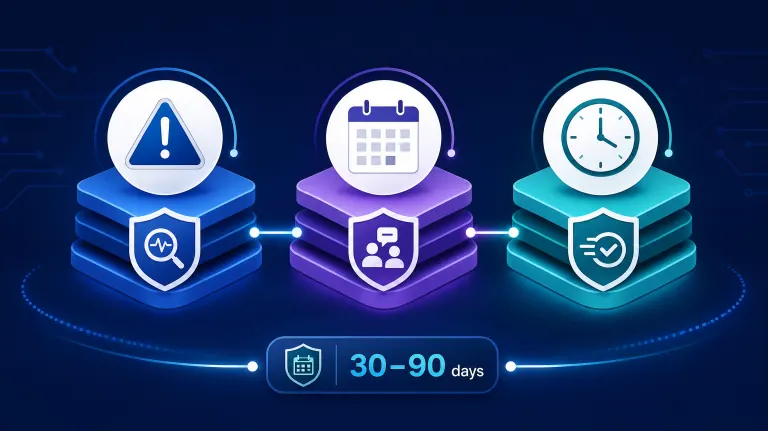
GET FREE AUDITAI consulting firms typically offer three layers of ongoing support after an automation goes live: monitoring to catch breakage when a connected tool changes, scheduled check-ins to adjust the workflow as your business changes, and a defined response window (usually 24–72 hours) for anything that stops working. Most fixed-price engagements include 30–90 days of this coverage; anything beyond that is either a paid maintenance retainer or a documented handoff where your team takes over.
Monitoring and error alerts: The firm watches for broken connections — a CRM field renamed, an API key expired, a form changed — and fixes it before you notice, usually included free during the support window. Workflow adjustments: As your process evolves (new pricing tiers, a new tool in your stack), the automation gets updated to match — scoped separately once the initial support window ends. Defined response time: A real support agreement names a number, like "respond within 24 hours, fix within 72" — not "we're available if you need us." Training and documentation: Your team gets a written runbook and a walkthrough so small changes don't require calling the consultant every time. Clear end date for free support, then a priced option: The honest firms tell you exactly when free support ends and what a maintenance retainer costs after — commonly $200–$800/month for a single automated workflow.
Here's the part most buyers don't find out until it's too late: the automation that worked perfectly in week one can quietly stop working in month four, and nobody tells you until a lead falls through a gap that used to be covered.
That's not a flaw in the technology. It's what happens when "ongoing support" was never defined in the contract. Gartner has estimated that a large share of generative AI projects get abandoned after the initial build — and a good chunk of those aren't failures of the model, they're failures of what happens after launch, when nobody owns fixing it anymore.
So before you sign anything, the real question isn't "will this work" — it's "who's responsible for it working six months from now, and what does that cost?" That's what the rest of this guide breaks down.
Not sure what support you actually need? Take the 2-minute AI Readiness Check and see whether a maintenance plan or a one-time build fits your situation. Check Your AI Readiness →
Table of Contents
- What "Ongoing Support" Actually Means
- What Breaks, and Why
- Support Window vs. Maintenance Retainer vs. Full Handoff
- What Ongoing Support Should Cost
- Who This Is For
- Frequently Asked Questions
What "Ongoing Support" Actually Means
"Ongoing support" is one of the vaguest phrases in AI consulting, and that's exactly the problem. A real support agreement answers four specific questions: what's being watched, how fast a fix happens, who pays for a change versus a break, and when the free period ends.
Watching for breaks, not just building the system. Most AI automations connect three or more tools — your CRM, your inbox, a form, a scheduling calendar. Each one can change independently of the others. A real support plan means someone is actively checking that those connections still work, not waiting for you to notice a lead didn't get a follow-up.
The difference between a fix and a change. A "fix" restores something that broke — the pricing field renamed in your CRM, so the automation stopped pulling the right number. A "change" is new scope — you want the automation to also handle a second product line. Good firms are explicit that fixes are covered in the support window and changes are quoted separately. Vague firms blur this line on purpose, so everything becomes billable.
A number, not a promise. "We're responsive" isn't a support agreement. "We respond within 24 business hours and resolve critical breaks within 72" is. If a firm won't commit to a number in writing, assume there isn't one.
If you're earlier in the process and still comparing firms before you've picked one, our guide to choosing an AI consulting partner covers the full evaluation checklist, including the handoff question this post goes deeper on. And if you haven't yet mapped what actually gets built in the first place, what AI consulting firms do during implementation covers the build phase this support phase follows.
See how we structure support for a business like yours Every AI Essentials project includes 90 days of monitoring and fixes, not a vague "we're here if you need us." Book a 30-Min Walkthrough →
What Breaks, and Why
Automations don't usually fail because the AI got worse. They fail because something around the AI changed and nobody updated the connection. Understanding this is the fastest way to tell a real support plan from a hollow one.
The tools you connected get updated on their own schedule. HubSpot, Salesforce, and similar platforms push updates regularly. An API field gets renamed, a permission structure changes, a free-tier limit gets hit — and the automation that depended on the old version quietly stops. MIT Sloan Management Review has written extensively about this kind of "model and system drift," where AI-driven processes degrade not because the model got worse, but because the inputs feeding it shifted underneath it.
Your business process changes before anyone tells the automation. You add a new sales rep, a new pricing tier, a new lead source. If nobody tells the consultant, the automation keeps running the old logic — technically "working," but wrong.
Login credentials and API keys expire. This is the most mundane failure and the most common one. A connected account's access token expires on a rotation schedule, and the automation silently stops pulling data until someone notices and reconnects it.
Support Coverage Comparison
| What's covered | Support Window (included) | Maintenance Retainer (paid) | No Support Plan |
|---|---|---|---|
| Fixes for broken connections | Yes, free | Yes, included in fee | No — billed as new work or not fixed |
| Workflow changes (new tiers, products) | No — scoped separately | Often included, limited hours | No |
| Response time commitment | Yes, usually 24–72 hrs | Yes, often faster (SLA-backed) | None |
| Typical duration | 30–90 days from launch | Ongoing, month-to-month | N/A |
| Typical cost | Included in project fee | $200–$800/mo per workflow | $0 upfront, highest long-term risk |
The honest tradeoff: a support window covers you for the period right after launch, when most breakage actually happens as the system meets real-world data for the first time. A maintenance retainer costs more over a year but means nobody has to notice a problem for it to get fixed. No support plan is the cheapest on paper and the most expensive the first time a silent failure costs you a week of missed leads.
Curious what a support plan would cost for your specific setup? Get a realistic estimate based on how many tools your automation touches. Check Your AI Readiness →
Support Window vs. Maintenance Retainer vs. Full Handoff
Once the included support window ends, there are really only three paths, and a good consultant will name all three up front instead of letting you find out by accident.
Full handoff. You and your team take over entirely. This works when the automation is simple and stable, and someone on your team is comfortable in the underlying tool (Zapier, Make, n8n). The firm hands off documentation and a short training session, and that's the last you hear from them unless you call for paid help later.
Maintenance retainer. The firm keeps monitoring and fixing for a monthly fee, typically $200–$800 per automated workflow depending on complexity, and separately quotes any new scope. This is the right call when the workflow touches revenue directly (lead routing, follow-up timing) and a silent break is expensive enough that paying to prevent it beats discovering it.
Re-engagement as needed. No standing retainer — you call when something breaks or you want to expand scope, and pay an hourly or project rate at that time. This is cheapest if breaks are genuinely rare, but it means a problem has to actually happen and get noticed before anyone's working on it.
McKinsey's research on AI value capture consistently points to the same finding: companies that treat AI as a one-time build rarely sustain the value past the first few months, while the ones that see lasting ROI have built some version of an ongoing operating model around it — whether that's an internal owner or a paid external one. Most small businesses don't have the former, which is exactly why the second option exists.
If your automation sits inside a broader B2B operations stack rather than a single isolated workflow, AI automation built for B2B businesses is scoped from the start to include that ongoing layer, instead of treating support as an afterthought tacked onto a one-off build.
See how we built this for a business like yours We tell you up front which of these three paths your situation calls for — before you sign anything. Book a 30-Min Walkthrough →
What Ongoing Support Should Cost
Run the math before you decide which path fits. A single automated lead-routing workflow that breaks silently for even one week can mean 10–20 leads sitting unassigned — at a typical B2B close rate and deal size, that's often $5,000–$15,000 in pipeline value sitting untouched, not a hypothetical.
Compare that to a maintenance retainer running $200–$800 a month ($2,400–$9,600 a year) for the same workflow. If a single undetected break costs more than a year of the retainer, paying for monitoring is the cheaper option — even though it feels like the more expensive one upfront. This is the same logic as our guide to AI consultant pricing: the sticker price and the real cost are rarely the same number.
A quick way to decide: if the workflow touches revenue directly and a silent failure would take you more than a day to notice, pay for a retainer. If it's a lower-stakes internal process (internal reporting, admin cleanup) where a break is annoying but not costly, a handoff with occasional re-engagement is usually enough.
Ready to see what support would look like for your setup? Book a 30-minute walkthrough — we'll tell you honestly which support path fits before quoting anything. Book a 30-Min Walkthrough →
Who This Is For
This is ideal for:
- Businesses that already have (or are about to sign) an AI automation project and want to know what happens after launch
- Teams that got burned once by a workflow that quietly stopped working with no one responsible for fixing it
- Operators trying to decide between a maintenance retainer and handling small breaks themselves
Consider alternatives if:
- Your workflow is genuinely simple and stable (a single trigger, no revenue impact) — a full handoff with no retainer is probably enough
- You have in-house technical staff who can already monitor and fix no-code automations themselves
- You're still deciding whether to automate at all — start with AI automation for B2B businesses before worrying about the support phase
Why AI Essentials specifically? Every fixed-price project includes 90 days of monitoring and fixes as standard, not an upsell — and we tell you the maintenance retainer price for your specific setup before you sign the initial project, not after the free window runs out.
Frequently Asked Questions
What ongoing support do AI consulting firms typically offer after implementation?
Most firms include a 30–90 day support window covering monitoring and fixes for broken connections, then offer a paid maintenance retainer (commonly $200–$800/month per workflow) for anything after that. Workflow changes — as opposed to fixes — are usually scoped and billed separately from day one.
What are the top 10 AI consulting companies?
Rankings vary by source and shift yearly, and most "top 10" lists target enterprise buyers, not small or mid-size businesses. For an SMB, the firm's post-implementation support terms and fixed-price scoping matter more than its position on an industry ranking list.
Which consulting firm is leading in AI?
There's no single firm leading across every industry and business size — enterprise AI leaders (large systems integrators, hyperscaler consulting arms) differ from the firms best suited to a $10,000–$25,000 small-business automation project. Match the firm's typical client size to your own before comparing rankings.
Who are the big 7 AI companies?
This usually refers to major AI model and infrastructure providers (think the large cloud and model companies), not consulting firms. A consulting firm's relationship with those providers matters less for a small business than whether the firm can support the specific workflow it builds for you.
Who are the big 4 of AI?
Similarly, this typically describes a small group of the largest AI technology or model providers, not consulting firms offering implementation and support. For hiring decisions, focus on a firm's track record and support terms rather than which large tech company it's associated with.
What practical steps does ongoing AI maintenance involve?
In practice: monitoring connected tools for breaks, checking in on a schedule (monthly or quarterly) to confirm the workflow still matches your process, patching broken integrations when a connected app changes, and documenting any adjustments so your team has an updated record of what the system actually does.
How much does ongoing AI consulting support cost?
Maintenance retainers typically run $200–$800 per month per automated workflow, scaling with how many tools it touches and how business-critical it is. Simple handoffs with occasional paid re-engagement can cost nothing until something needs fixing, but carry more risk of an unnoticed break.
Is a maintenance retainer worth the ongoing cost?
It's worth it when a silent failure would cost more than the retainer itself — which is almost always true for anything touching lead routing, follow-up timing, or revenue. For low-stakes internal workflows, a one-time handoff is often enough.
What pricing models do firms use for post-implementation support?
Three common models: a flat monthly retainer per workflow, an hourly rate for as-needed fixes, or a tiered support plan (basic monitoring vs. monitoring plus a set number of monthly change requests). Ask which model a firm defaults to before signing — it changes your cost predictability more than the sticker price does.
What's the ROI of paying for ongoing AI maintenance?
The ROI shows up as avoided downside, not added upside — a lead-routing workflow handling even a modest volume of inbound leads can lose thousands of dollars in missed pipeline from a single undetected week-long break, which a $200–$800/month retainer is built to prevent.
Conclusion
The build is the easy part to evaluate — it has a price, a timeline, and a demo. The support phase is where vague firms hide the real cost, because "we're here if you need us" sounds reassuring and commits to nothing.
Before you sign, get three things in writing: what's covered for free and for how long, what a maintenance retainer costs after that, and a specific response-time number. If a firm can't give you those three things in the first conversation, that's the answer to how well-supported you'll actually be after launch.
If you want a plan that names all three before you sign anything, book a 30-minute walkthrough — we'll tell you exactly what's included and what a retainer would cost for your specific setup.

Iliyan Ivanov
Founder of AIessentials · AI automation consultant helping B2B businesses save 20+ hours/week and grow without hiring