How Do I Get Into AI Automation? A Practical Guide
[ SUMMARIZE WITH AI ]
Start by identifying one repetitive task in your business that eats up at least 5 hours per week, then use a no-code tool like Zapier or Make.com to automate it. You don't need coding skills or a technical background—just a clear process and the willingness to experiment.

The barrier to entry for AI automation has never been lower. Five years ago, you'd need a software engineering team to build basic automations. Today, you can connect your email, CRM, and scheduling tools in an afternoon without writing a single line of code.
That said, jumping in without a plan usually leads to frustration. You'll automate the wrong things, pick tools that don't fit your needs, or spend money on features you'll never use. The businesses that succeed with AI automation start small, measure results, and expand systematically.
This guide walks you through everything you need to know: where to start, what skills actually matter, how much you should budget, and the specific steps to implement your first automation. Whether you're a solopreneur or running a team of 50, the fundamentals are the same. If you'd prefer a guided starting point, our free AI revenue and savings plan gives you a 30-minute call and a 1-page plan tailored to your business before you touch any tools. And if you'd rather skip the learning curve entirely, we can build and run these automations for you.
Before you touch any tool, you need to know what's worth automating. Not every task is a good candidate, and automating the wrong thing wastes time and money.
The 3-Question Test
Ask yourself these questions about any task you're considering:
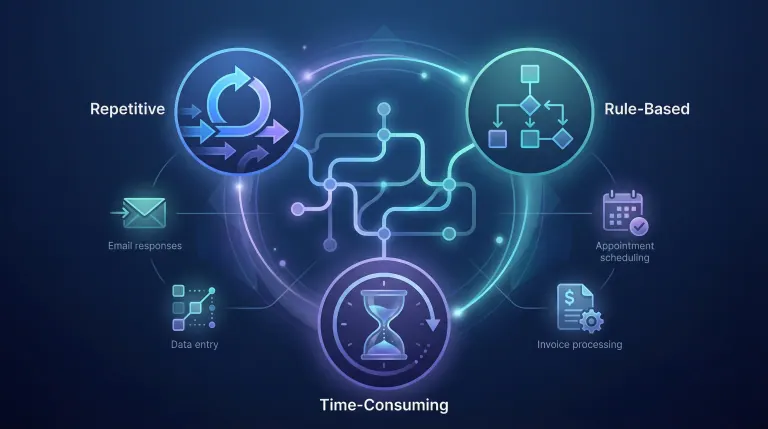
- Is it repetitive? Does this happen daily, weekly, or at least monthly?
- Is it rule-based? Can you describe exactly when and how it should happen?
- Is it time-consuming? Does it take more than 30 minutes per occurrence?
If you answer yes to all three, you've found a strong automation candidate.
High-Value Starting Points
Here's where most small businesses find quick wins:
| Task Category | Example | Typical Time Saved |
|---|---|---|
| Email responses | Auto-replies to common questions | 5-10 hours/week |
| Data entry | Moving info between apps | 3-8 hours/week |
| Appointment scheduling | Calendar booking and reminders | 2-5 hours/week |
| Invoice processing | Creating and sending invoices | 2-4 hours/week |
| Social media | Scheduling posts | 3-6 hours/week |
What NOT to Automate First
Avoid starting with tasks that require nuanced judgment, involve high-stakes decisions, or change frequently. Customer complaints, complex negotiations, and strategic planning should stay human—at least until you've built confidence with simpler automations.
How AIessentials helps here: We run a free automation audit that identifies your top 3 opportunities based on time saved and implementation difficulty. Most businesses have $50,000+ in hidden automation potential they don't see.
Essential Skills You Actually Need
Good news: you don't need to become a programmer. The skills that matter for AI automation are more about thinking clearly than writing code.
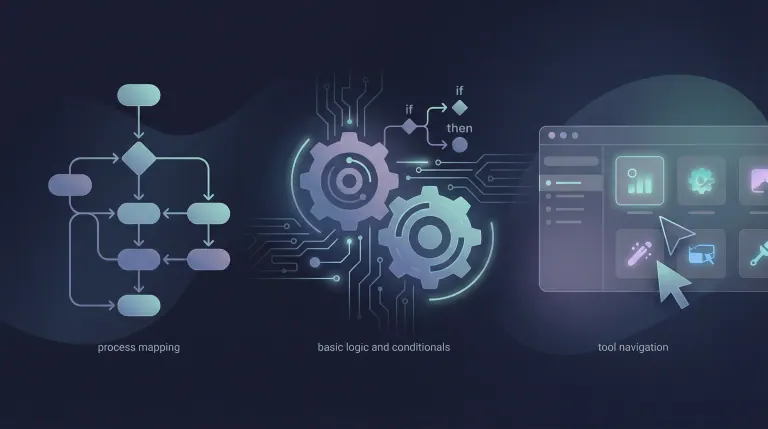
Process Mapping
Before you automate anything, you need to document how it currently works. This means:
- Writing down each step in order
- Noting who does what and when
- Identifying where information comes from and goes to
- Spotting bottlenecks and decision points
Most people skip this step and regret it. A 30-minute process mapping session can save you hours of trial and error.
Basic Logic and Conditionals
Automation tools use "if this, then that" logic. You need to think in terms of:
- Triggers: What event starts the automation?
- Conditions: Are there situations where the automation shouldn't run?
- Actions: What should happen when the trigger fires?
For example: "IF a new lead fills out our contact form, AND they're in the US, THEN add them to our CRM and send a welcome email."
Tool Navigation
You'll need to learn how your chosen automation platform works. This typically takes 2-4 hours of focused learning. Most platforms offer free tutorials and templates to get you started.
Skills You Can Skip (For Now)
- Coding: No-code tools handle 90% of small business needs
- Machine learning: Pre-built AI models do the heavy lifting
- Database management: Modern tools abstract this away
- API development: Integrations are mostly drag-and-drop now
How AIessentials helps here: We offer hands-on training sessions where you learn by building your first automation with expert guidance. You'll walk away with a working system and the skills to expand it.
Beginner-Friendly Tools and Platforms
The right tool depends on your budget, technical comfort, and specific needs. Here's an honest breakdown of the options.
No-Code Automation Platforms
Zapier - Best for beginners
- Connects 5,000+ apps
- Very intuitive interface
- Free tier available (100 tasks/month)
- Pricing: $19.99-$69/month for most small businesses
Make.com (formerly Integromat) - Best value
- More powerful than Zapier
- Steeper learning curve
- Better pricing for high-volume use
- Pricing: Free tier, then $9-$16/month
n8n - Best for technical users
- Self-hosted option (free)
- Maximum flexibility
- Requires some technical setup
- Pricing: Free (self-hosted) or $20+/month (cloud)
AI-Specific Tools
ChatGPT/Claude - Content and analysis
- Draft emails, summarize documents, analyze data
- API access for integration into workflows
- Pricing: $20/month for Plus, API costs vary
Jasper - Marketing content
- Trained on marketing best practices
- Templates for ads, emails, social posts
- Pricing: $39-$59/month
What We Recommend for Beginners
Start with Zapier's free tier. It's the most forgiving platform, has the best documentation, and you can always migrate to something more powerful later. Don't overthink the tool choice—pick one and start building. If you already work with Claude or Codex, our free library of reusable Claude and Codex skills gives you ready-made starting points for SEO, outreach and n8n automation.
Quick ROI Calculation
If a tool costs $20/month and saves you 4 hours of work, that's $5/hour for your time back. Most business owners value their time at $50-200/hour. The math almost always works in automation's favor.
How AIessentials helps here: We're tool-agnostic and help you choose based on your actual needs, not vendor marketing. We've implemented dozens of systems and know which tools work best for different situations.

Costs and ROI Expectations
Let's talk real numbers. AI automation costs vary widely, but here's what small businesses typically spend.
Startup Costs
| Approach | Initial Investment | Monthly Ongoing |
|---|---|---|
| DIY with free tools | $0 | $0-50 |
| DIY with paid tools | $100-500 | $50-200 |
| Guided implementation | $1,000-5,000 | $100-500 |
| Full-service agency | $5,000-25,000 | $500-2,000 |
What Affects Your Costs
Complexity: A simple email automation costs less than a multi-step workflow with branching logic.
Integration count: Each app connection adds complexity. Start with 2-3 tools, not 10.
Volume: Processing 100 tasks/month is cheaper than 10,000.
Support level: DIY is cheapest but slowest. Expert help costs more but delivers faster results.
Realistic ROI Timeline
- Month 1: Setup and learning. Minimal returns.
- Month 2-3: First automations running. 5-10 hours saved/week.
- Month 6: Systems refined. 15-20 hours saved/week.
- Year 1: Full implementation. 20-30+ hours saved/week.
The Hidden Costs of NOT Automating
Every hour you spend on repetitive tasks is an hour not spent on:
- Closing new deals
- Improving your product
- Building customer relationships
- Strategic planning
At $100/hour opportunity cost, 20 hours/week of manual work costs you $104,000/year. Suddenly that $5,000 automation investment looks different.
How AIessentials helps here: We agree the outcomes and a fixed price before you commit, and every build comes with a 60-day money-back guarantee: if you don't get the outcomes we agree on upfront within 60 days of kickoff, we refund your service fee.
Getting Started: Your First 30 Days
Here's a practical roadmap for your first month:
Week 1: Discovery
- List every repetitive task you do
- Apply the 3-question test to each
- Pick your top candidate
- Document the current process
Week 2: Tool Selection
- Sign up for Zapier (free tier)
- Complete their beginner tutorial (2 hours)
- Explore templates related to your task
- Map your process to available triggers/actions
Week 3: Building
- Create your first automation
- Test with sample data
- Refine based on results
- Document what you built
Week 4: Optimization
- Run in production
- Monitor for errors
- Measure time saved
- Plan your next automation
Frequently Asked Questions
What specific tasks can AI automation help me with in my small business?
AI automation handles repetitive, rule-based tasks across your entire operation. The most common wins include email management (auto-sorting, responding to FAQs, follow-up sequences), data entry (moving information between your CRM, spreadsheets, and accounting software), scheduling (booking appointments, sending reminders, managing calendars), and customer communication (chatbots, order confirmations, review requests). Start with whatever task frustrates you most—that's usually your best candidate.
How can I identify the best AI automation opportunities for my business?
Look for tasks that pass the "3R test": Repetitive (happens regularly), Rule-based (follows predictable logic), and Resource-heavy (takes significant time). Track your activities for one week and note anything you do more than twice. The tasks that make you think "I wish someone else could do this" are usually perfect automation targets. Focus on high-frequency, low-complexity tasks first.
What are the essential skills I need to learn to implement AI automation?
You need process thinking (documenting workflows clearly), basic logic (understanding if/then conditions), and tool familiarity (navigating your chosen platform). You don't need coding, data science, or technical certifications. The ability to break complex tasks into simple steps matters more than any technical skill. Most business owners learn enough to build useful automations within 10-15 hours of focused practice.
How much does it typically cost to implement AI automation for a small business?
Budget $50-200/month for tools if you're doing it yourself, or $2,000-10,000 for professional implementation of your first system. Ongoing costs depend on volume—most small businesses spend $100-500/month on automation tools once fully running. The investment typically pays for itself within 2-3 months through time savings alone. Start with free tiers to learn, then upgrade as you prove value. If you're hiring outside help, AI consultant salary ranges is a useful benchmark for what to expect at different expertise levels.
What are some beginner-friendly AI automation tools and platforms?
Zapier is the easiest starting point—intuitive interface, massive app library, excellent tutorials. Make.com offers more power at lower cost once you're comfortable. For AI-specific tasks, ChatGPT handles content and analysis well. Calendly automates scheduling. Typeform plus Zapier creates smart intake forms. Start with one tool, master it, then expand. Trying to learn multiple platforms simultaneously slows you down.
When is the right time to start implementing AI automation in my business?
Now, if you're spending more than 10 hours weekly on repetitive tasks. The technology is mature, costs are low, and waiting just means more wasted time. However, don't automate during major transitions (new product launches, team restructuring) when processes are still forming. The best time is when your operations are stable enough to document but painful enough to motivate change.
Why should a small business consider AI automation?
Because your competitors already are. AI automation lets small businesses operate with the efficiency of much larger companies. You'll reduce errors (machines don't get tired), speed up response times (instant vs. hours), cut costs (software vs. salaries), and free yourself to focus on growth. The businesses that automate first gain compounding advantages—each hour saved can be reinvested in improvement.
How do I integrate AI automation tools with my existing business systems?
Modern automation platforms connect through pre-built integrations—no coding required. Check if your tools are in Zapier's or Make's app directory (most popular software is). Connect accounts through OAuth (secure login), then build workflows that move data between systems. Start with simple two-app connections before building complex multi-tool workflows. If something isn't directly supported, webhooks or email parsing usually provide workarounds.
What are the potential risks and challenges of using AI automation?
The main risks are over-automation (removing helpful human touchpoints), tool dependency (building on platforms that change or disappear), and error amplification (bad automations can create big messes fast). Mitigate by starting small, keeping humans in the loop for important decisions, choosing established platforms, and building in error notifications. Test thoroughly before going live, and always have a manual fallback option.
How can I measure the ROI of AI automation in my business?
Track three metrics: time saved (hours per week reclaimed), error reduction (mistakes before vs. after), and speed improvement (task completion time). Calculate your hourly value, multiply by hours saved monthly, compare against tool and implementation costs. Most businesses see 3-10x ROI within the first year. Document your baseline before automating so you have clear before/after comparison.
Conclusion
Getting into AI automation isn't about becoming a tech expert. It's about identifying what's stealing your time, picking the right tool, and building one system at a time.
Start this week. Pick your most annoying repetitive task, sign up for Zapier's free tier, and build your first automation. You'll learn more in one afternoon of doing than weeks of research. Once you've got the basics running, you might wonder how far this can go—including whether AI can run your LLC end-to-end.
Ready to accelerate your automation journey? Book a free 30-minute strategy call to identify your highest-impact automation opportunities and get a custom implementation roadmap for your business.
Workflow Audit
]99% sure you are not seeing all the spots AI can help you in your business.
Are your workflows optimized with the most up to date solution, or are they costing you and your team time and money?
GET FREE AUDIT
Iliyan Ivanov
Founder of AIessentials · AI automation consultant helping B2B businesses save 20+ hours/week and grow without hiring