Best Workflow Automation Software: Worth It for B2B? (2026)
[ SUMMARIZE WITH AI ]
Workflow Audit
]99% sure you are not seeing all the spots AI can help you in your business.
Are your workflows optimized with the most up to date solution, or are they costing you and your team time and money?
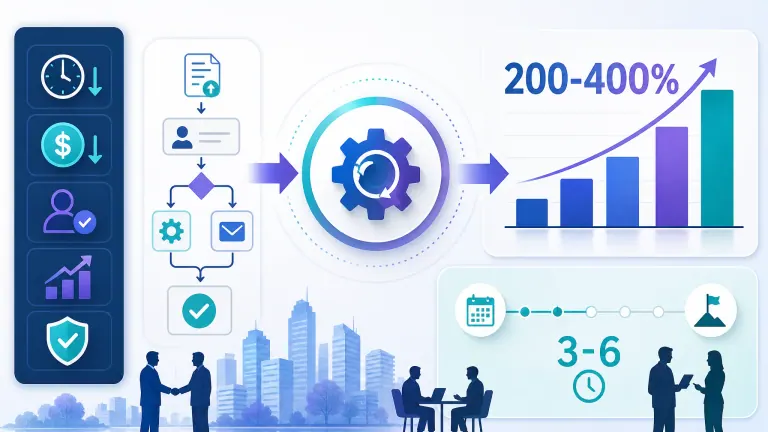
GET FREE AUDITBest workflow automation software is worth it for B2B service companies that automate a process with a clear, measurable cost — most see 200-400% ROI in year one with breakeven in 3-6 months. It stops being worth it when the automation targets a low-volume or constantly-changing process, or when the company buys the tool before mapping which workflow actually needs fixing.
Where the returns come from: Recovered staff hours on repetitive tasks — quoting, follow-up, data entry, scheduling — not from replacing headcount. What determines the payoff: Process volume and consistency. High-volume, repeatable workflows automate cleanly; low-volume, judgment-heavy ones often don't. Where most B2B buyers lose money: Buying platform licenses before identifying the specific workflow with a quantifiable time or revenue cost. Realistic timeline: 4-10 weeks to implement a first workflow, 3-6 months to break even, ongoing gains after that.
Most businesses that look into workflow automation never pull the trigger. Here's what separates the ones that do: they don't ask "is automation worth it" in the abstract. They ask "is automation worth it for *this specific process, with this volume, costing this much." That's a very different, much more answerable question.
Once you know the process is a good candidate, the follow-up questions get practical fast: how do you actually calculate the ROI before spending anything, what does "best" even mean across dozens of competing platforms, and how does this compare to just hiring someone to handle it manually? Those are the three things that determine whether an automation purchase pays for itself or joins the pile of subscriptions nobody uses. (If you've already confirmed automation is worth it and want the platform-by-platform breakdown, see our best workflow management software comparison — this page focuses on the ROI decision, that one on picking the tool.)
The honest answer requires looking at real numbers, not vendor promises. B2B service companies that get this right treat the software purchase as the last step, not the first one — after they've already identified the workflow, quantified the cost of doing it manually, and set a break-even target.
Automating the wrong process is what makes companies skeptical of AI in general — a related pattern behind why workflow automation fails when your process is already broken. If you want the numbers mapped for your specific setup before committing to a platform, that's exactly what our 24/7 Pipeline Engine assessment does for lead-facing workflows — we show you the ROI before you sign anything.
See how we built this for a business like yours We've mapped ROI for dozens of B2B service companies before they bought anything. Book a 30-minute walkthrough and see real before/after numbers from a comparable setup. Book a 30-Min Walkthrough →
Table of Contents
- How to Know If Your Workflow Is a Good Automation Candidate
- Best Workflow Automation Software vs. Manual Process vs. Hiring
- What Determines Whether the ROI Actually Shows Up
- Who This Is For
- Frequently Asked Questions
How to Know If Your Workflow Is a Good Automation Candidate
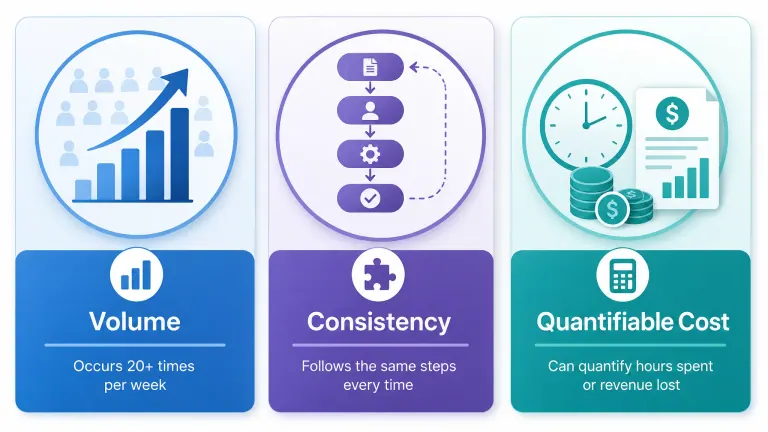
Not every repetitive task is worth automating, and not every B2B service company has the same starting point. Before comparing software, run your process through three filters.
Volume. A workflow that happens 5 times a week rarely justifies a $500-2,000/month platform. A workflow that happens 50+ times a week — lead intake, invoice follow-up, client onboarding checklists — almost always does. McKinsey's research on generative AI in the workplace found that up to 60-70% of employee time is spent on activities that could theoretically be automated with existing technology — but the highest-return automations concentrate in high-frequency, structured tasks, not one-off exceptions.
Consistency. If the steps change meaningfully every time — different documents, different approval chains, different exceptions — automation tools will either break constantly or need so much manual override that they don't save time. Structured, rules-based processes (data entry, status updates, scheduling, standard follow-up sequences) automate cleanly. Judgment-heavy processes (complex negotiations, one-off client escalations) don't.
Quantifiable cost. You need a number before you buy anything: hours per week spent, error rate, or revenue lost to delay. Without that baseline, you can't prove ROI after implementation — even if the automation is working.
How AI Essentials helps here: Before recommending any platform, we run a workflow audit that scores your top 3-5 candidate processes against these three filters, so the software decision comes after the analysis, not before it.
Not sure which workflow to start with? Most B2B service teams have 2-3 strong automation candidates hiding in daily operations. We map them in a 30-minute walkthrough. Get a Free Workflow Assessment →
Best Workflow Automation Software vs. Manual Process vs. Hiring
Once you've confirmed the workflow is a good candidate, the real decision is what to compare it against — not just tool-to-tool, but automation-to-alternatives.
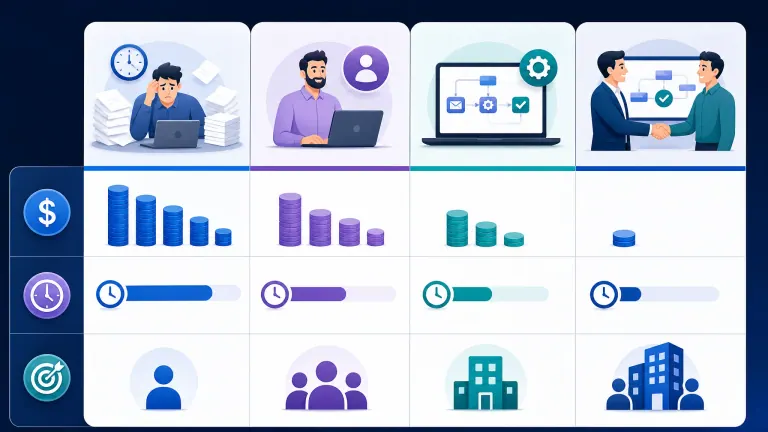
| Approach | Typical Cost | Time to Value | Best For |
|---|---|---|---|
| Manual process (status quo) | Hidden cost: 10-20 staff hours/week on repetitive tasks | Immediate, but ongoing drain | Very low volume, highly variable work |
| Hiring a dedicated staffer | $45,000-65,000/year salary + benefits + 60-90 day ramp | 3-4 months to full productivity | High-volume work requiring judgment calls automation can't make |
| Workflow automation software (self-managed) | $500-2,500/month platform cost + internal setup time | 4-8 weeks if you have technical staff | Teams with in-house automation capability and time to configure |
| Done-for-you automation implementation | $8,000-25,000 one-time + $500-2,000/month platform | 4-10 weeks, fully configured | Teams that want the ROI without building it themselves |
The comparison that gets skipped most often: workflow automation software vs. hiring. A $55,000/year hire costs roughly $4,580/month before benefits, onboarding, and turnover risk — B2B service industries see 20-30% annual turnover in operations roles, meaning you're re-hiring and re-training every 3-4 years on average. A well-scoped automation implementation at $1,500-3,000/month recovers equivalent capacity without that repeating cost, and it doesn't call in sick or give notice.
That doesn't mean automation always wins. Harvard Business Review's analysis of automation adoption notes that automation performs best on well-defined, repeatable decisions — and performs worse the more judgment, negotiation, or relationship context a task requires. Hiring still wins for complex account management and consultative sales work. NextAutomation covers the same "who's on the hook when it breaks" question from the build-it-yourself angle. For a deeper look from automation experts, check their DIY-vs-agency cost breakdown here. Fleece AI reaches a similar conclusion from the systems side — when a system is worth adding instead of a person — and TightSlice's automation-vs-hiring cost comparison lines up with the same 40-60% cost gap by month six.
How AI Essentials helps here: We build the cost comparison specific to your workflow before recommending a direction — including the honest cases where hiring, not automation, is the better near-term move.
Want the real cost comparison for your workflow? We calculate manual cost, hiring cost, and automation cost side by side using your actual numbers — no generic estimate. Book a 30-Min Walkthrough →
What Determines Whether the ROI Actually Shows Up
This is where most B2B service companies that "tried automation and it didn't work" actually went wrong — not the software, the setup around it.
No pre-implementation baseline. If you don't measure hours spent, error rate, or turnaround time before automating, you can't prove the after-state improved. Teams skip this step constantly because it feels like extra work before the "real" project starts. It's actually the most important step.
Wrong sequencing. Companies that automate the most visible process first — instead of the highest-ROI one — burn budget and goodwill on a workflow that was never the biggest problem. Start with the process that has the clearest dollar cost, not the one that's most annoying.
No ownership after go-live. Automation isn't "set and forget." Workflows drift, exceptions pile up, and a platform configured for how the business worked six months ago quietly starts producing bad outputs. Companies that see automation "stop working" after a few months usually stopped maintaining it, not that the tool failed.
Original ROI benchmark: Take a B2B service company automating client onboarding — currently 6 manual steps taking a coordinator 3 hours per new client, at 15 new clients/month. For the full playbook, see how to scale B2B client onboarding with workflow automation.
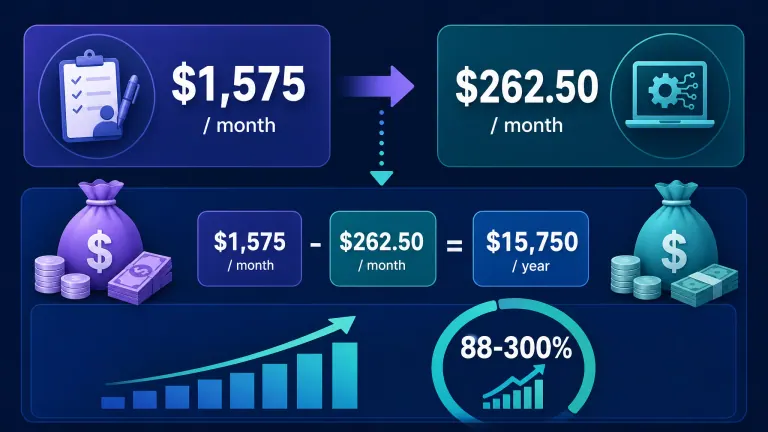
- Manual cost: 3 hrs × 15 clients × $35/hr blended cost = $1,575/month in labor
- Automated: coordinator time drops to 30 minutes/client for review and exceptions = $262.50/month in labor
- Recovered capacity: $1,312.50/month, or $15,750/year
- Platform + implementation cost: ~$1,800/month year one (implementation amortized), ~$800/month ongoing after
- Net year-one return: roughly 88% ROI in a conservative case, climbing to 300%+ in year two once implementation cost drops off
This is a conservative model — it doesn't count faster client response time, fewer onboarding errors, or the coordinator's freed-up hours going toward revenue-generating work instead of admin. Real B2B implementations we run typically land inside the 200-400% first-year range once those secondary effects are included.
How AI Essentials helps here: We build this exact model — using your actual labor cost, volume, and process steps — before you sign anything, so the ROI number is yours, not a marketing estimate. If lead follow-up or outbound is the workflow in question specifically, the 24/7 Pipeline Engine is built around this same ROI logic for sales-facing processes.
See your numbers before you commit We build your specific ROI model — your labor cost, your volume, your process — free, before any sales conversation. Book a 30-Min Walkthrough →
Who This Is For
This is ideal for:
- B2B service companies with a specific, repeatable process (onboarding, follow-up, quoting, reporting) that happens 20+ times a week
- Operations leaders who can name the process costing the most staff hours but haven't quantified it yet
- Teams that have already tried a DIY tool (Zapier, Make, n8n) and hit a ceiling on complexity or maintenance
- Companies weighing a new hire against automation for the same repetitive workload
Consider alternatives if:
- Your process changes meaningfully every time it runs — automation will need constant manual override and won't save the time you expect
- Your volume is under 15-20 occurrences per week — the platform cost may not clear the hiring-a-part-time-contractor threshold
- The bottleneck is a judgment call, relationship, or negotiation — that's a hiring or training problem, not a software one
Why AI Essentials specifically? We don't sell platform licenses and walk away. We run the workflow audit, build the ROI model on your numbers, implement the automation, and stay accountable for the post-launch metrics — typically a 4-10 week engagement with before/after numbers built into the delivery, not reported months later after you've already paid.
Frequently Asked Questions
B2B service companies workflow automation implementation steps
Implementation follows five steps: audit current process and measure baseline hours/errors, select the highest-ROI candidate workflow, configure the automation platform against that specific process, run a parallel test period comparing automated vs. manual output, then fully cut over with ongoing monitoring. Most B2B service companies complete steps 1-4 in 4-6 weeks, with full cutover by week 8-10.
Calculating ROI workflow automation B2B services
ROI = (Recovered labor cost + error reduction value + revenue impact from speed) minus (platform cost + implementation cost), divided by total investment. The inputs that matter most: hours spent per occurrence, occurrences per week, blended hourly labor cost, and current error or rework rate. Most B2B service companies underestimate error and rework cost, which often exceeds the raw time savings.
Workflow automation vs manual processes B2B
Manual processes have no upfront cost but carry a hidden, recurring cost in staff hours, inconsistency, and scaling limits — every new client or deal adds proportional manual work. Automation has upfront setup cost but decouples growth from headcount: handling 2x the volume doesn't require 2x the staff time once the workflow is automated correctly.
Workflow automation vs in-house development B2B
Building automation in-house (custom scripts, internal tools) avoids platform subscription fees but requires ongoing developer time to build and maintain — a real cost that's easy to underestimate. Established platforms (n8n, Make, Zapier, or a managed implementation) trade a monthly fee for faster deployment and vendor-maintained reliability. In-house development makes sense only when the process is highly specific to your business and no platform handles it well.
Common mistakes workflow automation B2B services
The top three: buying the platform before identifying the specific workflow to automate, skipping the pre-implementation baseline so ROI can't be proven, and automating the most annoying process instead of the highest-cost one. A close fourth: assuming automation is "set and forget" and not assigning anyone to monitor and adjust it after launch.
Successful workflow automation case studies B2B service companies
The pattern across successful B2B implementations: they start with one high-volume process, measure a clear before/after baseline, and expand to additional workflows only after the first one proves out. Companies that try to automate five processes simultaneously in their first implementation see lower success rates than those that prove ROI on one process first, then reinvest.
Timeline for workflow automation implementation B2B
A single well-scoped workflow typically takes 4-10 weeks from audit to full cutover: 1-2 weeks for the audit and ROI model, 2-4 weeks for platform configuration and integration, 1-2 weeks for parallel testing, and 1-2 weeks for monitored cutover. More complex workflows involving multiple systems or approval chains can extend to 12-16 weeks.
When is workflow automation suitable for B2B services
Workflow automation is suitable when a process runs 15-20+ times per week, follows a consistent structure with defined steps, and has a quantifiable cost in staff hours or errors. It's less suitable for low-volume, highly variable, or purely relationship-driven work where the "process" changes meaningfully every time it runs.
B2B service industry specific workflow automation use cases
The highest-ROI use cases in B2B services: client onboarding checklists, invoice and payment follow-up, lead intake and qualification, proposal and quoting generation, status reporting to clients, and internal handoffs between sales and delivery teams. These share high frequency and consistent structure — the two traits that make automation pay off fastest.
Advanced workflow automation features B2B executives should know about
Beyond basic trigger-action automation, look for conditional branching (different paths based on deal size or client type), AI-assisted data extraction (pulling structured data from unstructured emails or documents), and cross-system orchestration (updating CRM, finance, and project tools from one trigger). These features matter most once you've proven ROI on a simple workflow and are ready to expand into more complex processes.
Conclusion
Best workflow automation software is worth it for B2B service companies when three conditions line up: the process runs often enough to matter, follows a consistent structure, and has a cost you can measure in dollars or hours. When those conditions are met, 200-400% first-year ROI with a 3-6 month breakeven is a realistic, not optimistic, expectation. When they're not met, the software becomes another subscription nobody logs into.
The decision isn't "should my business automate." It's "which specific process, at what volume, costing how much." Get that answer first, and the software choice becomes straightforward.
See how we built this for a business like yours Book a 30-minute walkthrough — we'll map your highest-ROI workflow candidate and show you real before/after numbers from a comparable B2B service company. Book a 30-Min Walkthrough →

Iliyan Ivanov
Founder of AIessentials · AI automation consultant helping B2B businesses save 20+ hours/week and grow without hiring