Best Workflow Management Software (2026)
[ SUMMARIZE WITH AI ]
Workflow Audit
]99% sure you are not seeing all the spots AI can help you in your business.
Are your workflows optimized with the most up to date solution, or are they costing you and your team time and money?
GET FREE AUDITThere is no single "best" workflow management software for every B2B team — the right pick depends on team size, process complexity, and how many existing tools it needs to connect to. For teams already juggling 8-10 disconnected apps, the highest-value move is usually not adding another platform but consolidating the ones you have with automation built around your actual workflow.
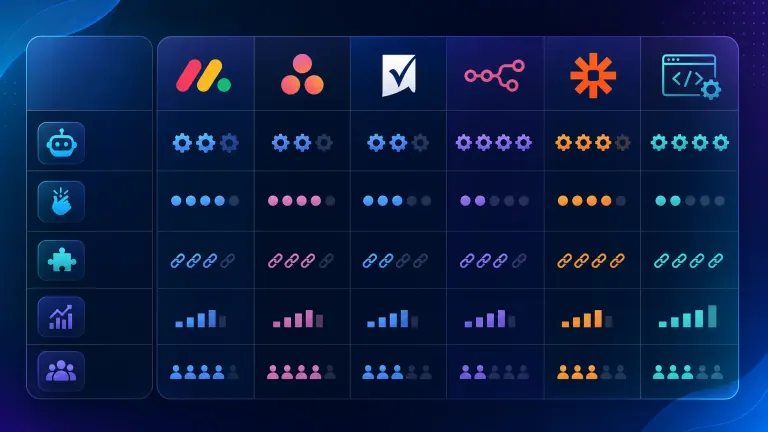
Monday.com and ClickUp: Best for teams that want a visual, all-in-one workspace and are willing to rebuild processes inside a new system ($9-$19/user/month). Asana: Best for cross-functional project tracking with lighter automation needs ($10.99-$24.99/user/month). Smartsheet: Best for teams that think in spreadsheets and need approval chains ($9-$25/user/month). n8n or Zapier: Best as connective tissue between tools you already use, not as a replacement for them ($0-$69/month plus usage). Custom-built automation: Best when the bottleneck isn't a missing app but a handoff between the apps you already have — this is the category most "best software" lists skip entirely.
You've already got Asana, a CRM, Slack, a spreadsheet nobody admits is load-bearing, and two tools someone bought in a hurry last year. Adding a sixth "workflow management" platform to fix the mess feels less like a solution and more like one more login to manage.
That reaction is correct more often than the software review sites want to admit. Most workflow tool comparisons assume your problem is a missing platform. For a lot of overwhelmed B2B teams, the real problem is that the platforms you have don't talk to each other — leads sit in the CRM until someone remembers to check, approvals happen over Slack DMs that get lost, and the "workflow" lives in someone's head, not in any tool at all.
The question worth answering before you buy anything new isn't "which software has the best reviews" — it's "where exactly is the handoff breaking, and does a new tool fix that or just add to the pile." That's the question the rest of this post actually answers, tool by tool and situation by situation. (If you're still deciding whether automation is worth the spend in the first place, our ROI breakdown for B2B workflow automation covers that decision — this page assumes you're past it and comparing tools.)
See how we built this for a business like yours We audit your current stack first — then show you exactly which tools to keep, which to cut, and where automation replaces the manual handoffs. Book a 30-minute walkthrough. See How We Do It →
Table of Contents
- The 6 Best Workflow Management Options, Compared
- Why "Best Software" Isn't Always the Right Question
- What Consolidation Actually Costs vs. Saves
- Who This Is For
- Frequently Asked Questions
The 6 Best Workflow Management Options, Compared
Every "best workflow software" roundup online is written by (or sponsored by) one of the tools on the list. That's not necessarily dishonest, but it does mean the comparison stops at feature checklists instead of asking whether you need a new platform at all. Here's an honest breakdown, including the option most lists leave out.
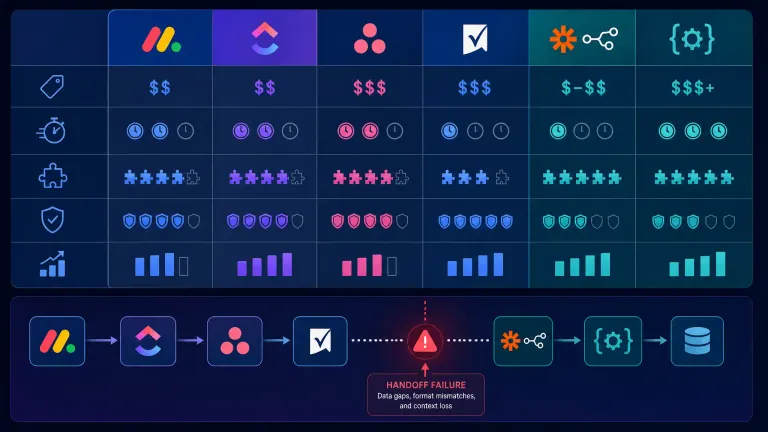
| Tool | Best For | Price Range | Setup Time | Integrates With Existing Stack? |
|---|---|---|---|---|
| Monday.com | Visual project tracking, all-in-one teams | $9-$19/user/mo | 2-6 weeks | Moderate — expects you to migrate in |
| ClickUp | Feature-dense teams wanting one app for everything | $7-$19/user/mo | 3-8 weeks | Moderate — steep learning curve |
| Asana | Cross-functional project and task tracking | $10.99-$24.99/user/mo | 1-3 weeks | Good — lighter footprint |
| Smartsheet | Spreadsheet-native teams, approval chains | $9-$25/user/mo | 2-4 weeks | Good via native connectors |
| n8n / Zapier | Connecting existing tools without replacing them | $0-$69/mo + usage | Days, if self-managed | Excellent — built for this |
| Custom automation build | Fixing specific handoff gaps between existing tools | Project-based, typically $3K-$15K one-time | 2-4 weeks | Excellent — built around your stack |
How AI Essentials helps here: Most teams that come to us have already tried option one through four. The tools work fine individually — the failure point is almost always in the handoff between them. Our AI Operating System approach starts by mapping where those handoffs break, then automates the specific gap instead of asking your team to re-learn a new platform from scratch.
Not sure which of these actually fits your situation? Take the 2-minute AI Readiness Check and see whether you need a new tool, fewer tools, or just the ones you have wired together properly. Take the Readiness Check →
Why "Best Software" Isn't Always the Right Question
According to McKinsey's 2025 State of Organizations report, the average employee at a mid-sized company now uses more than nine different applications to do their job, and 60% of leaders say tool sprawl is actively slowing decision-making — not speeding it up. Buying another workflow platform without addressing that sprawl usually adds a tenth tool to the pile. Blazly's breakdown of outbound tool sprawl puts a sharper number on it: the average company runs 87 different SaaS applications, with only 56% of purchased licenses actually getting used — the rest is dead weight on the monthly bill.
The Pattern We See Most Often
A team adopts a project management tool to "fix operations." Six months later, the tool is being used for maybe 40% of what it was bought for, because the other 60% of the work still routes through email, Slack, and a shared spreadsheet — because migrating everything into the new platform was never finished. The team is now paying for the old process (still partly running) and the new software (partly adopted) at the same time.
This isn't a failure of any specific tool. Monday, ClickUp, and Asana are all capable platforms. The failure is buying a platform to solve a process problem, when the process problem is actually about handoffs between systems that were never going to live in one app anyway — a CRM lead handoff, an invoice approval chain, a client onboarding checklist that spans three departments. See our guide on how to scale B2B client onboarding with workflow automation for a step-by-step breakdown.
What This Means for Overwhelmed Teams Specifically
If your team already has 5+ tools and still feels like nothing is tracked properly, the honest fix usually isn't "add tool #6." It's identifying the two or three handoffs causing 80% of the friction and automating those directly — sometimes with a lightweight connector like n8n, sometimes with a custom-built automation that sits between the tools you already pay for. This is exactly the audit our B2B process automation service runs before recommending anything new gets purchased.
Tired of evaluating software instead of fixing the actual problem? We map your current stack, find the 2-3 handoffs causing the most friction, and tell you honestly whether you need new software or just better automation. Get the Stack Audit →

What Consolidation Actually Costs vs. Saves
Here's the math most software comparison articles skip, because it requires admitting that buying more software isn't always the answer.
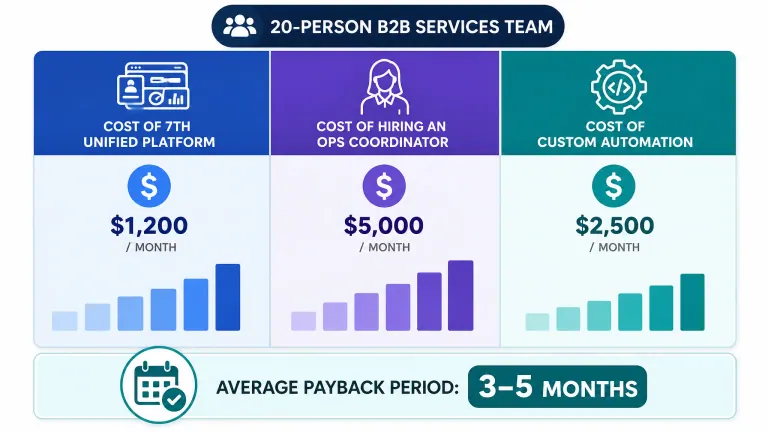
Scenario: a 20-person B2B services team running 6 disconnected tools
| Approach | Monthly Cost | Setup Time | What Actually Gets Fixed |
|---|---|---|---|
| Add a 7th "unified" platform | $9-$19/user × 20 = $180-$380/mo | 4-8 weeks migration | Only what gets fully migrated (often <60%) |
| Hire an ops coordinator to manually bridge tools | $4,500-$6,000/mo salary | Immediate, but doesn't scale | Manual bridging — breaks when they're out sick |
| Custom automation built around existing stack | $3K-$15K one-time + $0-$300/mo hosting | 2-4 weeks | The specific handoffs causing friction, permanently |
A Harvard Business Review analysis of digital transformation spend found that companies which prioritized process redesign before new software purchases reported 2.2x higher ROI on tooling investments than companies that bought tools first and adjusted process later. The order matters more than the tool.
For the 20-person team above, custom automation around the existing stack typically pays for itself in 3-5 months against the cost of the ops-coordinator alternative — and unlike the coordinator, it doesn't call in sick or need onboarding when someone leaves. You can run this math for your own team with our free AI ROI calculator. Mosaic AI's analysis of support-tool consolidation puts a number on the productivity side specifically: mid-sized teams lose roughly $39,000 a year to context-switching across fragmented tools alone, separate from what the licenses themselves cost.
Want the real numbers for your team's stack? We'll run your specific tool count and headcount through the same model and show you where the break-even point actually sits. Run Your ROI Numbers →
Who This Is For
This is ideal for:
- Teams already running 5+ disconnected tools who feel like nothing is fully tracked anywhere
- Operations leads who've noticed the same handoff breaking (lead intake, approvals, onboarding) over and over
- Businesses that tried a "unified platform" migration before and only got partial adoption
Consider alternatives if:
- You have fewer than 3 tools and a genuinely simple process — a single new platform like Asana may be all you need
- Your team has in-house technical capacity to build and maintain integrations long-term
- You haven't yet mapped which handoffs are actually broken — start there before buying anything
Why AI Essentials specifically? We don't sell software licenses, so we have no incentive to recommend a new platform when the fix is actually two connected automations. Our process starts with a stack audit, not a sales pitch for a specific tool — and most engagements are scoped and delivered inside 2-4 weeks.
Frequently Asked Questions
What are the implementation steps for B2B workflow management software?
Start with a process audit before selecting any tool — map every handoff between systems and flag where work currently stalls or gets duplicated. Then decide whether you need a new platform, a connector like n8n or Zapier, or custom automation for the specific broken handoffs. Most B2B teams skip step one and pay for it in low adoption six months later.
How do I calculate ROI on workflow automation for B2B services?
Compare the fully-loaded cost of current manual handling (hours spent × hourly cost, including errors and rework) against the one-time or monthly cost of automating it. A useful rule: if a handoff costs more than 5 hours/week in manual attention, automation typically pays back within 3-6 months. Use a free ROI calculator to run your specific numbers.
Is workflow automation better than manual processes for B2B teams?
For repetitive, rule-based handoffs — lead routing, approval chains, status updates — automation outperforms manual handling on speed, consistency, and error rate. For judgment-heavy decisions, manual review still wins. The best setups automate the repetitive 80% and route the exception 20% to a person.
Is custom workflow automation better than in-house development for B2B teams?
In-house development gives full control but requires ongoing engineering time most operations teams don't have budgeted. A scoped external build (2-4 weeks, fixed cost) is usually faster to deploy and cheaper than hiring or reassigning a developer, unless you already have spare technical capacity and plan to keep expanding the system yourself.
What are the most common mistakes B2B teams make with workflow automation?
Buying a new platform before mapping where the process actually breaks, migrating only partially and running two systems in parallel, and automating a process that was already inconsistent — which just makes inconsistency happen faster. Fixing the process before automating it prevents most of this.
What does a successful B2B workflow automation implementation look like?
A services company that automated client onboarding handoffs between their CRM and project management tool cut onboarding time from 9 days to 2, without adding headcount or replacing either tool — the fix was routing and status-sync automation, not a new platform.
What's the typical timeline for implementing workflow automation in a B2B business?
A targeted fix for 1-3 specific handoffs usually takes 2-4 weeks from audit to live automation. Full platform migrations (replacing your core tools) typically run 6-12 weeks and carry higher adoption risk, since every team member has to relearn where their work lives.
When is workflow automation the right call for a B2B service company vs. buying new software?
If the friction is a handoff between tools you already use and trust, automate the handoff. If the friction is that no tool exists yet for a core function (e.g., you're tracking client work in a shared spreadsheet with no system at all), a new platform may genuinely be the right first step.
What industry-specific use cases exist for B2B workflow automation?
Agencies automate client onboarding and reporting handoffs. Professional services firms automate intake, approval, and invoicing chains. B2B SaaS teams automate lead routing between marketing and sales tools. The pattern is the same across industries — it's the handoff, not the industry, that determines the fix.
What advanced workflow automation features should B2B executives evaluate?
Look past dashboards and Kanban boards to conditional logic (can it branch based on real data, not just move cards), native integration depth with your actual CRM/ERP, and error handling (what happens when a step fails — does it alert someone or silently drop the task). These separate tools that hold up under real volume from ones that look good in a demo.
Conclusion
The best workflow management software for an overwhelmed B2B team usually isn't a seventh platform — it's a clear map of where your current tools actually break down, followed by targeted automation of those specific handoffs. Monday, Asana, ClickUp, and Smartsheet are all solid choices when you're starting from zero. If you're starting from five tools and a headache, the higher-leverage move is consolidation, not addition.
We've built this exact audit for teams in your situation — see how it worked for a business like yours before you buy anything else.

Iliyan Ivanov
Founder of AIessentials · AI automation consultant helping B2B businesses save 20+ hours/week and grow without hiring