Best Workflow Automation Tools for Overwhelmed Small Business
[ SUMMARIZE WITH AI ]
Workflow Audit
]99% sure you are not seeing all the spots AI can help you in your business.
Are your workflows optimized with the most up to date solution, or are they costing you and your team time and money?
GET FREE AUDITWhat are the best AI workflow automation tools for small business?
The best AI workflow automation tools for small business in 2026 are Zapier, Make, and n8n for connecting apps and adding AI-driven decision logic, plus Airtable for combining a database with automation in one place. Most small businesses pay between $20 and $300 a month depending on how many workflows they run and how many app connections they need — the tool choice matters less than mapping which process is actually worth automating first.
Key Takeaway
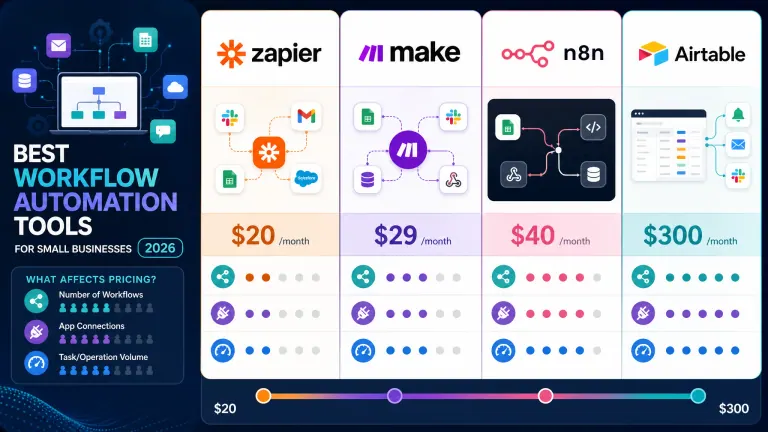
- Zapier — easiest to start, 7,000+ app connections, ~$20/mo, best for simple trigger-and-action automation
- Make — visual builder with branching logic, ~$9/mo, best for multi-step processes
- n8n — open-source, self-hostable, no per-task pricing, best for technical teams or agencies with AI/LLM steps built in
- Airtable — database plus built-in automations, best when the workflow needs a system of record
- The tool is rarely the bottleneck — most stalled automation projects fail because nobody mapped the process before buying a subscription
AI Essentials is a done-for-you AI automation provider for small and mid-sized B2B businesses. Rather than selling a tool subscription, we map a business's actual process, then design and build the automation — including AI-driven steps like lead qualification, follow-up sequencing, and data routing — inside Zapier, Make, or n8n, delivering a working system without ongoing tool maintenance shifted onto the owner.
Zapier: Easiest to start with, connects 7,000+ apps, starts around $20/month, best if you want speed over control. Make: Visual workflow builder with more logic and branching than Zapier, starts around $9/month, better for multi-step processes. n8n: Open-source, self-hostable or cloud-hosted, no per-task pricing on self-hosted plans, best for technical teams or agencies building on your behalf. Airtable: A flexible database with built-in automations, useful when the workflow needs a system of record, not just a connector. The step tools don't do for you: mapping which parts of your process are actually worth automating before you buy anything.
AI sounds like it's for companies with a data team and a six-figure budget — but the tools above start at less than a single employee's hourly rate.
Picking a tool is the easy part. The harder question is: which parts of your business are actually worth automating first, and how do you avoid ending up with another subscription your team quietly ignores? That's the part most "best tools" lists skip entirely, and it's usually why the automation project stalls after week two.
This guide covers the tools, what they actually cost once you add real usage, and — more importantly — how to figure out where to point them so the investment pays off instead of gathering dust in your app list.
Not sure where your business is bleeding time? Get a Free Workflow Leak Report — we find the 3 places your business is bleeding time (10 spots/week). Get My Free Report →
Table of Contents
- The Best Workflow Automation Tools, Compared
- What These Tools Actually Cost Once You're Using Them
- Why Buying the Tool Isn't the Hard Part
- Who This Is For
- Frequently Asked Questions
The Best Workflow Automation Tools, Compared
If you've never automated anything before, the tool names alone can feel like a wall. Here's the plain-English version of what each one is actually for.
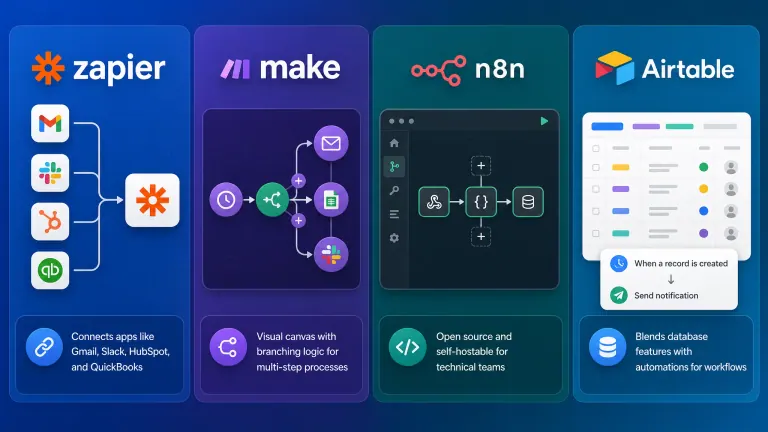
Zapier is the on-ramp. It connects the tools you already use — Gmail, Slack, HubSpot, QuickBooks — through simple "when this happens, do that" rules called Zaps. No code, no logic diagrams, just triggers and actions. It's the right pick if you want something running by the end of the day.
Make (formerly Integromat) does what Zapier does, but with a visual canvas that lets you build branching logic — if X, do this; if Y, do that. It's a bigger learning curve than Zapier, but it handles multi-step processes (like a lead qualification flow with three different outcomes) without needing five separate Zaps stitched together.
n8n is open source and can be self-hosted, which matters if you're automating anything with sensitive client data or you outgrow the per-task pricing of the SaaS tools. It's more technical to set up on your own, which is why most small businesses that use it have someone — internal or outsourced — building it for them. We covered n8n's real cost and learning curve in more depth here.
Airtable blurs the line between a database and a workflow tool. If your process needs a place to actually store and track records — client intake, project status, inventory — and not just move data between two other apps, Airtable's built-in automations often replace a second tool entirely.
| Tool | Best for | Learning curve | Starting price |
|---|---|---|---|
| Zapier | Fast, simple app-to-app automations | Low | ~$20/mo |
| Make | Multi-step logic and branching | Medium | ~$9/mo |
| n8n | Technical teams, self-hosted, sensitive data | High | Free self-hosted, or ~$20/mo cloud |
| Airtable | Workflows that need a system of record | Medium | ~$20/seat/mo |
How AI Essentials helps here: most owners don't need to become experts in all four — they need someone to pick the right one for their specific process and build it correctly the first time, which is the part a tool subscription can't do for you.
Not sure if AI automation is right for your situation yet? Get a Free Workflow Leak Report — we find the 3 places your business is bleeding time (10 spots/week). Get My Free Report →
What These Tools Actually Cost Once You're Using Them
The advertised prices above are the floor, not the real number. Most of these platforms charge by "tasks," "operations," or "runs" — and a single automated workflow can burn through hundreds of tasks a day without you noticing until the bill arrives.
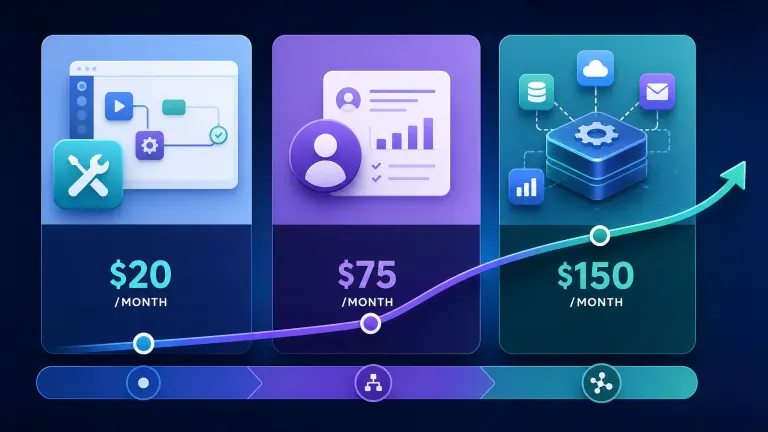
A business automating client onboarding — pulling a new signup into a CRM, sending a welcome email, creating a project folder, and notifying the team — might use 4-6 tasks per new client. That sounds trivial until you're running 200 clients a month across three different automated workflows. At that volume, a lot of businesses quietly get bumped from the $20/month tier into $70-$150/month without changing what the automation actually does.
Research backs up why this matters: McKinsey found that automating a business process typically requires combining multiple technologies rather than a single tool, and that 30% of tasks in about 60% of occupations could be automated with current technology — the gap is almost always in the setup, not the tool's capability (McKinsey Global Institute).
Here's a rough side-by-side of doing it yourself versus having it built for you:
| Approach | Monthly cost | Time to working automation | Who maintains it |
|---|---|---|---|
| DIY with a no-code tool | $20–$150/mo | 2-6 weeks (nights/weekends) | You, when it breaks |
| Hiring a full-time ops hire | $4,000–$6,000/mo | 4-8 weeks to onboard | Them, if they stay |
| Done-for-you automation build | $150–$300/mo + one-time setup | 1-2 weeks | Built to not need you |
The keyword "best workflow automation tools" gets you to a list of options. It doesn't tell you which combination fits your actual process, or how much task volume your business will really generate — and that's usually where the budget surprises show up.
See how a business like yours automated without the subscription creep Get a Free Workflow Leak Report — we find the 3 places your business is bleeding time (10 spots/week). Get My Free Report →
Why Buying the Tool Isn't the Hard Part
Here's the thing nobody selling you a $20/month plan wants to say out loud: the tool was never the bottleneck. Most small businesses that try to automate on their own hit the same wall — they buy Zapier, build one or two Zaps, and then the project stalls because nobody mapped out what "the process" actually is before trying to automate it.
If your process lives in your head, or changes depending on who's doing it that week, automating it just makes the mess move faster. A workflow tool copies whatever you feed it — it doesn't fix a broken handoff between sales and fulfillment, it just runs that broken handoff on autopilot. We wrote a full breakdown of why automation projects fail when the underlying process is already broken — it's worth reading before you touch a tool.
Compared to hiring, automation still wins on raw economics: a $70/month automation tool replaces roughly 10-15 hours a month of manual data entry and follow-up work, versus $4,000+/month for a part-time ops hire doing the same repetitive tasks. But the tool only delivers that if someone maps the process correctly first — which is exactly what a done-for-you automation build does that a self-serve subscription can't.
Harvard Business Review's research on automation adoption found that companies that treat automation as a one-time tool purchase see returns fade within a year, while companies that pair the tool with a documented, owned process see compounding gains as they add more workflows on top of the first one (Harvard Business Review).
Original ROI math, one real workflow: a 10-person service business manually processing 150 client intake forms a month, at roughly 8 minutes of manual data entry and routing per form, spends about 20 hours a month on that single task — worth roughly $700-$1,000 in owner or staff time at typical SMB labor rates. A properly built intake automation (Zapier or Make, connected to the CRM) runs that same task in minutes, for a $30-$70/month tool cost. That's a payback period measured in weeks, not months — provided the workflow was mapped correctly before it was built.
Get your workflow mapped before you buy anything Get a Free Workflow Leak Report — we find the 3 places your business is bleeding time (10 spots/week). Get My Free Report →

Who This Is For
This is ideal for:
- Small business owners who feel like they're "in evaluation mode" on automation but haven't picked a tool or a starting point
- Teams manually re-entering the same data across two or more apps every day
- Businesses that have tried a free trial of Zapier or Make and stalled after the first automation
Consider alternatives if:
- Your process changes so often that automating it now would just lock in a bad version of it — fix the process first
- You have a single, very low-volume manual task (under an hour a week) where the automation setup time isn't worth it yet
- You already have a technical team member who can own n8n or a custom build in-house
Why AI Essentials specifically? We map the process before recommending a tool, so you're not paying for Zapier tasks that automate the wrong step. Builds are typically live within 1-2 weeks, and we build workflows to run without needing you to babysit them — not another dashboard for you to check.
Frequently Asked Questions
What are the practical steps to implement workflow automation in a small B2B business?
Start by writing down the exact steps of one manual process, from trigger to finish — most owners have never done this. Then identify which steps are repetitive and rule-based (good automation candidates) versus judgment calls (keep those manual). Pick one tool, build that single workflow, test it for two weeks, then expand.
Is there a practical, beginner-friendly guide to workflow automation for SMBs?
Yes — the short version is: pick one repetitive task that eats at least 3-5 hours a week, choose a tool that matches its complexity (Zapier for simple, Make for branching logic), and build only that one workflow first. Resist the urge to automate everything at once; one working automation beats five half-finished ones.
What do workflow automation tools actually cost for a small business, all-in?
Expect $20-$150/month for tool subscriptions depending on task volume, plus either your own time (10-30 hours) or a one-time setup fee ($500-$2,500) if you have someone build it for you. Costs scale with how many workflows you run and how many tasks each one generates monthly — not just the advertised base price.
What ROI can a small business expect from workflow automation?
Most SMBs see payback within 4-8 weeks on a single well-chosen workflow, based on hours saved at typical labor rates. A workflow that saves 15-20 hours a month against a $50-$100/month tool cost pays for itself almost immediately — the bigger ROI driver is picking the right process to automate first.
How do workflow automation tools compare to just doing the process manually?
Manual processes scale linearly with headcount — more clients means more hours, every time. Automated workflows have a fixed setup cost and then run at near-zero marginal cost per transaction. The tradeoff is upfront time or money to build it correctly, versus ongoing hours that grow with your business.
Should a small business build custom automation instead of using an off-the-shelf tool?
Only if your workflow needs logic that no-code tools can't handle — complex conditional branching, integrations with a niche internal system, or very high task volume where per-task pricing gets expensive. For most SMB processes, a well-built Zapier or Make workflow does the job for a fraction of custom development cost.
What are the most common mistakes businesses make implementing workflow automation?
Automating a broken or undocumented process, trying to automate everything at once instead of one workflow at a time, and picking a tool based on price alone without checking if it can handle the logic the workflow needs. The most expensive mistake is skipping the process-mapping step entirely.
How can a small business avoid the common pitfalls of workflow automation?
Map the process on paper before touching any tool, start with the single highest-time-cost task rather than the easiest one, and set a review date 30 days out to check whether the automation is actually being used — not just built.
What real-world outcomes have small businesses seen from workflow automation?
Common outcomes include cutting client intake processing time by 70-90%, reducing manual data-entry errors significantly, and freeing 10-20 hours a month per automated workflow. The specific numbers vary by process, but the pattern — hours moving from manual entry to oversight — holds across industries.
Are there workflow automation success stories from businesses my size?
Yes — service businesses automating client onboarding, agencies automating lead routing, and operations teams automating invoice processing are the three most common early wins for SMBs, typically because those processes are high-frequency, rule-based, and easy to measure before and after.
Conclusion
Zapier, Make, n8n, and Airtable each solve a different shape of problem — but picking the right one only matters after you know which process is actually worth automating and what it's really going to cost you at real usage volume, not the advertised starting price.
If you're still in "which tool do I even pick" mode, that's normal — most owners are. The fastest way through it isn't more research; it's getting your specific process looked at by someone who's built dozens of these.
Get a Free Workflow Leak Report We find the 3 places your business is bleeding time — no sales pitch, just a clear map of what's worth automating first. 10 spots available this week. Get My Free Report →

Iliyan Ivanov
Founder of AIessentials · AI automation consultant helping B2B businesses save 20+ hours/week and grow without hiring