Workflow Automation Fails (2026): Your Process Is Broken
[ SUMMARIZE WITH AI ]
Workflow Audit
]99% sure you are not seeing all the spots AI can help you in your business.
Are your workflows optimized with the most up to date solution, or are they costing you and your team time and money?
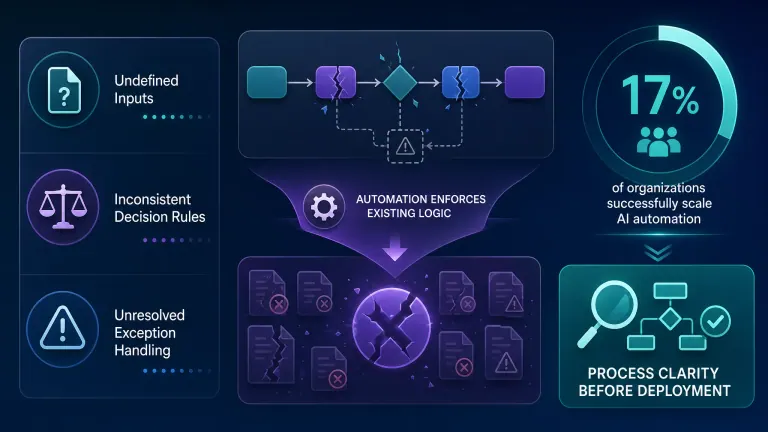
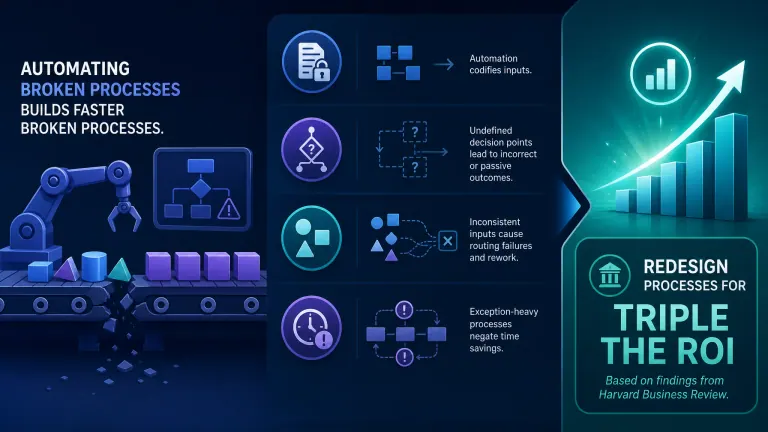
GET FREE AUDITWorkflow automation fails when the underlying process has undefined inputs, inconsistent decision rules, or unresolved exception handling — the automation enforces whatever logic exists in the process, which means a broken process produces broken results at scale, not fixed ones. According to McKinsey, only 17% of organizations successfully scale AI automation, and the gap between those that do and those that don't almost always traces back to process clarity before deployment, not to the tools selected. Most businesses that see automation "fail" have actually succeeded at automating a flawed workflow — they've just made their existing problems faster and harder to reverse.
Automation amplifies, not repairs: If your process has five steps where step three is "check with Sarah," automation will reach step three and either stall, error out, or skip Sarah — and the result lands downstream without that check.
Undefined inputs break automation immediately: A workflow that starts with "receive an inbound lead" fails when different leads come in different formats, from different sources, with different data fields. The automation can't choose — it breaks.
Exception-heavy processes are automation traps: If more than 20% of your real-world cases require someone to make a judgment call, the "standard" path you automate covers less than 80% of actual volume — and the 20% that doesn't fit will create manual cleanup work that cancels the time savings.
Process consistency is the pre-condition, not the outcome: You don't need a perfect process to automate. You need one agreed-upon path. Two people doing the same task differently means you're actually running two different processes — automation picks one and breaks on the other.
The fix costs more after automation than before: Rearchitecting a process after automation is deployed takes 3–5x longer than fixing it before. The automation has already touched your data, your integrations, and your team's habits.
You automated something. It's been running for two months. And it still doesn't work the way it should — errors keep slipping through, someone still checks everything manually, and honestly, it might be slower than before.
This is one of the most common situations we see when businesses come to us after a failed automation rollout. The tool wasn't the problem. The process it was built on was.
Most automation breakdowns don't announce themselves at launch. They appear two or three weeks in, when edge cases pile up, when data doesn't match what the workflow expected, or when the "exception" that seemed rare turns out to happen every third time. By then, the team has already built manual workarounds around the automation — which means you now have two processes to maintain instead of one.
Understanding why automation fails on a broken process is the prerequisite to fixing it — whether you haven't automated yet, or you're already dealing with the fallout.
Your automation isn't working and you're not sure why? We find the specific process gap that's causing the breakdown — and tell you exactly what to fix before spending another hour in the workflow builder. Get Your Free Workflow Leak Report →
Table of Contents
- Why Automation Can't Fix a Broken Process
- 5 Signs Your Process Isn't Ready to Automate
- How to Fix the Process Before (or After) You Automate
- Who This Is For
- Frequently Asked Questions
Why Automation Can't Fix a Broken Process
The most persistent myth in business automation is that implementing a workflow platform will force your team into better habits. The logic sounds reasonable: "Once the system requires step A before step B, everyone has to follow the process." But it doesn't work that way in practice.
Automation codifies what you give it. If you map a process where step three depends on a judgment call that only one person on your team knows how to make, the automation either blocks at step three or skips it entirely. Neither outcome is acceptable — but both are predictable.
What "Broken" Actually Means
Not all broken processes look the same. There are three patterns that consistently cause automation failures:
1. Undefined decision points. Any step that currently gets resolved with "it depends" is a decision point without a rule. When you automate this, the workflow either forces a default answer (often wrong) or stalls waiting for human input — which means you've automated the work up to that point but not through it.
2. Inconsistent inputs. Automation needs to receive the same type of data in the same format to proceed reliably. If leads come in through three channels, each with different fields, different naming conventions, and different data quality — the automation will handle 30% of them cleanly and struggle with the rest.
3. Untracked exceptions. Most businesses know their "standard" path but have never counted how often the exception path is actually taken. If you're honest, it's usually more than expected. A Harvard Business Review analysis found that organizations performing structured process redesign before automation achieve triple the ROI compared to those that automate first — precisely because exception mapping is part of that redesign.
Why Automation Makes This Worse, Not Better
When you automate a broken process, you lose something critical: the informal fixes your team was applying manually. Before automation, when a lead came in with a missing phone number, someone noticed and looked it up. After automation, the workflow routes the lead without a phone number to the CRM, the sales rep calls a number that doesn't exist, and the lead ages out in the pipeline. The manual workaround is gone. The gap it was covering is now visible — and compounding.
Forrester research from their 2025 Automation Landscape Report found that organizations that optimized their workflows before deployment were 43% more likely to capture productivity gains in year one. The organizations that didn't were disproportionately represented in the "automation didn't deliver" group.
This is why the AI Operating System — the way we structure automation at AI Essentials — always starts with a process audit, not a platform selection. The tool choice matters far less than what you're feeding the tool.
Already running a broken automation? We can diagnose exactly where the process breaks — and whether it's faster to fix what's live or restart with a clean foundation. Get Your Free Workflow Leak Report →
5 Signs Your Process Isn't Ready to Automate
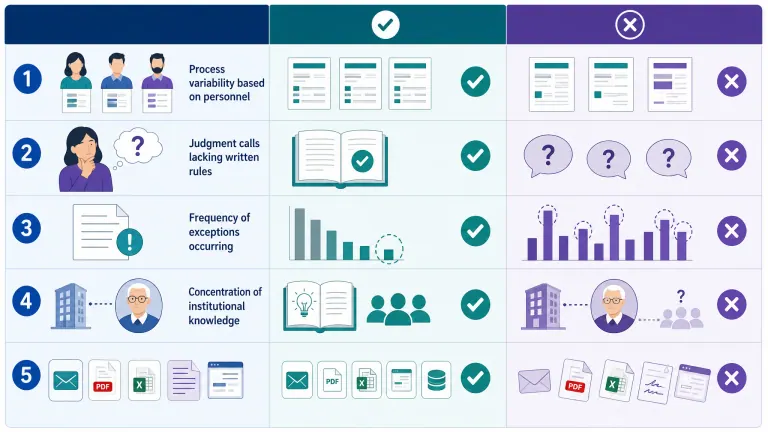
Before you connect a single trigger to an action, run your target process through these five checks. If you hit more than two red flags, fix the process first — the automation will be faster to build, cheaper to maintain, and far less likely to produce a mess you have to undo.
Sign 1: The process runs differently depending on who's doing it. If two people on your team perform the same task and produce different outputs, you have two processes sharing one name. Automating either version will break on the other person's inputs.
Sign 2: You can't describe the steps without saying "it depends." "It depends" is a decision point that has no documented rule. Every time someone says "it depends" when describing a step, that's a place where automation will produce inconsistent results.
Sign 3: The last person who set this up is the only one who understands it. If institutional knowledge lives in one person's head, automation will make that dependency invisible — right up until it fails and no one knows why.
Sign 4: Exceptions happen more than once a week. Exceptions that are genuinely rare (once a quarter) can be handled as manual overrides. Exceptions that happen weekly are actually part of the standard workflow — and they need to be mapped before automation handles them.
Sign 5: The process involves a judgment call about a person or relationship. Sales processes and customer service workflows frequently include "check the history with this client before responding." That context doesn't exist in a database field. Automation that skips this produces responses that damage relationships.
Process Readiness Comparison
| Signal | Ready to Automate | Not Ready |
|---|---|---|
| Steps per task | Consistent, repeatable | Varies by person or situation |
| Input format | Standardized (same fields, same source) | Mixed format, multiple sources |
| Exception rate | < 15% of cases | > 20% of cases |
| Decision rules | Written or easily writable | "It depends," judgment-based |
| Process owner | One person owns the outcome | Shared ownership or unclear |
| Documentation | Can be described in 10 steps or fewer | Requires institutional knowledge |
If your process scores "Not Ready" on three or more rows, you'll save more time fixing the process than you'll ever save by automating it now. See the AI Automation Business Readiness Guide for a full diagnostic framework.
Want to know which of your processes are actually ready? Our free 30-minute workflow audit identifies your highest-ROI automation target — and flags which ones to fix first. Get Your Free Workflow Leak Report →
How to Fix the Process Before (or After) You Automate
The good news: fixing a process before automating is dramatically faster than fixing it after. The bad news: most businesses discover this in reverse order.
Whether you're pre-automation or already running something that's breaking, the fix follows the same four steps.
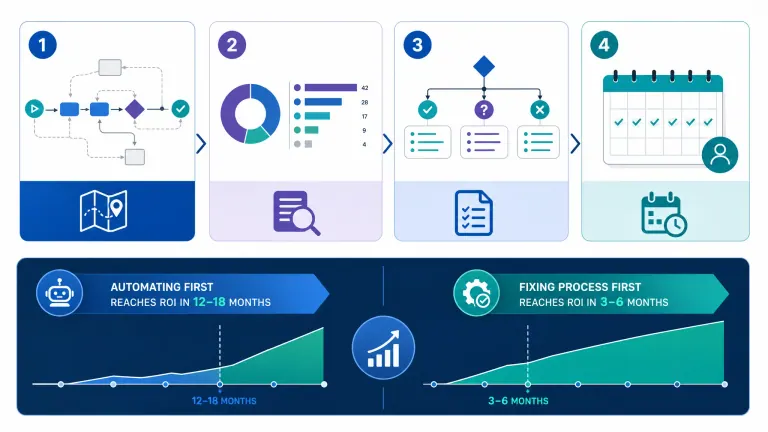
The Process Readiness Fix (4 Steps)
Step 1: Map the actual process, not the intended one. Watch or interview the people doing the work. Document what actually happens, including the workarounds, the "quick fixes," and the exception paths. This takes two to four hours for most processes — and almost always surfaces something the automation spec missed.
Step 2: Count exceptions and categorize them. List every case where the standard path doesn't apply. Group them by type. If a group represents more than 10% of total volume, it belongs in the standard process — not the exception handler.
Step 3: Write the decision rules. For every "it depends" step, write the rule that determines the answer. "If the deal value is over $10,000, route to senior sales. If under, route to the standard follow-up sequence." That sentence is now automatable. "It depends on the client relationship" is not.
Step 4: Run the process manually for one week with the new rules. Before building anything, run one week of actual volume through the new documented process. Surface the gaps before the automation enforces them. Then build.
The Cost of Skipping This
| Approach | Build Time | Error Rate (Months 1–3) | Fix Cost | Time to Positive ROI |
|---|---|---|---|---|
| Automate first, fix later | 2–3 weeks | 30–50% of cases need manual review | 3–5x original build | 12–18 months |
| Fix process first, then automate | 3–5 weeks total | < 10% exceptions | Minimal | 3–6 months |
The total time investment is actually shorter when you fix first. The painful part is that it doesn't feel that way at the start — and most businesses choose speed-to-launch over thoroughness, then pay for it for a year.
Once the process is clean, workflow automation platform pricing becomes the relevant question. Until then, it's the wrong question entirely. For the step-by-step on picking the first workflow to automate once your process is ready, see our complete guide to AI automation for small business.
Ready to build automation that actually works? We audit your process, identify the specific gaps, and build the automation in the same engagement. Get Your Free Workflow Leak Report →
Who This Is For
This post is useful for:
- Anyone who automated a process and is still manually checking or correcting the output
- Business owners evaluating workflow automation who want to avoid a failed rollout
- Operations leads whose team has built workarounds around an existing automation
- Anyone who was told "just connect the tools and it'll work" — and discovered that wasn't true
Consider a different approach if:
- Your process is genuinely simple, linear, and already consistent — basic automation will work fine without a formal audit
- You're in the early stages of a business where the process itself is still changing every few weeks — document it first, automate once it's stable
Why AI Essentials specifically? We don't sell software. We build the automation and fix the process in the same engagement, which means you get a clean workflow and a running system — not a platform subscription and a project you're still figuring out six months later. Most implementations go live in two to four weeks.
Frequently Asked Questions
What are the most common reasons workflow automation projects fail?
The most common root cause is automating a process that hasn't been designed for automation — either the inputs are inconsistent, the decision rules aren't written down, or exception cases weren't counted before build. Tool selection and technical issues account for less than 20% of failures; process gaps account for the rest. Organizations that audit the process before deployment see dramatically lower failure rates.
How do you know if a process is too broken to automate right now?
Use the process readiness checklist above. If more than two signs apply — inconsistent steps, frequent exceptions, undocumented decision rules, single point of knowledge — the process needs a redesign pass before you automate. The rule of thumb: if you can't describe the process in under 10 steps without saying "it depends," it's not ready.
What is the cost of automating a broken process?
Beyond the initial build cost, automating a broken process generates ongoing manual cleanup, trust erosion in the automation, and eventually a rearchitecting project that costs 3–5x the original build. Businesses that fix the process first typically reach positive ROI in 3–6 months; businesses that automate first often wait 12–18 months for the same outcome.
What does a process audit look like before implementing a workflow platform?
A process audit maps the actual current state of a workflow, not the intended version. It documents every step, every decision point, every exception, and every person involved. For most SMB workflows, this takes two to four hours and produces a documented map, a list of decision rules to write, and a count of exception volume. That's enough to build reliable automation.
How do you prevent automation from amplifying existing errors?
You prevent it by mapping exceptions before you build. Run the process manually on a representative batch of real cases — 30 to 50 — and capture every case where the standard path didn't apply. Then decide: is this exception a rule you can write, or is it a genuine edge case that should trigger a human handoff? Write the rule or build the handoff before deployment.
What are early warning signs that an automation project will fail?
Watch for: no process owner assigned, a "we'll figure it out as we go" approach to exceptions, no agreed-upon definition of a successful output, integrations being planned before the process steps are confirmed, and automation being scoped before the inputs are standardized. Any two of these in the same project is a red flag.
How do you course-correct an automation that is making things worse?
Pause the automation and route work manually for one week while you audit the output errors. Categorize the errors by type — wrong routing, missing data, wrong decision rule triggered. Each category maps to a specific process gap. Fix the three highest-volume gaps first, then rebuild. Don't try to patch a fundamentally broken architecture with more automation logic.
What is the difference between process improvement and automation?
Process improvement changes how work is done — the steps, the decision rules, the handoffs, the owners. Automation replaces a human doing those steps with a system doing those same steps. If the steps are wrong, automation makes them wrong faster. Process improvement must come first, or at least simultaneously. They are not the same activity, and treating automation as a substitute for process improvement is one of the most expensive mistakes in operations.
When should you pause an automation project and go back to basics?
Pause when: more than 15% of automated cases are requiring manual review within the first four weeks, error patterns repeat across different case types, or your team has built a second manual process to catch automation errors. These signals mean the process architecture is the problem — not the automation configuration. More rules and more conditions won't fix a fundamentally incorrect process map.
Who in the organization should own process design before automation begins?
The person who owns the outcome of the process — not the person who executes the steps, and not the IT lead. In a sales workflow, that's the head of sales or revenue. In an onboarding workflow, that's the customer success lead. When process ownership is unclear, that ambiguity becomes the most common source of automation failure. Assign an owner before the first workflow node is placed.
Conclusion
Automation doesn't fail because the tools are bad. It fails because it takes the process you give it and runs it at speed — and if that process has gaps, exceptions, or undocumented rules, those gaps are now running at speed too.
The businesses that get real ROI from workflow automation share one thing: they defined the process clearly before building anything. Not perfectly — just consistently. One agreed-upon path, written decision rules, and a count of how often exceptions actually happen.
If your automation is already running and producing noise instead of output, the fix is a process audit, not more automation logic. If you haven't started yet, the audit is where you start — not the tool selection.
The three things to take from this post:
- Automation amplifies whatever process it runs — broken or working
- The cost of fixing after deployment is 3–5x the cost of fixing before
- Any process where you can't describe the steps without saying "it depends" is not ready to automate
Not sure where your process gaps are? We find the specific breakdowns in your workflows and show you exactly what to fix first — no tech background required. Get Your Free Workflow Leak Report →

Iliyan Ivanov
Founder of AIessentials · AI automation consultant helping B2B businesses save 20+ hours/week and grow without hiring