Why Do Teams Resist When You Try to Automate the Process?
[ SUMMARIZE WITH AI ]
Workflow Audit
]99% sure you are not seeing all the spots AI can help you in your business.
Are your workflows optimized with the most up to date solution, or are they costing you and your team time and money?
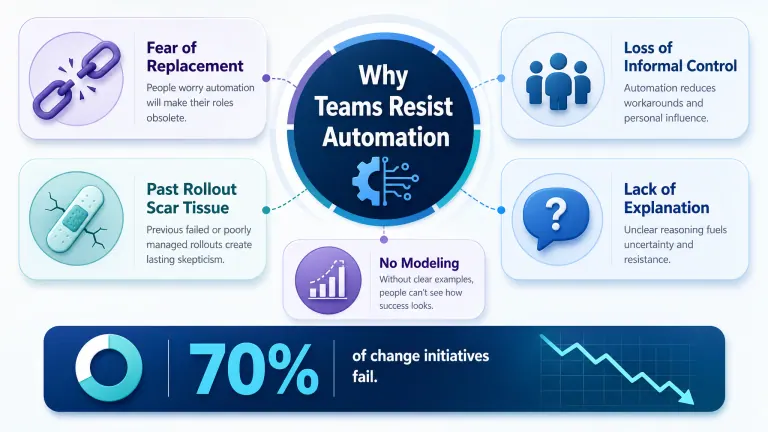
GET FREE AUDITTeams resist automation because it threatens job security, exposes gaps in how work actually gets done, and — most often — repeats the pattern of a past rollout that was announced, launched, and never fully adopted. Roughly 70% of change initiatives fail to meet their goals, according to McKinsey, and the gap between success and failure almost always traces back to how the change was introduced, not the tool itself. When you automate the process without addressing these three things first, the automation gets built and the team quietly works around it.
Fear of replacement: Even when leadership frames automation as "freeing up time," employees hear "my role is on the list." Loss of informal control: People who've built workarounds and shortcuts over years see automation as removing the flexibility that made their job manageable. Past rollout scar tissue: If the last three tools were announced with fanfare and quietly abandoned, your team has learned that waiting out the change costs less than learning it. Nobody explained the "why": Teams comply with instructions. They only adopt changes they understand the reason for. No one modeled it first: If leadership never uses the new process themselves, the team reads that as permission to skip it too.
If you've hit this wall, you already know the frustrating part: the automation works. The demo went fine. The workflow does exactly what it was built to do. And your team is still doing it the old way, or worse, doing both — the old way and the new system, in parallel, "just to be safe."
That's not a training problem. It's not even really a technology problem. It's what happens when a team is asked to change how they work without being given a reason to trust that the change will actually make their day better. The good news is that this is one of the most predictable, well-studied problems in operations — which means it's also one of the most fixable, if you catch it at the right phase of the rollout instead of after the workarounds have already formed.
The rest of this post breaks down exactly where resistance shows up in a typical automation rollout, what causes it at each stage, and what to do differently — with real numbers on what resistance actually costs a B2B team, not just the theory.
If you're not sure where your own rollout risk is highest, an AI automation assessment for your business maps out which of your workflows are ready to automate and which ones need buy-in work first — before you spend a single hour building.
Get a Free Workflow Leak Report We find the 3 places your business is bleeding time — and flag where your team is most likely to resist the fix before you build it. 10 spots this week. Get Your Free Workflow Leak Report →
Table of Contents
- The Real Reasons Teams Resist Automation
- Where Resistance Shows Up in a Typical Rollout
- What Actually Fixes Resistance
- Who This Is For
- Frequently Asked Questions
The Real Reasons Teams Resist Automation
Most managers assume resistance means the team doesn't understand the tool. In practice, resistance is almost never about capability — it's about trust, identity, and unresolved questions the rollout never answered.
It's Rarely About the Tool
A Harvard Business Review analysis of change failures found that most resistance to organizational change comes from unaddressed emotional and psychological factors, not a lack of skill or understanding. People aren't rejecting the software. They're rejecting the uncertainty of not knowing what their job looks like once it's live.
This shows up in three recognizable patterns on a B2B team:
1. The quiet workaround. The automation runs, but someone keeps a personal spreadsheet "just in case" — and eventually trusts the spreadsheet more than the system. 2. The malicious compliance. The team follows the new process exactly as written, including the parts that clearly don't fit edge cases, so it fails visibly and "proves" the old way was better. 3. The slow fade. Adoption starts strong in week one, then drops as soon as leadership's attention moves to the next initiative.
Why Identity Matters More Than Efficiency
Gartner research on digital transformation puts failure rates for major change initiatives at around 80%, and the common thread isn't technical complexity — it's that the people doing the work were never made part of designing how the work would change. When someone has spent two years becoming the person who "just knows how to handle the tricky accounts," automating that judgment call without involving them doesn't just remove a task. It removes the thing that made them valuable on the team.
How AI Essentials helps here: every automation project starts with a 60–90 minute workflow audit that includes the people actually doing the work, not just the manager who requested the change — because the rollout plan changes completely once you know which steps carry someone's professional identity and which ones are just busywork nobody will miss.
Not sure where your team will push back? Take the 2-minute AI Readiness Check to see which of your processes are ready to automate — and where you'll need buy-in work first. Take the Readiness Check →

Where Resistance Shows Up in a Typical Rollout
Resistance doesn't appear all at once — it shows up at specific, predictable points in an implementation. Knowing where lets you head it off instead of reacting to it after adoption has already stalled.
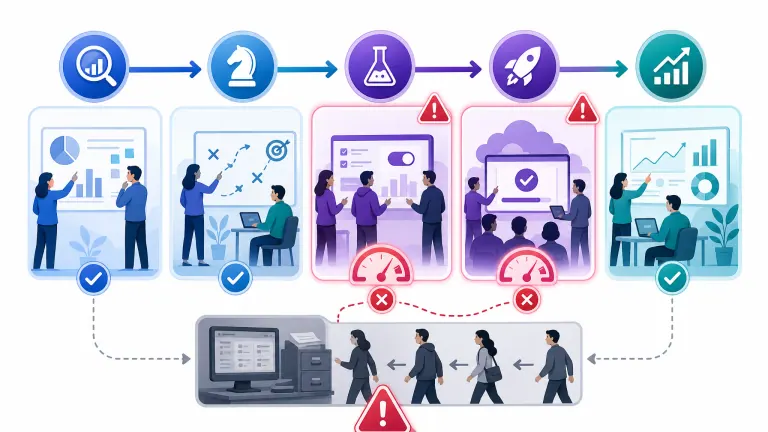
Most B2B automation rollouts follow five phases: discovery, strategy, pilot, deployment, and optimization. Resistance risk is highest at two of them — and almost every failed rollout we've seen skipped preparing for exactly those two.
| Phase | Resistance Risk | What Causes It | Fix |
|---|---|---|---|
| Discovery | Low | Team isn't affected yet | Involve 1-2 frontline staff in the audit, not just management |
| Strategy | Medium | Team hears about the plan secondhand | Share the "why" before the "what" — name the problem being solved |
| Pilot | High | This is where the tool first touches real work and real judgment calls | Run the pilot with volunteers, not the whole team, and publicize early wins |
| Deployment | Highest | Old habits are still muscle memory; workarounds form fast | Retire the old process/tool at the same time — don't let both run in parallel |
| Optimization | Low | Team has already adopted or already abandoned it by this point | Too late to prevent resistance — this phase is for measuring it |
The single biggest mistake we see: leaving the old system live "as a backup" during deployment. It feels safe, but it guarantees the team has an escape hatch, and most people take it the first time the new process feels unfamiliar.
Once the team is actively working around the automation instead of through it, you end up in the same trap we cover in why workflow automation fails when your process is already broken — the informal fixes people build to avoid the new system quietly become a second process you now have to maintain.
Already seeing workarounds form? We diagnose exactly where adoption is breaking down and what to change — before the workaround becomes permanent. Get Your Free Workflow Leak Report →
What Actually Fixes Resistance
Generic change-management advice tells you to "communicate clearly" and "get buy-in." That's true, but it's not specific enough to act on. Here's what that looks like in a real B2B automation rollout — and what it costs when you skip it.
The Cost of Skipping Buy-In
| Approach | Adoption Rate at 90 Days | Time to Positive ROI | Manual Cleanup Work |
|---|---|---|---|
| Automate without involving the team | 35–50% | 9–14 months | High — parallel manual process persists |
| Involve team in pilot + phase out old system | 80–90% | 2–4 months | Minimal after week 3 |
The difference isn't the automation itself — both scenarios use the same tool. The difference is whether the team trusts the system enough to stop running the old one alongside it.
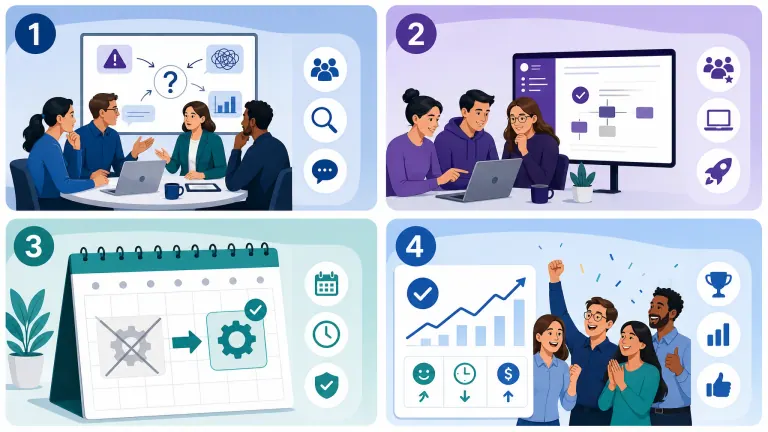
Four Things That Move Adoption
1. Name the problem before the solution. Don't open with "we're automating lead follow-up." Open with "we're losing deals because follow-up happens 18 hours late on average — here's what we're changing and why." The team needs the problem to feel real before the fix feels welcome.
2. Pilot with volunteers, not everyone. People who choose to test something give you honest feedback and become internal advocates. People who are told to test it look for reasons it's wrong.
3. Retire the old way on a fixed date. Running the new system "alongside" the old one for a transition period sounds reasonable and almost never works — it just gives everyone permission to default back to what they know. Set a hard cutover date and communicate it early.
4. Show the win within two weeks. Adoption research consistently shows that early, visible wins matter more than comprehensive training. One person saving four hours in week one does more for adoption than a full manual nobody reads.
For a full breakdown of what a properly staged rollout looks like phase by phase, see what steps AI consulting firms take to implement new solutions — the pilot phase described there is exactly where the fixes above need to happen.
Ready to roll out automation your team will actually use? We build the automation and the adoption plan in the same engagement — including who to pilot with and when to cut over. Get Your Free Workflow Leak Report →
Who This Is For
This is ideal for:
- Leaders who automated a process and found the team quietly still doing it the old way
- Anyone about to roll out a new tool who wants to avoid repeating a past failed launch
- Ops leads managing a team that's been through "the last three tools that didn't stick"
Consider a different approach if:
- Your team is small enough (1-3 people) that informal, direct conversation covers buy-in without a formal rollout plan
- The process you're automating doesn't touch anyone's daily judgment calls or workload — low-stakes automations rarely trigger real resistance
Why AI Essentials specifically? We build the automation and the adoption plan together, starting with the same workflow audit that identifies which steps carry someone's professional identity — because that's the part generic change-management advice always misses. Most rollouts we run reach 80%+ adoption within 60 days because the team helped shape the pilot, not just receive it.
Frequently Asked Questions
What does it mean to automate a process?
Automating a process means replacing manual, repetitive steps — data entry, follow-up emails, scheduling, approvals — with a system that performs them consistently without a person doing each step by hand. The person's role shifts from doing the task to handling the exceptions the system can't resolve on its own.
How do you automate a process?
Start by mapping the current process exactly as it's actually done, including workarounds. Identify which steps are repetitive and rule-based versus which require judgment. Build and pilot the automation on the rule-based steps first, involve the team who does the work in testing, then set a fixed cutover date to retire the manual version.
What is another word for automating?
Common alternatives include streamlining, systematizing, or mechanizing a process. In a B2B operations context, "automating a workflow" and "digitizing a process" are often used interchangeably, though automation specifically implies removing manual human steps rather than just moving paper-based work online.
What is a process automation example?
A common example is automated lead follow-up: instead of a rep manually emailing every new lead, a system sends a personalized first response within minutes, logs the interaction in the CRM, and flags the lead for human follow-up only if it meets certain criteria. Invoice processing, appointment scheduling, and employee onboarding checklists are other frequent first automations.
What are the common pitfalls to avoid when implementing process automation in a B2B company?
The three biggest pitfalls are automating a process nobody agreed on a single version of, running the old and new systems in parallel indefinitely, and skipping team involvement in the pilot. Each of these produces the same result: the automation technically works, but adoption stalls and manual workarounds persist alongside it.
What are B2B process automation best practices?
Map the actual process before building anything. Pilot with volunteers on real data before a full rollout. Set a hard cutover date rather than running old and new systems in parallel. Communicate the problem being solved, not just the tool being introduced. And measure adoption at 30, 60, and 90 days — not just whether the system is technically live.
What are the practical steps for B2B automation implementation?
The typical sequence is: audit the current workflow (1-3 weeks), select and scope the highest-impact use case (1-2 weeks), pilot it with a small group on real data (2-6 weeks), deploy to the full team with a fixed cutover from the old process (4-12 weeks), then monitor and adjust. Most single-workflow implementations take 8-16 weeks start to finish.
How do you calculate B2B automation ROI?
Calculate the hours currently spent on the manual version per week, multiply by the fully loaded hourly cost of the people doing it, then subtract the time still needed for exception handling after automation. A process taking 10 hours/week at $40/hour that drops to 2 hours/week of exception handling saves roughly $1,600/month — but only if adoption actually holds past 90 days, which is why buy-in work is part of the ROI calculation, not separate from it.
What are the cost considerations for process automation in B2B?
Beyond the build cost, factor in the hidden cost of low adoption: when a team runs the automation alongside a manual workaround, you're paying for the software and the labor it was supposed to replace. Rollouts that skip buy-in work typically see 35-50% adoption at 90 days, meaning more than half the expected savings never materialize until the resistance is actively addressed.
What are alternatives to B2B process automation?
Alternatives include hiring additional headcount to absorb the manual work, outsourcing the process to a third-party service, or leaving the process manual and accepting the current error rate and time cost. Each of these avoids the change-management challenge automation introduces, but none of them scale — headcount and outsourcing costs grow linearly with volume, while automation costs stay roughly flat.
Conclusion
Teams don't resist automation because they're change-averse. They resist it because rollouts are usually announced instead of built with them, and because the last few "improvements" quietly disappeared without anyone explaining why. Fix the trust problem — involve the people doing the work, pilot with volunteers, retire the old system on a fixed date — and adoption stops being the hard part.
The three things to take from this post:
- Resistance is highest during the pilot and deployment phases, not at announcement — plan for it there specifically
- Rollouts that involve the team in the pilot see 80-90% adoption at 90 days versus 35-50% for rollouts that don't
- Running the old process "as a backup" during deployment is the single most common reason adoption stalls
Ready to automate the process without losing your team along the way? We build the automation and the adoption plan together — starting with a free workflow audit that shows you exactly where resistance is likely to show up. Get Your Free Workflow Leak Report →

Iliyan Ivanov
Founder of AIessentials · AI automation consultant helping B2B businesses save 20+ hours/week and grow without hiring