How to Automate Client Intake for a Law Firm Without Hiring More Staff
[ SUMMARIZE WITH AI ]
Workflow Audit
]99% sure you are not seeing all the spots AI can help you in your business.
Are your workflows optimized with the most up to date solution, or are they costing you and your team time and money?
GET FREE AUDITYou automate law firm client intake without hiring more staff by fixing the three stages that actually cause cases to leak — first reply, case screening, and routing — in that order, using tools that connect to what your firm already runs on. Most firms reach for a job posting when intake feels behind, but the volume that's slipping through usually isn't a staffing-capacity problem. It's a response-time and process problem, and both of those are solvable with a system instead of a salary.
The three things that matter most:
- Fix first reply before anything else — it's the highest-leverage, lowest-cost stage to automate
- Add screening once reply speed stops being the bottleneck, so staff time only goes to qualified inquiries
- Automate routing and logging last, once the first two stages are proven, so nothing tracked manually falls through
A free Lead-to-Consult System Map shows exactly which of these three stages is losing your firm the most cases right now.
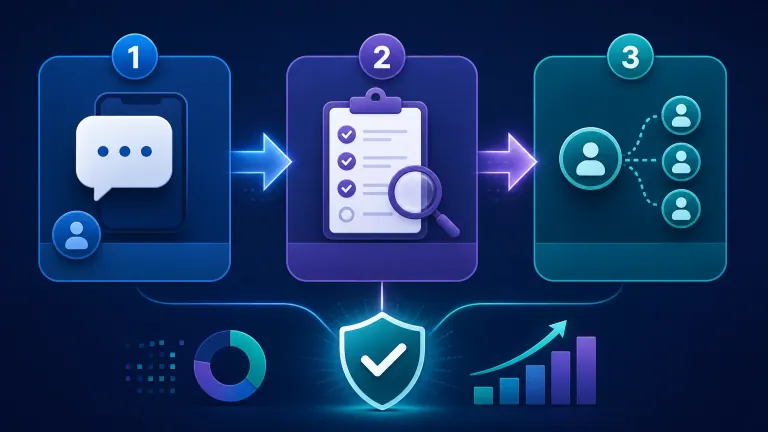
Table of Contents
- Why "Hire Someone" Is the Default Answer (And Usually the Wrong One)
- The Three Stages Worth Automating, In Order
- What This Actually Replaces
- What You Don't Need to Automate
- Who This Is For
- Frequently Asked Questions
Why "Hire Someone" Is the Default Answer (And Usually the Wrong One)
When intake starts slipping, the instinct is to add a body: a part-time intake coordinator, an answering service, an extra paralegal to handle the overflow. That instinct treats the problem as a capacity shortage. For most solo and small firms, it isn't — it's that inquiries sit unanswered during the hours nobody's watching the phone, and by the time someone gets to them, the caller has already reached the next firm on their list.
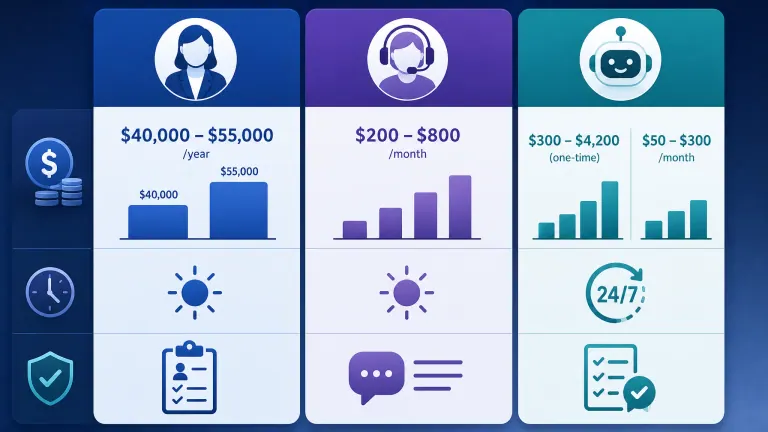
A dedicated intake hire runs $40,000 to $55,000 a year in salary and benefits, and still only covers business hours unless you pay for shift coverage on top of that. An answering service is cheaper month to month but is a person reading a script — it can catch the call, but it can't reliably apply your firm's actual case-screening criteria, and quality varies by whoever's on shift.
How AI Essentials helps here: the intake mapping call identifies which specific stage is actually losing you cases before you spend a dollar on staffing or a subscription, so you're not solving a capacity problem with a process fix, or vice versa.
Not sure if it's a staffing problem or a process problem? The mapping call tells you which stage is actually leaking cases before you commit to a hire or a tool. Get Your Free Lead-to-Consult System Map →
The Three Stages Worth Automating, In Order
Trying to automate everything at once is how firms end up with three disconnected tools that don't talk to each other. Build in this order instead.
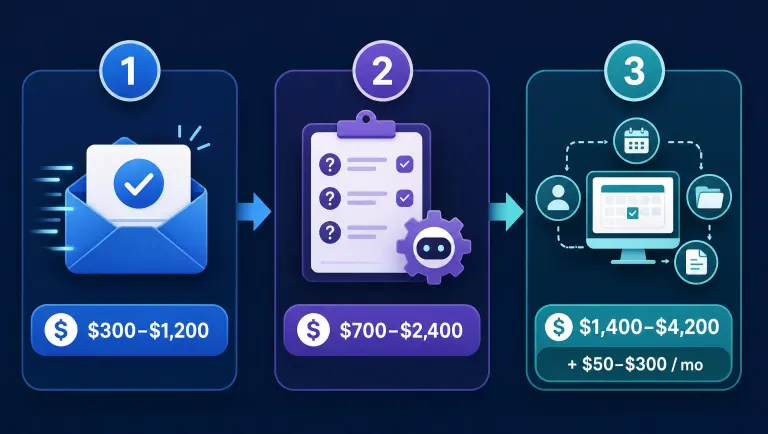
1. First reply. This is the highest-leverage stage because response speed is the single biggest driver of whether a case stays with your firm at all. An automated instant-reply workflow acknowledges every new inquiry — call, form, or email — within a minute, day or night, before a human ever needs to be involved. This alone typically runs $300 to $1,200 as a one-time build.
2. Case screening. Once reply speed is fixed, the next leak is manual screening — someone has to ask the right qualifying questions and decide whether this is a real case. Automating this stage means the system asks your firm's specific screening questions every time, consistently, and flags anything borderline for a person instead of guessing. Reply plus screening typically runs $700 to $2,400.
3. Routing, booking, and logging. The last stage connects a qualified inquiry straight to a booked consult and logs the outcome automatically, so nothing depends on someone remembering to follow up. A full system covering all three stages typically runs $1,400 to $4,200 one-time, plus $50 to $300 a month in platform costs.
How AI Essentials helps here: we build and connect each stage to your existing phone, form, and calendar tools — nothing technical required on your end, and most firms are live inside 14 days of the mapping call.
Ready to see which stage to fix first? We scope the build around your firm's actual intake volume and current tools, not a generic package. Book a Free Intake Mapping Call →
What This Actually Replaces
The honest comparison isn't automation versus doing nothing — it's automation versus the alternatives firms actually reach for.
| Approach | Typical Cost | Coverage | Consistency |
|---|---|---|---|
| Hiring a dedicated intake coordinator | $40,000–$55,000/year salary plus benefits | Business hours only unless you staff shifts | High, but a single point of failure |
| Human answering service | $200–$800/month | 24/7, but scripted and limited on legal screening | Varies by agent and shift |
| AI intake automation | $300–$4,200 one-time plus $50–$300/month | True 24/7, same screening logic every time | Consistent, never off script |
A generic industry guide will tell you to "use online forms and a chatbot." That's the first stage only, and it still leaves screening and routing manual — which is why firms that stop at forms often find their staff time problem hasn't actually gone away, just moved one step down the funnel.
What You Don't Need to Automate
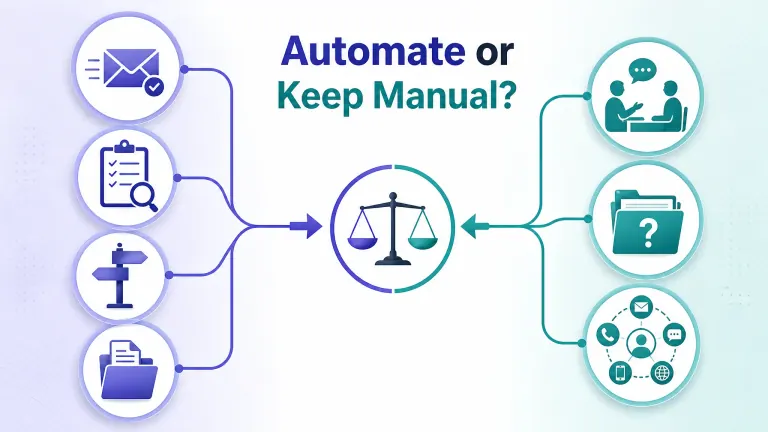
Not every part of intake needs a system, and over-automating creates its own problem. You don't need to automate:
- The actual client relationship conversation. Once a case is qualified and booked, the consult itself should stay human — automation's job is getting a real prospect to that point faster, not replacing the attorney conversation.
- Complex or unusual case types your firm rarely sees. If a case type comes in once a quarter, hand-build a screening rule for it isn't worth the setup time; route anything unfamiliar to a person by default.
- Every communication channel at once. Start with whichever channel loses you the most inquiries today — usually phone or after-hours form submissions — rather than trying to unify five channels in one build.
Where firms overpay: buying a broad contact-center subscription or an all-in-one legal CRM's automation add-on before confirming which specific stage is actually the bottleneck. A firm that's fine on first-reply speed but losing cases at screening doesn't need a bigger phone system, it needs a screening workflow.
Who This Is For
This is a fit if:
- You're a solo or small-to-mid-sized law firm getting more inquiries than your staff can catch immediately
- Your first instinct when intake falls behind is "we need to hire," but you haven't confirmed where the leak actually is
- After-hours or overflow inquiries currently go to voicemail or a general inbox
This isn't a fit if:
- You already have a dedicated intake team answering every inquiry in under a minute, 24/7
- Your volume is low enough that a person catches nearly everything already
Why AI Essentials specifically? We scope the exact system your firm needs during a free mapping call, quote a fixed price range up front, and go live in about 14 days. If you don't start booking more of the clients you're currently missing, we keep working for free until you do.
Frequently Asked Questions
Can you automate law firm intake without hiring more staff?
Yes. Most intake bottlenecks come from slow first response and manual screening, not staff capacity — automating those two stages typically resolves the backlog without adding headcount.
What's the first thing to automate in law firm intake?
First reply. It's the highest-leverage, lowest-cost stage to fix, and it's usually the single biggest driver of whether an inquiry stays with your firm or moves to the next one on the caller's list.
Is automation cheaper than hiring an intake coordinator?
Typically yes. A dedicated intake hire runs $40,000 to $55,000 a year in salary and benefits, versus a one-time automation build of $300 to $4,200 plus a modest monthly platform fee.
Does intake automation replace my staff entirely?
No. It removes the manual, repetitive parts of intake — replying, screening, routing, logging — so your existing staff can focus on cases that are already qualified, rather than replacing the people who handle the actual client relationship.
How long does it take to set up automated client intake?
Most firms go live within about 14 days of an intake mapping call, covering the build, integration with existing tools, and initial testing before launch.
Conclusion
Automating law firm client intake without hiring more staff comes down to fixing first reply, screening, and routing in that order, using a system that connects to the tools your firm already runs on. The instinct to hire treats a process problem as a capacity problem — and usually costs 10 to 15 times more per year than the automation that would have fixed the actual leak.
The three things to take from this post:
- Fix first reply first — it's the highest-leverage, lowest-cost stage and usually the real bottleneck
- Automation typically costs a fraction of a dedicated hire and covers hours a person can't
- Not everything needs automating — the actual client conversation and rare case types should stay manual
Ready to find out which stage is leaking your firm cases? Get a free Lead-to-Consult System Map showing exactly where your firm is losing inquiries today, and what fixing it actually costs. Get My Free Lead-to-Consult System Map →

Iliyan Ivanov
Founder of AIessentials · AI automation consultant helping B2B businesses save 20+ hours/week and grow without hiring