How to Scale B2B Client Onboarding With Workflow Automation Examples
[ SUMMARIZE WITH AI ]
Workflow Audit
]99% sure you are not seeing all the spots AI can help you in your business.
Are your workflows optimized with the most up to date solution, or are they costing you and your team time and money?
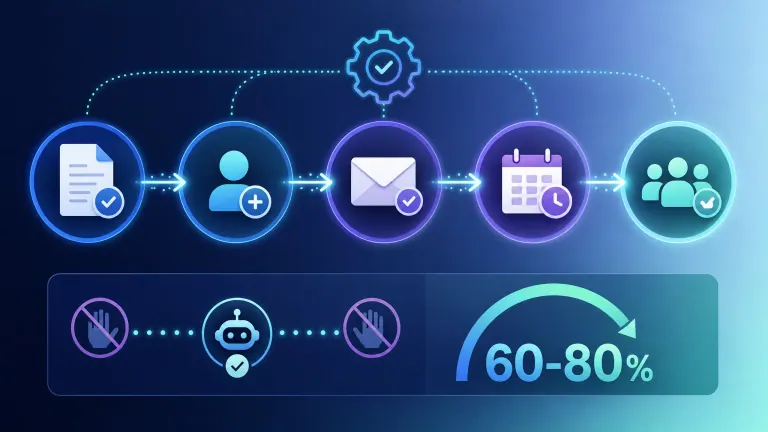
GET FREE AUDITWorkflow automation cuts client onboarding time by 60-80% by replacing manual data entry, follow-up emails, and status checks with triggered actions between your CRM, contract tool, and project management system. A typical automated onboarding sequence runs in 3-7 steps: contract signed → account created → welcome email sent → kickoff scheduled → internal team notified — with zero manual handoffs between steps.
Trigger-based sequencing: New client status in your CRM (e.g., "deal won" in HubSpot) fires the entire chain automatically, no one has to remember to start it. Cross-system syncing: Client data entered once in your CRM populates your invoicing tool, project management board, and shared drive without re-typing. Conditional branching: Different client types (enterprise vs. self-serve, different service tiers) route through different onboarding paths automatically. Human-in-the-loop checkpoints: Automation handles the repetitive parts; a person still approves contracts or has the first kickoff call. Time-to-value tracking: Automated timestamps show exactly how long each onboarding stage takes, so bottlenecks are visible instead of hidden in someone's inbox.
You're doing what should be automatic — copying client details into three different tools, chasing signatures, and reminding your team about kickoff calls — and it's eating the hours you should be spending on the next deal.
Every new client should mean more revenue, not more manual work. When onboarding depends on someone remembering to send the welcome email or update the project board, growth becomes the thing that breaks your operations, not the thing that rewards them. The good news: onboarding is one of the most template-friendly processes to automate, because the steps rarely change from client to client — only the details do.
The rest of this post walks through the specific workflow automation examples that work for small B2B teams, what a before/after onboarding process actually looks like in hours and dollars, and how to figure out which parts of your onboarding to automate first.
For a full breakdown of how automated workflows connect your other B2B systems beyond onboarding, our AI Operating System service builds this kind of connected automation into daily operations — not just at the start of a client relationship.
Not sure which approach fits your business? Take the 2-minute AI Readiness Check and see whether workflow automation or a different approach makes more sense for your onboarding process. Take the AI Readiness Check →
Table of Contents
- 5 Workflow Automation Examples for B2B Client Onboarding
- Before and After: What Automated Onboarding Actually Looks Like
- How to Choose What to Automate First
- Who This Is For
- Frequently Asked Questions
5 Workflow Automation Examples for B2B Client Onboarding
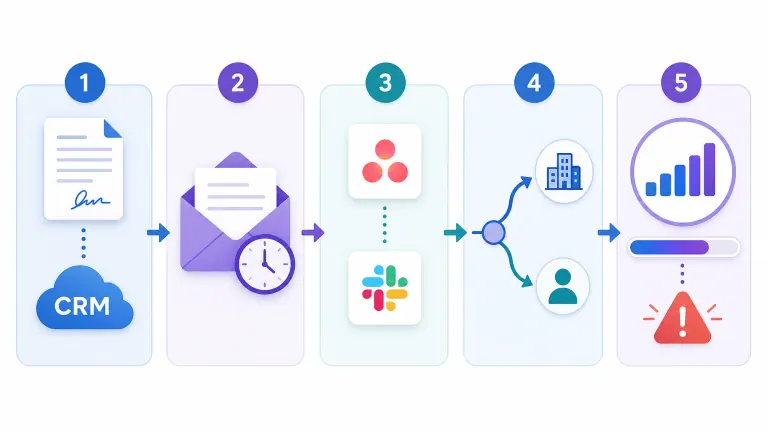
These are the five onboarding steps small B2B teams automate most often, in the order they usually tackle them.
1. Contract-to-CRM Sync
When a contract gets signed in a tool like PandaDoc or DocuSign, an automation creates or updates the client record in your CRM automatically — name, company, deal size, service tier, and start date all populate without anyone typing them twice. This alone eliminates one of the most common onboarding failure points: a signed deal that sits for two days because no one updated the CRM.
2. Automated Welcome Sequence
Once the CRM record is created, a triggered email sequence goes out immediately: a welcome message, a request for any missing information (billing contact, logo files, access credentials), and a scheduling link for the kickoff call. According to McKinsey research on generative AI in operations, companies that automate repetitive customer-facing communication see meaningfully faster time-to-value because clients aren't waiting on a person to have time to write the same email again.
3. Internal Task Creation
The same trigger that starts the client-facing sequence also creates internal tasks: a project board gets set up in Asana or ClickUp, a shared folder gets created in Google Drive with the right permissions, and the account manager gets a Slack notification with the client's details already attached. No one has to remember which five things need to happen internally — the system remembers for them.
4. Conditional Routing by Client Type
Not every client needs the same onboarding path. A self-serve client might get a fully automated sequence with no human touch until the first check-in. An enterprise client on your top tier might trigger an automation that also books a dedicated onboarding specialist and sends a custom welcome packet. Conditional logic — if service tier equals X, do Y — handles this branching without a human deciding it every time.
5. Progress Tracking and Escalation
The last piece is visibility: an automated dashboard or status tracker shows where every client sits in the onboarding pipeline, and if a step stalls (say, a client hasn't provided billing info within 3 days), the system automatically nudges them and flags it to the account manager. This replaces the "did anyone follow up with them?" Slack message that happens in most unautomated onboarding processes.
Consider these automation examples against manual onboarding: a manual process typically requires 4-6 hours of staff time per new client across data entry, email writing, and internal coordination. An automated version cuts that to under an hour of actual human attention — mostly the kickoff call itself.
How AI Essentials helps here: we map your existing onboarding steps, identify which ones are pure repetition versus which need a human judgment call, and build the automation to handle the former so your team only touches the parts that actually need them.
Not sure which approach fits your business? Take the 2-minute AI Readiness Check and find out where automation would save you the most time in your current onboarding flow. Take the AI Readiness Check →
Before and After: What Automated Onboarding Actually Looks Like
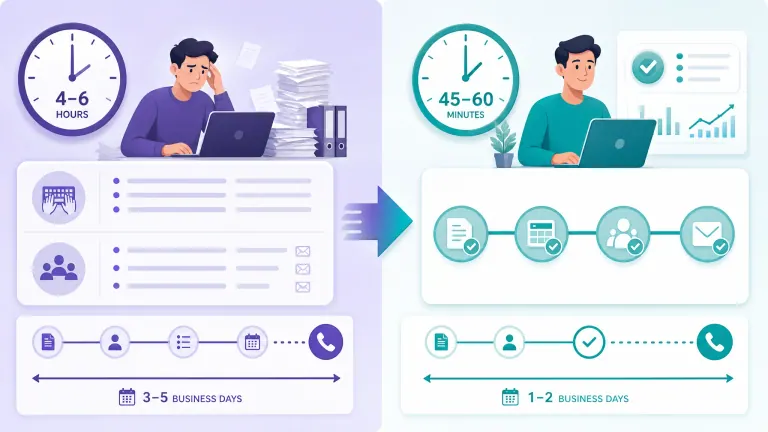
Here's a direct comparison based on a typical small B2B service business bringing on a new client.
| Step | Manual Process | Automated Process |
|---|---|---|
| Contract to CRM | 20-30 min manual entry, often delayed 1-2 days | Instant, triggered on signature |
| Welcome email | Written and sent individually, 15-20 min | Sent automatically within minutes |
| Internal task setup | 30-45 min across 2-3 tools | Created automatically alongside CRM record |
| Missing info follow-up | Manual reminder emails, often forgotten | Automated reminders on a set schedule |
| Total staff time per client | 4-6 hours | 45-60 minutes |
| Time to first kickoff call | 3-5 business days | 1-2 business days |
This isn't a hypothetical — it reflects the range we see when service businesses automate onboarding with tools like HubSpot, Zapier, or a custom-built system tied to their CRM. Harvard Business Review has noted that the real value of automation for growing companies isn't just cost-cutting — it's removing the operational drag that otherwise caps how fast a team can take on new work.
The honest tradeoff: automation setup takes time upfront, usually one to three weeks depending on how many tools need to connect. And it's not a fit for every business — if you onboard fewer than a handful of clients a month, the manual process might genuinely be fine. But once onboarding becomes a repeated bottleneck, the setup cost pays for itself within the first few automated clients.
Compare this to the alternative of hiring: a part-time ops coordinator to manage onboarding runs $1,500-$3,000/month depending on your market, versus a one-time automation build that typically costs a few thousand dollars and then runs with minimal ongoing cost. If you're weighing that tradeoff directly, our 24/7 Pipeline Engine page covers how automated systems compare to adding headcount across the full client journey, not just onboarding.
Not sure which approach fits your business? Take the 2-minute AI Readiness Check to see whether automation or additional headcount solves your onboarding bottleneck. Take the AI Readiness Check →
How to Choose What to Automate First
Not every step in your onboarding process is worth automating right away. Here's how to prioritize.
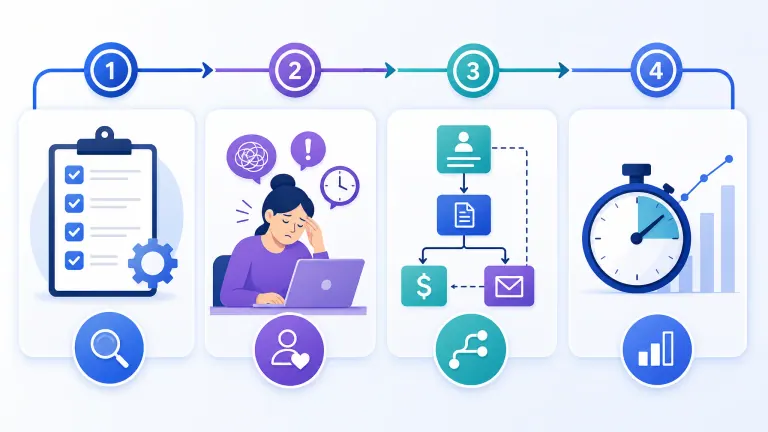
Start with the steps that happen every single time, the same way. Contract-to-CRM sync and welcome emails are almost always identical regardless of client, which makes them the easiest and highest-value first automations. Steps that genuinely vary client-to-client — like a custom strategy call agenda — are lower priority because the automation has less to do.
Look for the steps someone complains about. If your team already mentions a specific onboarding task as tedious or easy to forget, that's a strong signal it's costing more than it looks like on paper. MIT Sloan Management Review has found that employee-reported friction points are often more predictive of process breakdowns than time-tracking data alone, because people notice patterns before the data catches up.
Map dependencies before you automate. If step 3 depends on someone manually checking step 2 finished, automating step 3 alone won't help — you need the trigger chain to be continuous. This is the most common reason DIY automation attempts stall out: a business automates one tool in isolation instead of the sequence.
Set a baseline before you start. Track how long onboarding currently takes and where it stalls. Without that baseline, you won't know if the automation actually worked — you'll just have a vague sense that things feel faster.
If you're evaluating tools to actually run this automation, our comparison of what to look for in workflow management software covers the platform side of this decision in more depth.
Not sure which approach fits your business? Take the 2-minute AI Readiness Check to find your highest-impact onboarding automation first. Take the AI Readiness Check →
Who This Is For
This is ideal for:
- Small B2B service businesses onboarding 5+ new clients a month who feel the process eating into billable or strategic time
- Teams where onboarding steps live in someone's head or a scattered set of tools instead of a repeatable system
- Businesses that want to grow client volume without proportionally growing headcount
Consider alternatives if:
- You onboard fewer than 2-3 clients a month — manual process may still be efficient enough
- Every client's onboarding is genuinely unique with no repeatable steps — automation has less to work with
- Your current tools don't integrate at all and a full system migration is a bigger project than onboarding automation alone
Why AI Essentials specifically? We build the automation around your existing tools instead of asking you to switch platforms, we map dependencies before building (so nothing breaks when one step changes), and most onboarding automations go live within 1-3 weeks.
Frequently Asked Questions
Workflow automation examples for B2B client onboarding, small business?
The most common examples are contract-to-CRM sync, automated welcome email sequences, internal task creation across project tools, conditional routing by client type, and automated progress tracking. Small businesses typically start with the first two since they apply to every client identically.
How do I implement workflow automation for client onboarding?
Start by mapping your current onboarding steps end to end, identify which are identical every time, choose a trigger point (usually "contract signed"), and connect your CRM, email, and project tools through an automation platform or custom build. Most small teams get a basic version running in 1-3 weeks.
What's the cost and ROI of automating client onboarding for a small B2B business?
Setup typically runs a few thousand dollars for a custom build, or less with existing platform automations like HubSpot workflows. ROI comes from reducing 4-6 hours of manual onboarding work per client to under an hour, which usually pays back within the first few automated clients.
How does workflow automation compare to manual client onboarding?
Manual onboarding depends on someone remembering every step and typically takes 4-6 hours of staff time per client across data entry and follow-ups. Automated onboarding runs the repetitive steps instantly and consistently, cutting staff time to under an hour while reducing the chance a step gets missed.
What are common mistakes in B2B client onboarding automation?
The biggest mistake is automating one tool in isolation instead of the full sequence, which breaks the chain when a manual check is still required somewhere in the middle. Others include skipping a baseline measurement (so you can't prove it worked) and automating steps that genuinely vary by client, where the automation adds complexity instead of removing it.
What real-world outcomes have small B2B businesses seen from onboarding automation?
Businesses that automate onboarding commonly report cutting time-to-first-kickoff-call from 3-5 business days to 1-2, and reducing staff time per client from several hours to under an hour. The bigger outcome is usually indirect: teams can take on more new clients without adding an ops hire.
What's the timeline for implementing onboarding workflow automation?
A basic automation covering contract sync, welcome emails, and internal task creation typically takes 1-3 weeks to build and test, depending on how many tools need to connect and how much conditional logic is required.
When is workflow automation the right choice for B2B client onboarding?
It's the right choice once onboarding becomes a repeated bottleneck — when you're onboarding several clients a month and the same manual steps happen every time. It's less necessary if you onboard rarely or if every client's process is genuinely unique.
Can workflow automation for onboarding work across different industries?
Yes. The pattern — trigger on contract signature, sync client data, send welcome communication, create internal tasks, track progress — applies whether you're a marketing agency, a SaaS company, a consulting firm, or a service business. The tools and specific steps vary; the structure doesn't.
How long does it take to implement workflow automation examples like these?
Most of the examples in this post — contract-to-CRM sync, welcome sequences, internal task creation — can go live within 1-2 weeks each. A full onboarding automation covering all five examples typically takes 2-3 weeks end to end, including testing with a real client.
Conclusion
Onboarding is one of the highest-leverage places to start with workflow automation because the steps repeat identically for every client, which makes it easy to template and hard to get wrong once it's built. The businesses that automate this first free up 4-6 hours per client without adding headcount, and just as importantly, they stop losing new clients to a slow, inconsistent start.
Not sure if this is the right first automation for your business? Take the 2-minute AI Readiness Check and we'll help you figure out where automation would save you the most time right now.

Iliyan Ivanov
Founder of AIessentials · AI automation consultant helping B2B businesses save 20+ hours/week and grow without hiring