How to Automate Business Processes With AI: Steps, Costs and Real ROI
[ SUMMARIZE WITH AI ]
To automate business processes with AI, you pick one repetitive process with clear rules, map every step, let a normal workflow tool move the data, and use AI only at the steps that need a judgment, such as reading an email, sorting a request or drafting a reply. A single well-chosen process typically takes 1 to 3 weeks to build and pays back in about 2 to 4 months. The ROI comes from hours recovered, so you have to measure the hours before you start.
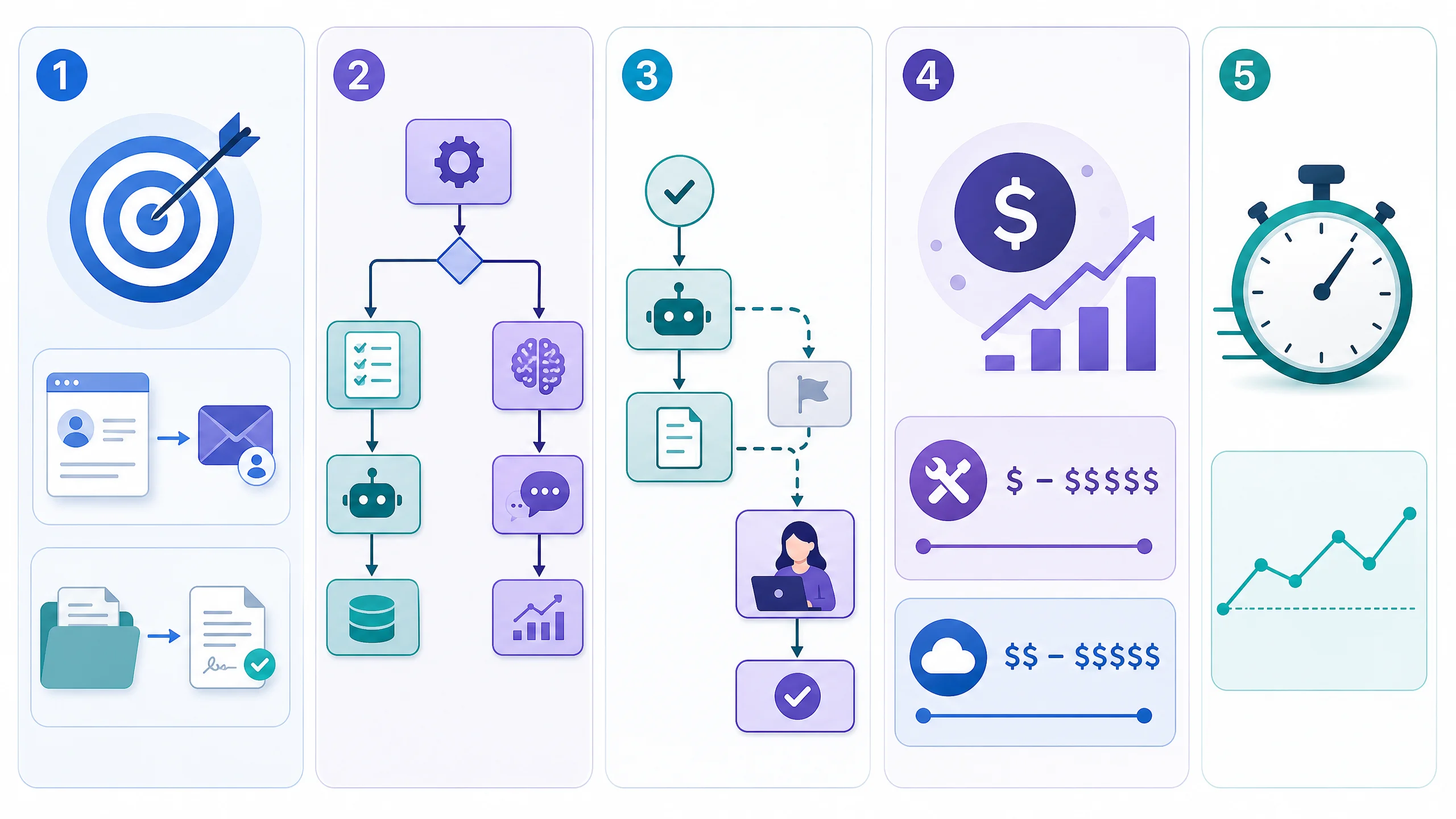
Start with one process: Choose something done at least 20 times a week with the same steps each time. Lead follow-up, quote requests, invoice intake and onboarding paperwork all qualify. Split the work in two: Rules move the data (trigger, fields, routing). AI handles the fuzzy parts (reading, classifying, drafting). Most failures come from using AI for the rule parts. Keep a human on exceptions: Let automation handle the common 80% and route the rest to a person. Remove the human check only after the accuracy holds up for a few weeks. Know the real cost: A single-workflow build runs from a few hundred dollars to a few thousand, plus roughly $20 to $100 a month in tool fees. Your own time to maintain it is the hidden line. Measure against a baseline: Time the process for two weeks before you touch it. Without that number, you can't prove the savings afterward.
Most owners we talk to aren't asking whether AI can automate a process. They already know it can. The real question is how to do it without spending three months on something that quietly breaks.
This guide is about the how. It walks through the steps in order, shows where AI belongs and where it doesn't, and puts real dollars on a worked example. If you want the formulas on their own, we cover them in how to calculate the ROI of AI automation, and the benchmark ranges in what the ROI of workflow automation looks like. This post is the part in between: what you actually do, and what it costs.
AIessentials (aiessentials.us) builds these workflows for small B2B teams, so if you'd rather have this built for you, that's an option. But everything below works if you do it yourself.
Table of Contents
- Step 1: Choose a process worth automating
- Step 2: Map it, then decide where AI goes
- Step 3: Build, test and keep a human on exceptions
- A worked example: what it costs and what it returns
- Who This Is For
- Conclusion
Step 1: Choose a process worth automating
Not every process is worth the work. A quick filter saves weeks.
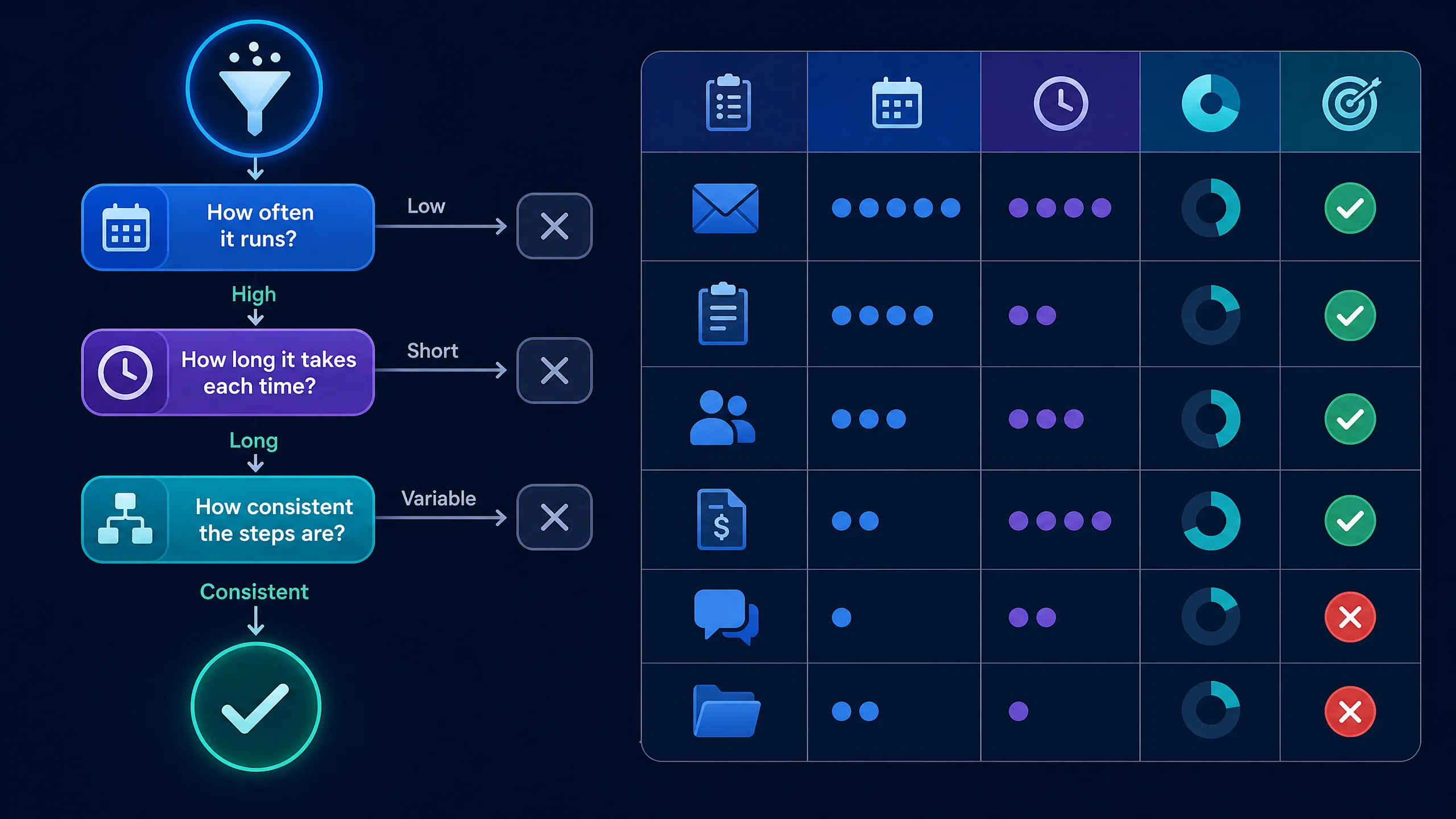
Score each candidate on three things: how often it runs, how long it takes each time, and how consistent the steps are. A task that runs 50 times a week at 10 minutes each is 8 hours of work. A task that runs twice a month, no matter how annoying, will never pay for itself.
| Process | How often | Time each | Hours a week | Good first target? |
|---|---|---|---|---|
| Replying to new lead inquiries | 40/week | 10 min | 6.7 | Yes. High volume, clear steps |
| Entering invoices into accounting | 60/week | 5 min | 5.0 | Yes. Rule-based, easy to check |
| Onboarding paperwork for new clients | 6/week | 45 min | 4.5 | Yes, if the steps are the same each time |
| Monthly board report | 1/month | 4 hours | 0.9 | No. Too rare |
| Custom client proposals | 5/week | 60 min | 5.0 | Partly. Automate the draft, keep the judgment |
Two warnings before you pick.
Automating a broken process just breaks faster. If two people do the same task two different ways, you actually have two processes. Agree on one path first. We wrote about why this is the top reason projects fail in why workflow automation fails when your process is already broken.
If more than about 20% of cases need a judgment call, start somewhere else. The exceptions will eat the savings.
If you're not sure your business is ready, the five-question check in how to know if your business is ready for AI automation takes a couple of minutes.
Step 2: Map it, then decide where AI goes
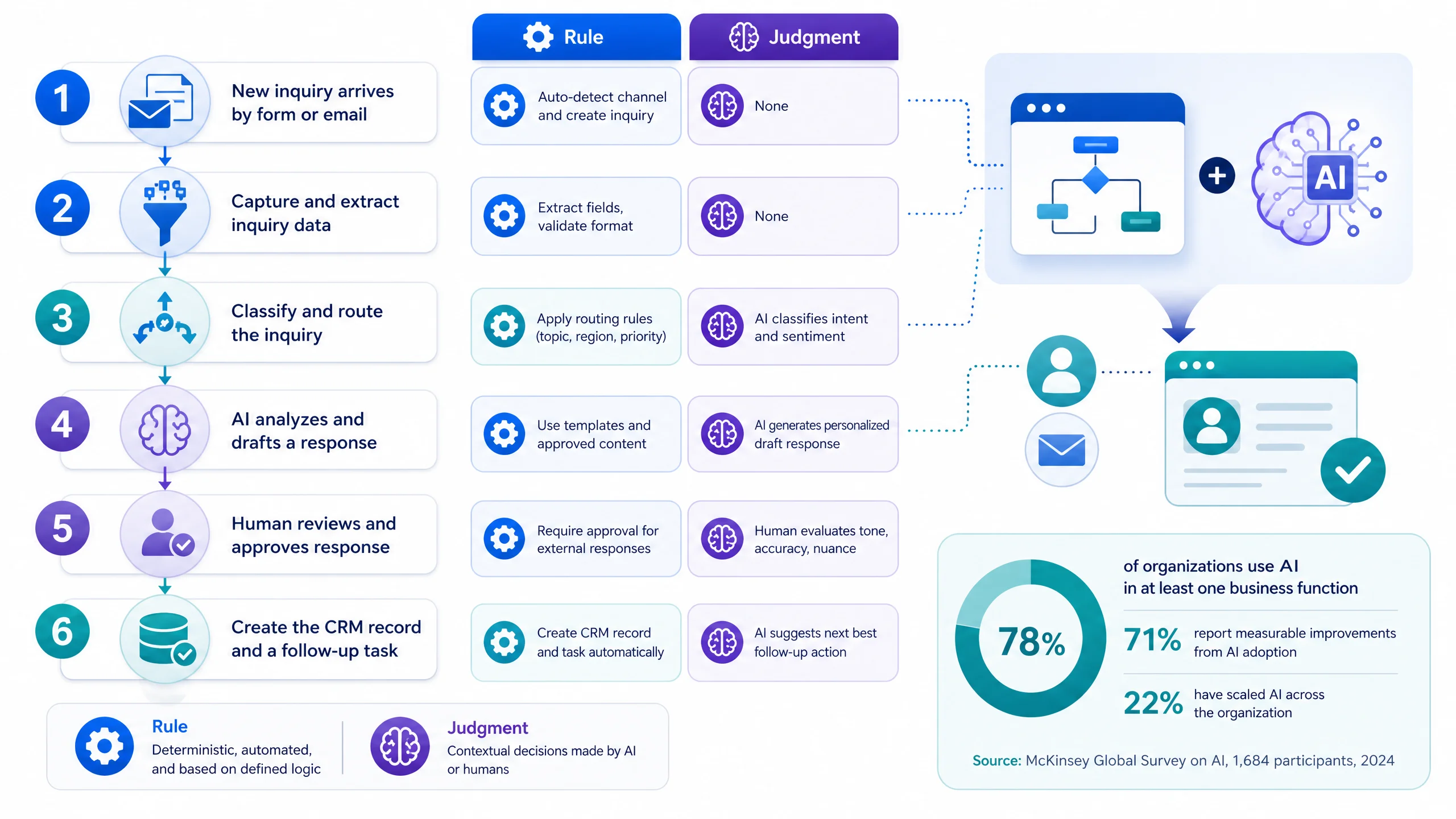
Write the process down as a list of steps. Then label each step as rule or judgment.
- Rule steps follow an if-this-then-that logic. "When a form is submitted, add a row to the CRM." A workflow tool like Zapier, Make or n8n does this reliably and cheaply.
- Judgment steps need to understand messy text or images. "Read this email and decide whether it's a quote request, a complaint or spam." This is where AI earns its place.
Here is a lead-inquiry process labelled this way:
| Step | Type | Handled by |
|---|---|---|
| New inquiry arrives by form or email | Trigger | Workflow tool |
| Pull out name, company, what they asked for | Judgment | AI |
| Check if they're already in the CRM | Rule | Workflow tool |
| Decide: hot lead, general question or not a fit | Judgment | AI, with a confidence score |
| Draft a reply in your voice | Judgment | AI |
| Send if confidence is high, hold for review if low | Rule | Workflow tool plus a human |
| Create the CRM record and a follow-up task | Rule | Workflow tool |
Notice that only three of the seven steps use AI. That's normal. McKinsey's 2025 research found that 88% of organizations now use AI in at least one function, but nearly two-thirds haven't begun scaling it, and the high performers are the ones redesigning workflows rather than bolting AI onto old ones (McKinsey, The state of AI in 2025). Mapping first is the redesign.
How AI and plain automation compare
| Plain rule-based automation | AI in the workflow | |
|---|---|---|
| Good at | Moving data between tools, scheduled tasks, routing on fixed fields | Reading free text, classifying, summarizing, drafting |
| Fails when | Input is messy or varies | It's asked for exact numbers or must never be wrong |
| Cost per run | Near zero | A few cents of model usage |
| Needs a human check | Rarely | Yes, at least at first |
The pattern that works: let the rules do the moving, let AI do the reading, and let a person do the deciding on anything unusual or high-stakes.
Step 3: Build, test and keep a human on exceptions
Build the smallest version that works end to end, then test it on real past cases.
- Run it on 20 to 50 old examples. Compare what the automation did with what your team did. You want it to agree most of the time before it touches a live customer.
- Set a confidence rule. If the AI isn't sure, it sends the item to a person instead of guessing. A simple threshold is enough.
- Go live in "review" mode. For the first two weeks, the automation drafts and a person approves. Count how often they change the draft.
- Remove the approval gradually. When approvals stop changing anything on a type of case, let that type go through on its own. Keep the human check on the rest.
- Add a failure alert. The automation should message you when a step errors. Silent failures are the real danger, because nobody notices for weeks.
Plan for upkeep, too. Tools change, forms change and edge cases show up. Budget 1 to 2 hours a month for a simple workflow, or pay someone to watch it.
Want to see what your own numbers look like? Put your hours, team size and hourly cost into the free calculator and see monthly savings, 12-month ROI and breakeven in about 30 seconds. Run the ROI calculator
A worked example: what it costs and what it returns
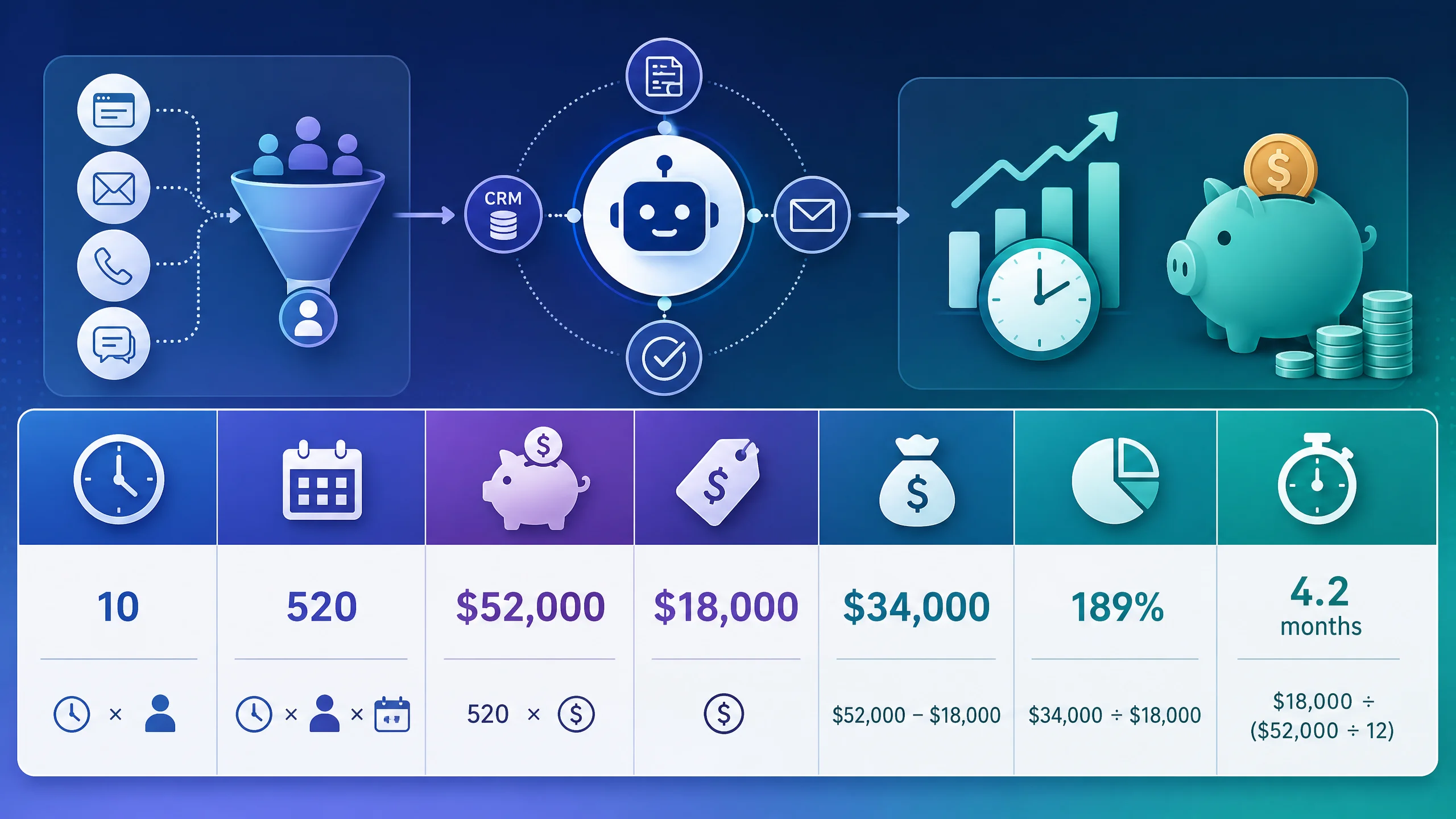
Let's price the lead-inquiry process above. These are illustrations with stated assumptions, not client results.
Assumptions:
- One person spends 8 hours a week reading inquiries, entering them and writing first replies.
- Their fully loaded cost is $46.89 an hour. That's the average employer compensation cost for US private industry workers in June 2026 (BLS Employer Costs for Employee Compensation). Use your own figure if you know it.
- Automation handles 65% of that work, which is the mid-point our ROI calculator uses for repetitive workflows. The person still reviews exceptions.
- The build costs $2,579 once, and tools plus model usage run $60 a month.
The math:
| Line | Calculation | Result |
|---|---|---|
| Hours recovered per week | 8 hours × 65% | 5.2 hours |
| Hours recovered per year | 5.2 × 52 weeks | 270 hours |
| Annual labor savings | 270 hours × $46.89 | about $12,680 |
| Year-one cost | $2,579 build + ($60 × 12) | $3,299 |
| Year-one net gain | $12,680 − $3,299 | about $9,380 |
| Year-one ROI | $9,380 ÷ $3,299 | about 284% |
| Payback | $2,579 ÷ ($1,057 monthly savings − $60) | about 2.6 months |
That lands inside the 200 to 400% first-year range we see quoted for workflow automation, but it only holds if the 8 hours are real. Time the process first.
Two things this table doesn't count, on purpose. First, faster replies tend to win more leads, and that revenue is real but hard to promise, so we left it out. Second, your time spent reviewing and fixing the automation. If that runs above 2 hours a month, the payback stretches.
Doing it yourself vs hiring it out vs hiring a person
| Option | Upfront | Ongoing | Best when |
|---|---|---|---|
| Build it yourself with no-code tools | $0 to $500 in tools | Your time: 20 to 40 hours to build, 1 to 2 hours a month | You enjoy the tinkering and the process is simple |
| Have a specialist build it | $300 to $3,747 for a fixed-scope automation (our published range) | Optional monitoring | You want it working in weeks and your hours are worth more than the build fee |
| Hire a person for the task | None | A part-time hire costs far more than $12,680 a year once you add recruiting and management time | The work needs judgment on most cases |
If you go the specialist route, our automations carry a 60-day money-back guarantee: if you don't get the outcomes we agree on upfront within 60 days of kickoff, we refund your service fee. Whoever you hire, ask for a written outcome and a refund term.
Who This Is For
This is ideal for:
- Owners or ops leads whose team repeats the same task dozens of times a week and who can time it
- Small B2B teams with a documented, consistent process and a tool stack that has an API or integration (CRM, email, forms, accounting)
- Anyone who wants to start with one process and expand only after it pays back
Consider alternatives if:
- The process changes every time or most cases need a judgment call. Fix the process first.
- The task runs only a few times a month. The build cost won't come back.
- The work is regulated or high-stakes enough that an unreviewed error is unacceptable. Keep a human in the loop permanently, and get advice for your sector.
Why AIessentials specifically? We build small, fixed-scope automations for B2B teams, with published prices and a written outcome before we start. We'll also tell you when a process isn't worth automating, which saves you the fee. If you're comparing options, our complete guide to AI automation for small business lays out the full landscape.
Conclusion
Three things to take away:
- Automate one process, not the company. Pick something frequent, consistent and timed, and expect payback in a few months.
- Rules move data, AI reads and drafts, people decide the exceptions. Putting AI on the wrong step is the most common mistake.
- Measure before you build. Without a baseline, you can't tell whether it worked.
If you'd like help finding which of your tasks is costing the most, we'll write you a free report on your three biggest time and money drains, with the cost of each and how to automate it. It's yours to keep whether or not you ever work with us.
Not sure which process to start with? We'll send you a free report on the 3 tasks costing your team the most, what each costs every month, and exactly how to automate it. Get My Biggest Drains
Your 3 Biggest Time & Money Drains
Every manual task you're not automating is leaking team hours and money. Get a free report on the 3 tasks costing you the most: what each one costs your team every month, and exactly how to automate it.
Limited to 10 reports per week
Sent to your inbox within 24–48 hours. Yours to keep.

Iliyan Ivanov
Founder of AIessentials · AI automation consultant helping B2B businesses save 20+ hours/week and grow without hiring