AI Customer Service ROI for B2B SaaS (2026): Worth It?
[ SUMMARIZE WITH AI ]
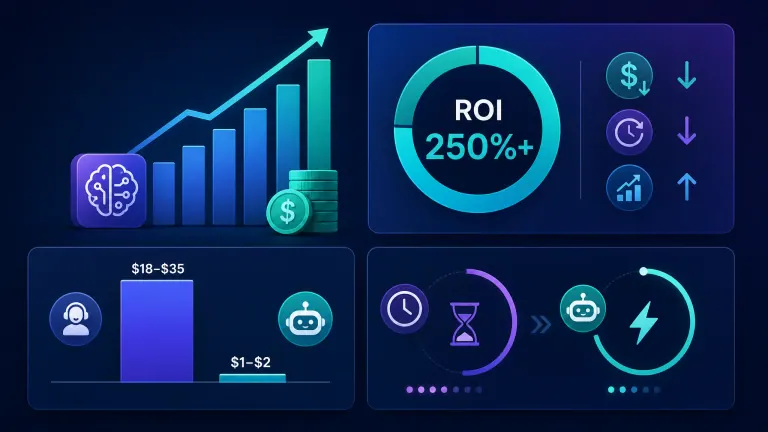
Artificial intelligence customer service delivers an average of $3.50 back for every $1 spent for B2B SaaS companies, with most teams reaching payback in 3-6 months. The return comes from cutting cost-per-ticket from $18-$35 for a human agent down to $1-$2 for an AI-resolved ticket, while cutting response time from hours to under a minute on routine requests.
Typical payback window: 3-6 months for teams with clean data and a defined support workflow. Cost per ticket: $18-$35 (human, SaaS baseline) vs $1-$2 (AI-resolved). Realistic deflection rate: 41% at the median, 58%+ for top-quartile teams — not the 80% vendors advertise. Where it fails: Teams that skip baseline measurement (current cost-per-ticket, resolution rate, handoff count) can't prove ROI after the fact, because they never had a "before."
Implementation slots for Q4 automation projects are filling fast — most companies that ask "is this worth it" already know the answer and just need the numbers to defend the budget.
You've read the vendor pitches. You've probably seen the case studies where some company saved millions. The real question isn't whether artificial intelligence customer service can work — it's whether it works for a B2B SaaS business specifically, where support tickets are more technical, contracts are bigger, and one bad automated response can cost you a renewal.
That's a different math problem than a retail chatbot answering "where's my order." SaaS support tickets run $18-$35 each because they involve troubleshooting, integrations, and account-specific context — a much higher baseline cost than the $6-$12 typical of general customer service (see our breakdown of AI customer service pricing and salary savings for the full cost model). That higher baseline is exactly why the ROI case is stronger here, not weaker, once you set it up correctly.
Below is the full financial breakdown, the mistakes that erode returns, and what separates SaaS companies that make this pay off from the ones that don't.
Your 3 biggest time & money drains, free. We find the 3 tasks costing your team the most, what each one costs every month, and how to automate it. Get My Biggest Drains
Table of Contents
- The Real Numbers: What ROI Looks Like for B2B SaaS
- Where the ROI Breaks Down
- The Business Case Your Finance Team Will Actually Approve
- Who This Is For
- Frequently Asked Questions
The Real Numbers: What ROI Looks Like for B2B SaaS
Most ROI claims you'll find online are averaged across every industry — retail, healthcare, insurance, SaaS — lumped together. That flattens the picture for a SaaS-specific decision, because SaaS support costs more per ticket to begin with, which changes the payback math in your favor.
Here's the direct comparison, using SaaS-specific baselines instead of blended industry averages.
| Metric | Human-Only Support | AI-Assisted Support |
|---|---|---|
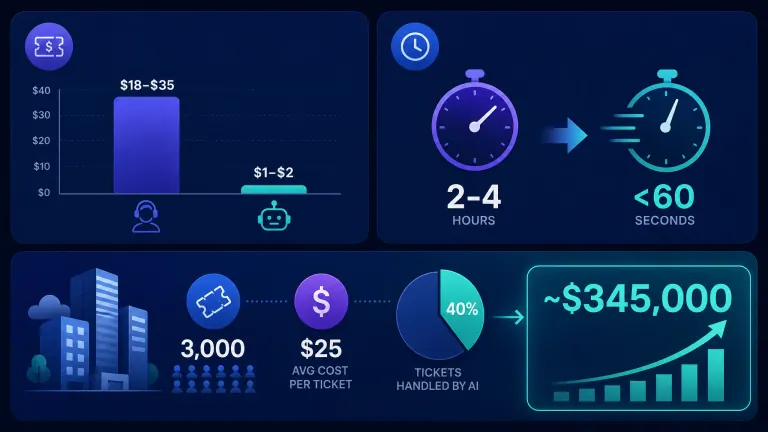
| Cost per ticket (SaaS baseline) | $18-$35 | $1-$2 |
| First response time | 2-4 hours | Under 60 seconds |
| Resolution rate (routine tickets) | Varies by team | 41% median, 58%+ top quartile |
| Availability | Business hours | 24/7 |
| Scaling cost | Linear (hire more agents) | Near-flat (same system, more volume) |
A mid-market SaaS company handling 3,000 tickets a month at $25 average cost sees $75,000/month in support costs. Shifting 40% of that volume to AI resolution at $1.50/ticket cuts roughly $28,800/month, or about $345,000 annually — before counting faster response times reducing churn.
Forrester's Total Economic Impact studies of AI customer service agents report three-year ROI in the 200–400% range — 396% in its study of Salesforce Agentforce. Those studies are commissioned by the vendor and built on its best customers, so treat them as a ceiling, not a forecast for a small team. Nucleus Research separately found teams reaching measurable value in an average of 25 days when the rollout targets a narrow, well-defined ticket category first, rather than trying to automate everything on day one.
The gap between what vendors claim and what independent research finds matters here. Some platforms advertise 80% deflection rates. Enterprise-wide data from Zendesk's 2026 CX Trends report puts the actual median closer to 41%, with top-quartile teams reaching 58-59%. That's still a strong return — just not the number in the sales deck.
Ready to see what this looks like against your own ticket volume? Our free AI ROI calculator runs the same math against your actual support costs instead of industry averages.
Your 3 biggest time & money drains, free. We find the 3 tasks costing your team the most, what each one costs every month, and how to automate it. Get My Biggest Drains
Where the ROI Breaks Down
The investment doesn't always pay off — and the businesses that get burned usually make one of three mistakes.
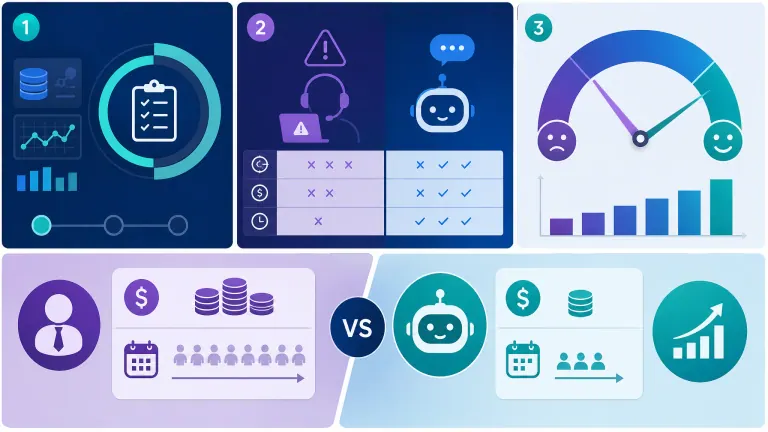
Skipping the baseline. If you don't know your current cost-per-ticket, first-contact resolution rate, or average handoff count before you launch, you have nothing to measure improvement against. You'll feel like things got better. You won't be able to prove it to your CFO.
Automating the wrong tickets first. Complex account escalations and contract disputes are the worst place to start — they're high-stakes, low-volume, and hard to automate well. Password resets, billing FAQs, and status checks are the right first targets: high-volume, low-risk, and pattern-based.
Ignoring the CSAT gap. Zendesk's 2026 CX Trends data shows a real, if modest, satisfaction gap between AI and human resolution — roughly 4.10 out of 5 for AI versus 4.30 for human agents. That gap narrows fast when AI handles the right ticket types and hands off cleanly when it's out of its depth, but pretending the gap doesn't exist is how you end up with angry enterprise clients.
McKinsey's research on AI-driven operational transformation echoes the same pattern across departments, not just support: the companies that see returns are the ones that redesign the workflow around AI, not the ones that bolt AI onto an unchanged process (McKinsey, State of AI). Automation without a workflow rebuild delivers a fraction of the possible return.
This is also where the "AI vs hiring another support rep" comparison gets real. A fully loaded SaaS support hire costs $55,000-$75,000/year including benefits and management overhead, and takes 60-90 days to fully ramp. An AI system handling the same ticket volume costs a fraction of that annually and is live within weeks — but only for the ticket types it's actually good at. The honest answer is that most SaaS teams need both: AI for volume and speed, humans for judgment calls and relationship management — a workflow split we cover in more depth in how conversational assistance enhances B2B customer experience.
Your 3 biggest time & money drains, free. We find the 3 tasks costing your team the most, what each one costs every month, and how to automate it. Get My Biggest Drains
The Business Case Your Finance Team Will Actually Approve
If you're building the case internally, here's the calculation that survives a budget review.
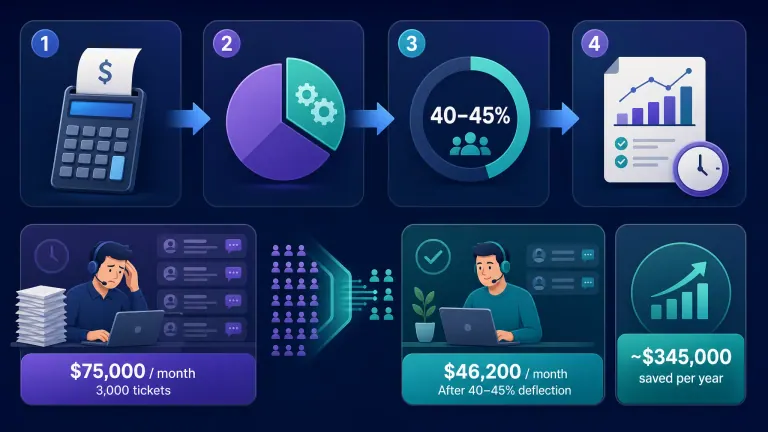
Step 1 — Get your real cost-per-ticket. Total monthly support cost (salaries, tools, overhead) divided by ticket volume. Most SaaS teams underestimate this because they forget management time and tooling costs.
Step 2 — Identify your automatable volume. Pull your ticket categories for the last 90 days. Password resets, billing questions, status checks, and basic troubleshooting typically make up 35-45% of total volume in a B2B SaaS support queue.
Step 3 — Apply a realistic deflection rate. Use 40-45% as your planning number, not the 80% a vendor promises. If you beat it, that's upside. If you plan around it, you won't overcommit budget on a number that never materializes.
Step 4 — Calculate payback, not just annual savings. Include setup cost, integration time, and the first 60-90 days of tuning. A realistic B2B SaaS deployment reaches payback in 3-6 months, in line with Nucleus Research's 25-day-to-value finding for narrow first deployments.
Here's what that looks like as a before/after for a 3,000-ticket-a-month SaaS support team:
| Before | After (Year 1) | |
|---|---|---|
| Monthly support cost | $75,000 | ~$46,200 |
| Avg. first response time | 2-4 hours | Under 60 seconds (routine tickets) |
| Support headcount needed to scale 2x | +100% | Near-flat |
| Annual savings | — | ~$345,000 |
Klarna is the most cited large-scale example: in its first month its AI assistant handled two-thirds of customer service chats, cut average resolution time from 11 minutes to under 2, and was projected to add about $40 million to 2024 profit (Klarna press release). Klarna later walked back part of the "replace the agents" framing and brought humans back for complex cases — which is the point. Klarna isn't a B2B SaaS company, and your numbers won't match theirs exactly — but the pattern (narrow rollout, clear baseline, honest measurement) is the same one that works at SaaS scale.
Your 3 biggest time & money drains, free. We find the 3 tasks costing your team the most, what each one costs every month, and how to automate it. Get My Biggest Drains
Who This Is For
This is ideal for:
- B2B SaaS companies with 1,000+ support tickets a month and a support cost you can't fully account for
- Teams that have already tried a generic AI tool that didn't stick, and want to know if the category is worth a second attempt
- VP Sales, CTOs, or budget owners who need a defensible ROI number before approving spend
Consider alternatives if:
- Your ticket volume is under a few hundred a month — the setup cost may not pay back fast enough to justify a dedicated system yet
- Your tickets are almost entirely complex, judgment-heavy escalations with little repeatable pattern
- You don't have baseline metrics and aren't willing to spend two weeks capturing them before launch
Why AIessentials specifically? We build the baseline measurement into week one of every engagement, not as an afterthought — so you have a before-and-after number, not a feeling. We price around outcomes tied to your actual ticket volume, not a flat software license, and we hand off a system your team runs independently once it's live.
Frequently Asked Questions
Does AI do customer service?
Yes. AI customer service tools handle routine tickets — password resets, billing questions, order status, basic troubleshooting — end-to-end, and route complex or high-stakes issues to a human agent with full context attached. Most B2B SaaS teams see 40-45% of ticket volume handled this way once the system is tuned.
Can I speak with AI for free?
Most AI customer service platforms offer a free tier or trial for testing, but a production-grade system built for your actual ticket volume, integrations, and escalation rules is a paid implementation. Free tools are useful for evaluating fit, not for running your real support queue at scale.
How to tell if customer service is AI?
Look for instant responses regardless of time of day, consistent phrasing across interactions, and a clear handoff moment when the conversation gets complex ("let me connect you with a specialist"). Well-built systems disclose they're AI upfront — it's both a trust practice and often a legal requirement depending on your market.
How to use AI for customer support?
Start by auditing your last 90 days of tickets to find your highest-volume, lowest-complexity categories. Build the AI workflow around those first, connect it to your knowledge base and CRM for context, set clear handoff rules for anything outside its scope, and measure resolution rate weekly for the first two months.
What are the benefits of AI customer service for B2B SaaS specifically?
Faster first response (under 60 seconds vs 2-4 hours), lower cost per ticket ($1-$2 vs $18-$35), 24/7 coverage without added headcount, and near-flat scaling cost as ticket volume grows. For SaaS specifically, this also means fewer support-related churn triggers during renewal periods.
What are the implementation steps for AI customer service in a B2B SaaS company?
Audit ticket volume and categorize by type, establish baseline cost-per-ticket and resolution metrics, connect the AI system to your knowledge base and CRM, launch on your highest-volume low-complexity ticket category, measure results for 60-90 days, then expand scope based on what's working.
What's the real cost and ROI of AI customer service for B2B SaaS?
Setup and monthly costs vary by scope, but the return averages $3.50 per $1 spent, with payback in 3-6 months for SaaS teams that start with a clear baseline. Forrester's TEI study found 120% ROI with a 15-month payback across three years when implementation costs are fully accounted for.
AI customer service vs human support for B2B SaaS — which is better?
Neither wins outright. AI wins on speed, cost, and availability for high-volume routine tickets. Humans win on judgment, relationship management, and complex account issues. Most B2B SaaS teams that see strong ROI use both — AI for volume, humans for what actually needs a person.
What are the common mistakes in B2B SaaS AI customer service implementation?
Skipping baseline measurement, automating complex escalations before proving the system on simple tickets, trusting vendor-claimed deflection rates without independent verification, and treating the rollout as a one-time setup instead of an ongoing tuning process.
Are there real case studies and outcomes for B2B SaaS AI customer service?
Klarna's disclosed results (80% of chats automated, $39 million saved in 2024) are the most cited large-scale example, though Klarna isn't SaaS-specific. Within SaaS, Nucleus Research found companies reaching measurable value in an average of 25 days when starting with a narrow, well-defined ticket category rather than a full rollout.
Conclusion
Artificial intelligence customer service is worth the investment for most B2B SaaS companies with meaningful ticket volume — the math works out to roughly $3.50 back per $1 spent, with payback in 3-6 months when you measure your baseline honestly and start with the right ticket categories. It's not worth it if you skip the baseline, automate the wrong tickets first, or trust vendor deflection claims without checking them against your own data.
Want to see where this applies in your business? Get My Biggest Drains: a free report on the 3 tasks costing your team the most, and how to automate each one.
Your 3 Biggest Time & Money Drains
Every manual task you're not automating is leaking team hours and money. Get a free report on the 3 tasks costing you the most: what each one costs your team every month, and exactly how to automate it.
Limited to 10 reports per week
Sent to your inbox within 24–48 hours. Yours to keep.

Iliyan Ivanov
Founder of AIessentials · AI automation consultant helping B2B businesses save 20+ hours/week and grow without hiring