How to Automate Cold Email Outreach Without Burning Your Domain
[ SUMMARIZE WITH AI ]
You automate cold email outreach in six steps: set up separate sending domains, warm up the mailboxes, build a verified list, write one short email with a few follow-ups, let a sending tool run the sequence under a daily cap, and route replies to a person. Most of the work happens before the first email goes out. Skipping the setup is how domains get burned.
Sending domains: Send from lookalike domains, not your main business domain, with 2 to 3 mailboxes per domain. Vendor guides from Instantly and Prospeo give the same range. Warmup: Plan 4 to 6 weeks before reaching full volume. Instantly's own guide says 2 weeks to be campaign-eligible and 4 to 6 weeks to stable volume. Daily cap: Keep cold sends to roughly 30 a day per mailbox. That is a vendor rule of thumb, and it is a good one to start under. Spam rate: Google tells bulk senders to stay under 0.30% spam complaints and recommends under 0.10% (Google). Expectations: Belkins measured an average cold email reply rate of 0.45% across 7.5 million emails sent in 2025 (Belkins). Automation raises your volume and consistency. It does not raise the reply rate by itself.
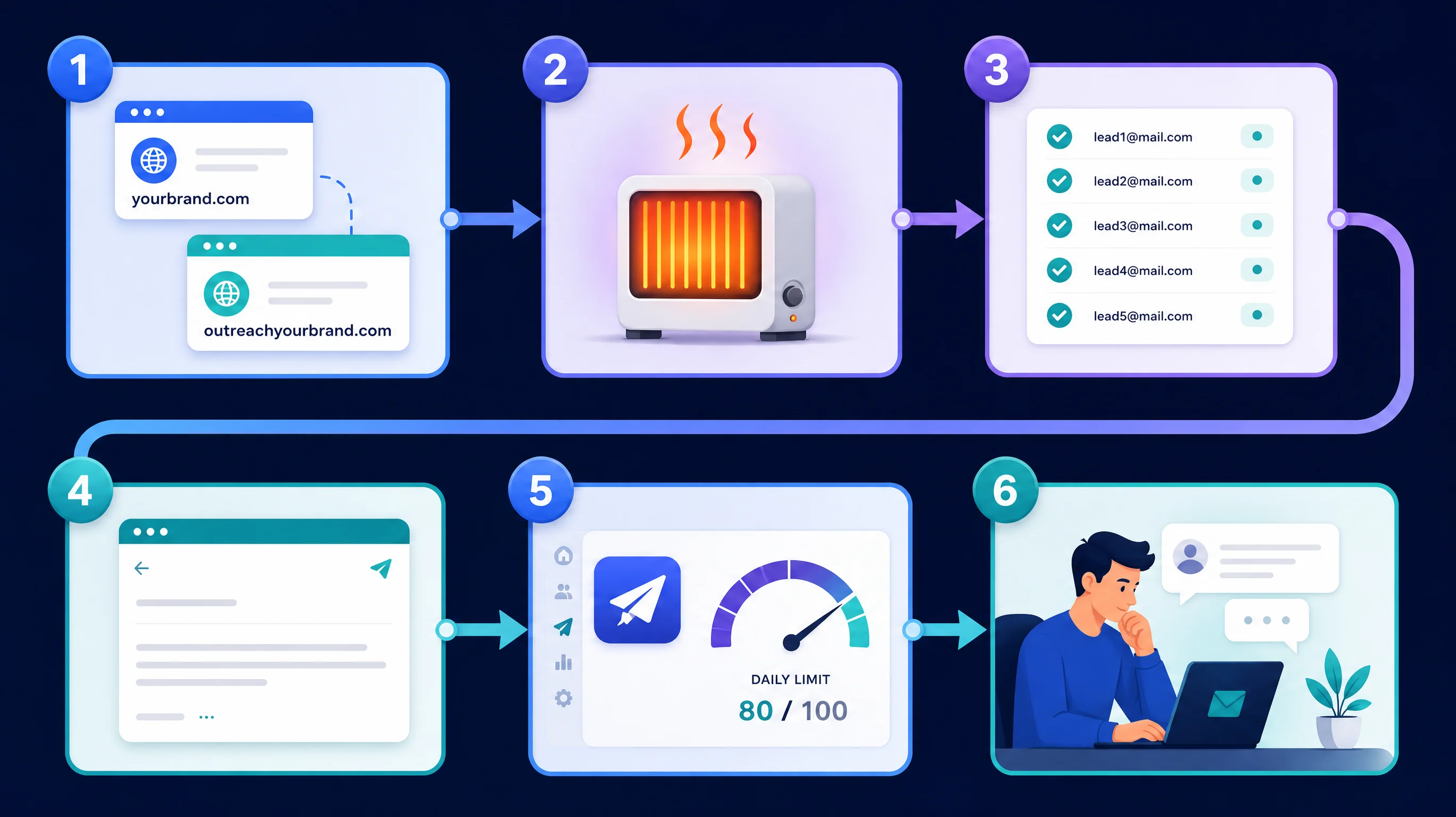
You're probably sending these emails by hand right now, and you've hit the ceiling: the evenings go to the inbox and the pipeline still depends on whether you had time that week.
Here's the part that surprises people. Automating the sending is the easy half. Any tool does it for $39 to $109 a month. The hard half is automating without ruining the thing that makes email work at all, which is whether your messages reach the inbox. A burned domain doesn't recover quickly, and if it's your main domain, your normal invoices and replies go to spam too.
This guide walks through the workflow we'd set up, with the limits and the numbers. If you'd rather compare sending tools first, see our prices for Smartlead, Instantly and lemlist. This post is about the workflow around the tool. And if you'd rather have the whole thing built and run for you, that is what our 24/7 Pipeline Engine does.
Table of Contents
- Step 1 and 2: Domains, authentication and warmup
- Step 3 and 4: The list and the copy
- Step 5 and 6: Sending, follow-ups and replies
- What it costs and how much time it saves
- Who This Is For
- Frequently Asked Questions
Step 1 and 2: Domains, authentication and warmup
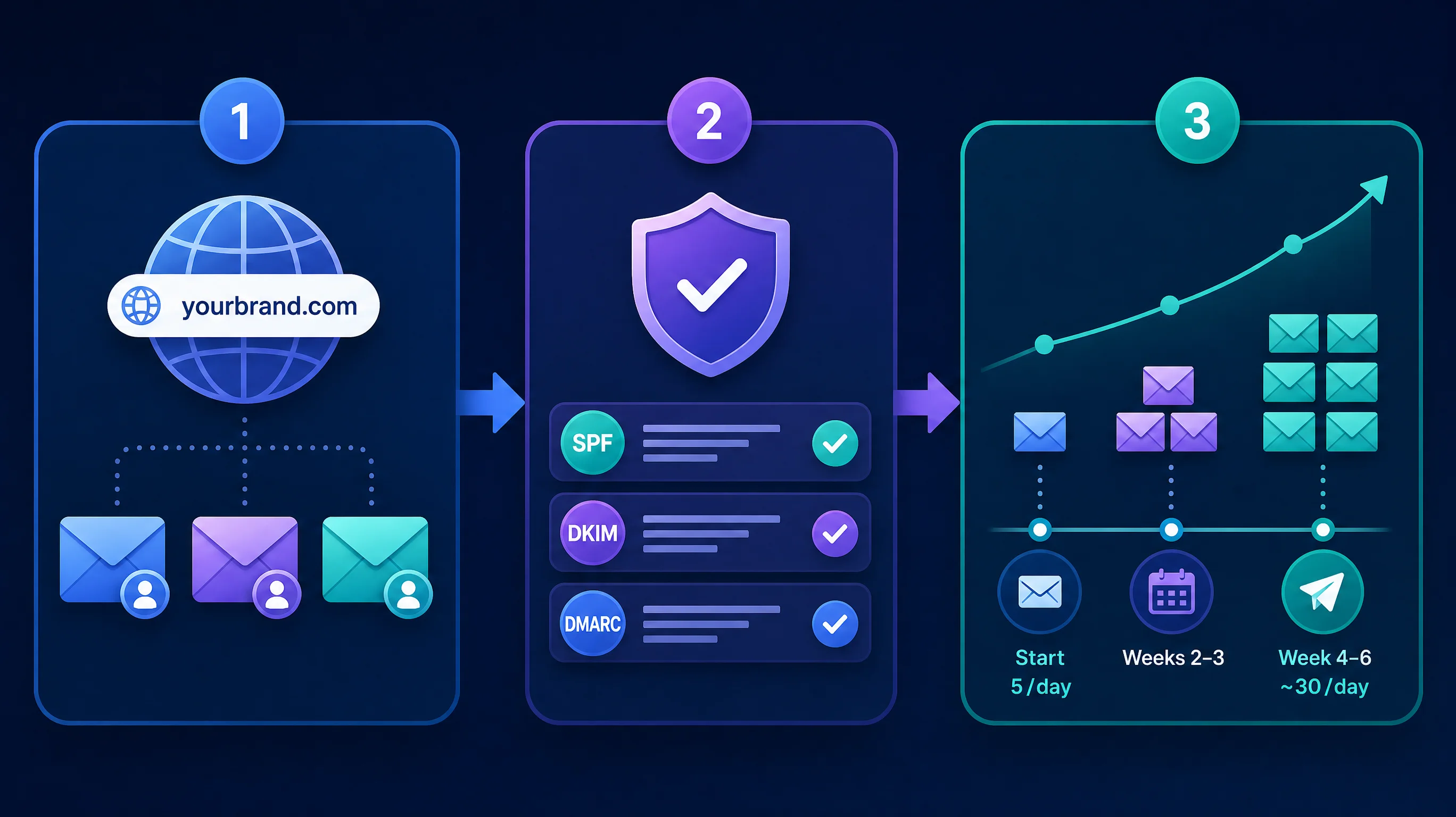
Step 1: Buy sending domains. Don't send cold email from your main domain. Buy two or three close variants of it. If your company is acme.com, that might be getacme.com and tryacme.com, each redirecting to your real website. A domain costs roughly $10 to $15 a year. If one gets flagged, your real domain stays clean.
Then add 2 to 3 mailboxes per domain. Every mailbox is a real inbox on Google Workspace or Microsoft 365, with a real person's name on it. Budget about $7 per mailbox per month (our assumption, check your provider).
Step 2: Authenticate and warm up. Each domain needs three DNS records before it sends anything:
- SPF says which servers may send for the domain.
- DKIM signs each message so it can't be forged.
- DMARC tells receiving servers what to do with mail that fails the first two.
Google requires all three from anyone sending more than 5,000 messages a day to Gmail, plus one-click unsubscribe for marketing mail and a spam rate under 0.30% (Google email sender guidelines). A small team sends far less than that, so the formal rules may not apply to you. Treat them as the standard anyway, because they describe what mailbox providers check.
Then warm up. New mailboxes have no reputation, so a sending tool trades mock emails between your mailboxes and others in its network, which builds a history of messages being opened and answered. Smartlead, Instantly and lemlist all include this. A typical ramp looks like this:
| Week | Warmup emails per mailbox per day | Cold emails per mailbox per day |
|---|---|---|
| 1 | 5 to 10 | 0 |
| 2 | 10 to 20 | 0 to 10 |
| 3 to 4 | about 20 | 10 to 20 |
| 5 to 6 | about 20 | up to 30 |
These numbers are working rules drawn from vendor guides (Instantly and Prospeo publish similar ramps), not guarantees. Instantly's own guide contradicts itself on timing, saying 2 weeks in one place and 4 to 6 in another. Take the longer one.
How AIessentials helps here: this is the part of a build that takes the most calendar time and the least thinking. When we scope an outbound system, the first week goes to domains and warmup, so the clock starts before the copy is even written.
Step 3 and 4: The list and the copy
Step 3: Build a verified list. Bounces hurt your sender reputation faster than almost anything else, so verify every address before it goes into a sequence. Pull a list that matches your ideal customer, run it through an email verifier, and drop anything risky or catch-all that you can't confirm. Prospeo's guide suggests pausing a campaign if bounces climb past about 3%. We'd pause sooner, at 2%.
Then enrich lightly. One real fact per prospect (a recent hire, a post they wrote, a tool they use) beats five generic merge fields. This is where AI earns its place: it can read a prospect's site or LinkedIn summary and draft a single opening line. The rule that keeps it safe is to restrict the model to facts pulled from a source. A language model will confidently write "congrats on the Series B" when there was no Series B.
Step 4: Write one short email and two or three follow-ups. Cold email works when it's short, specific and easy to answer. A workable shape:
- First email, under 80 words. One sentence on why you're writing to them in particular, one sentence on what you do and for whom, one question that's easy to say yes or no to.
- Follow-up 1, 3 days later. A different angle, not "just bumping this".
- Follow-up 2, 7 days after that. A short, polite close.
Send the first touch as plain text, with no images, and ideally no links or open tracking. Instantly and Prospeo both recommend this, and we agree.
Is this too few emails? Instantly suggests dropping a lead after three follow-ups, and so do we. More touches add complaints faster than they add replies.
Step 5 and 6: Sending, follow-ups and replies
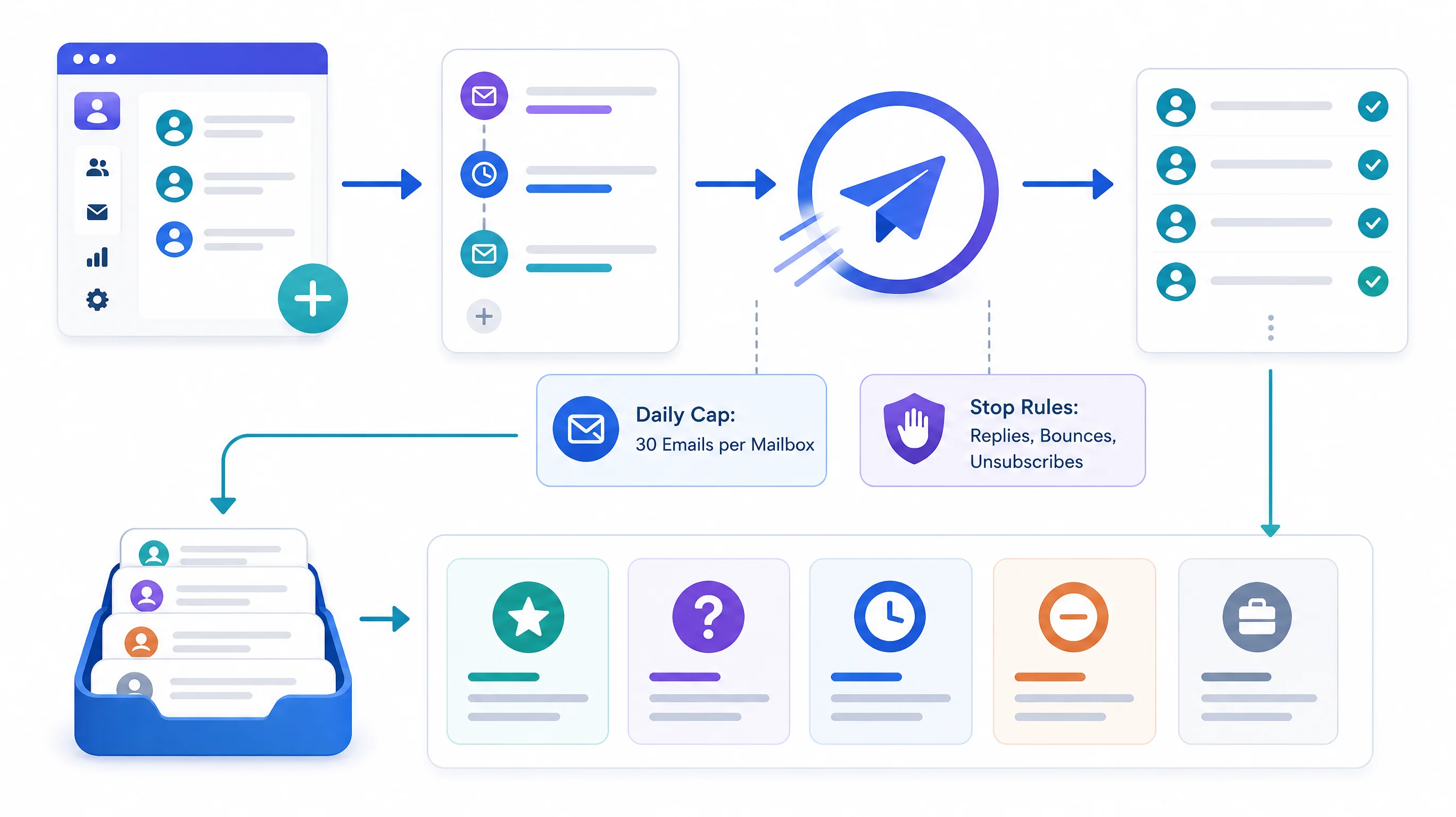
Step 5: Let the tool run the sequence, with caps. This is the part you automate. Load the verified list into your sending tool, attach the sequence, and set the rules:
- Daily cap: about 30 cold emails per mailbox.
- Send window: business hours in the prospect's time zone, with random gaps of a few minutes between sends.
- Stop rules: a reply, a bounce or an unsubscribe removes that person from every future step.
- Tripwires: pause the whole campaign if bounces pass 2% or if Google Postmaster Tools shows spam complaints near 0.10%.
You can also build this yourself. A popular n8n workflow reads rows from a Google Sheet, caps the run at 20 emails a day, waits a random 30 to 90 between sends and marks each row as sent. That is a fine start for one mailbox and a few hundred contacts. But notice what it leaves out: no warmup, no authentication steps, no bounce handling and no unsubscribe. A script that sends is not a cold email system. It is the sending part of one.
Step 6: Route replies to a person. Sort replies into five buckets: interested, objection, not now, unsubscribe and out-of-office. Automation handles the last two. A person answers the first three, quickly, because the first hour matters. A prospect who writes "we tried something like this last year and it was a mess" needs a human, not a template.
Two legal points before you press go. In the US, the FTC's CAN-SPAM guide requires an accurate sender name and subject line, a valid physical postal address, a clear way to opt out, and honoring opt-outs within 10 business days. Penalties run up to $53,088 per violating email according to the FTC, a figure that is adjusted for inflation, so check the current amount. You can't hand off the responsibility either: if a vendor sends for you, you're still liable. This is general information, not legal advice, and sending into the EU or Canada has stricter rules.
What it costs and how much time it saves
Here's what a small setup costs and how the hours change. The setup is an illustration, not a quote: 1,000 new prospects a month, four emails each, so about 4,000 sends. At 30 a day per mailbox, that needs about 8 mailboxes across 3 domains.
| Manual (inbox, spreadsheet) | Automated (sending tool + workflow) | |
|---|---|---|
| Tool cost per month | $0 | $39 to $109 |
| Mailboxes and domains | 1 mailbox | about $61 (8 mailboxes, 3 domains) |
| Emails sent per month | about 400 | about 4,000 |
| Weekly hours, illustrative | 8 to 10 | 2 to 3 (list, copy, replies) |
| Reply rate | Depends on you | Depends on list and offer |
The hours are our estimate, not a measured result. The point is the shape: the sending time collapses, and what's left is judgment.
And the replies? At Belkins' 0.45% average, 4,000 sends gives about 18 replies a month. A tight list and a clear offer should beat that. A generic blast won't. Automation multiplies whatever you feed it, so a weak offer sent at ten times the volume just fails ten times as fast. If you want to turn these into your own numbers, use the free ROI calculator.
If you'd rather not run the system yourself, the trade-off is cash against hours:
| DIY with a sending tool | Built-for-you | |
|---|---|---|
| Cash cost, year one | about $1,200 to $2,300 | $6,479 (Pipeline Engine: $2,579 setup + $325/month) |
| Your time | about 2 to 3 hours a week | Approving the offer, taking meetings |
| Setup time | 4 to 6 weeks of warmup either way | Same warmup, but handled for you |
| Best when | You enjoy the work and have the hours | You'd rather not run it |
The DIY column is cheaper in cash, and that is a fair reason to choose it. Our 24/7 Pipeline Engine comes with a 60-day money-back guarantee: if you don't get the outcomes we agree on upfront within 60 days of kickoff, we refund your service fee. For the wider picture of how email connects to your CRM and calendar, see how to build an automated lead pipeline, and for how the AI part works, what an AI SDR is and how it works.
Who This Is For
This is ideal for:
- Founders and small sales teams sending cold email by hand and hitting a ceiling at a few hundred emails a month.
- Owners who have a clear offer and ideal customer, and want consistent volume without a full-time rep.
- Teams burned by a blast that landed in spam and wanting a safer setup.
Consider alternatives if:
- You sell to a short list of named accounts. Personal, one-to-one emails will beat a sequence.
- You send fewer than 100 emails a week to people who already know you. An inbox tool is enough.
- You have no clear offer yet. Automation only scales what you already have.
Why AIessentials specifically? AIessentials (aiessentials.us) builds outbound systems for small B2B teams and prices them openly: $2,579 setup plus $325 a month for the Pipeline Engine. We run our own outreach on lemlist, so we have a bias toward that tool, and we'll tell you when a $39 plan is the right call.
Frequently Asked Questions
What is the best workflow for automating cold email outreach?
Buy separate sending domains and authenticate them with SPF, DKIM and DMARC. Warm up the mailboxes for 4 to 6 weeks. Load a verified list into a sending tool, run one short email and two or three follow-ups under a daily cap, and stop the sequence on any reply, bounce or unsubscribe. A person answers every real reply.
What does the CAN-SPAM Act require for commercial email?
The FTC says commercial email needs accurate sender and routing information, a subject line that isn't deceptive, a valid physical postal address, a clear and conspicuous way to opt out, and opt-outs honored within 10 business days. Each violating email can cost up to $53,088. B2B email is covered too, and you stay responsible if a vendor sends for you.
Conclusion
Three things to take away:
- Set up before you send. Separate domains, authentication and a 4 to 6 week warmup protect the thing the whole system depends on, which is inbox placement.
- Automate the sending, not the judgment. Caps, stop rules and a human on replies keep volume from turning into complaints.
- Fix the list and the offer first. The 0.45% average reply rate says volume doesn't rescue a weak message.
If you'd rather see what this would look like for your market, we'll build a free report with your ideal customers and what's likely to get a reply, and you can use it with any tool.
Want this built and run for you? Tell us who you sell to and we'll send a free report showing the buying signals worth emailing, the prospects they point to and the opening email we'd send. Get My Free Report
Free Pipeline Intelligence Report
Every day your pipeline runs without buying signals, you're losing clients to whoever reaches them first. Get a free pipeline strategy built around the buying signals of your ideal customer.
Limited to 10 reports per week
Sent to your inbox within 24–48 hours. Yours to keep.

Iliyan Ivanov
Founder of AIessentials · AI automation consultant helping B2B businesses save 20+ hours/week and grow without hiring